
Contact Info
16-Z-1, Madina Town, Near Bank Morr Susan Road, Faisalabad- Pakistan.
+92-300-9657744
khalil@vision.pk
Get StartedRecommended Services


Supported Scripts

Table of Contents
Let’s start with an uncomfortable confession: most websites don’t fall apart because of bad design. They fall apart because nobody bothered with data modeling before the first line of code was written.
I’ve watched it happen more times than I can count. A business owner gets excited, hires a developer, and three months later they have a “working” website that grinds to a halt the moment real customers show up. Orders go missing. Inventory numbers lie. The “add to cart” button starts feeling like a slot machine. And almost every single time, the root cause traces back to one thing — nobody modeled the data properly before building on top of it.
So if you’re a business owner, a freelancer juggling client sites, a Shopify partner who keeps getting asked “can you also do WordPress?”, or a developer who’s tired of duct-taping fixes onto a broken schema — this one’s for you. We’re going to talk about what data modeling actually means, why it’s the single most important phase of full-stack development, and how getting it wrong quietly kills websites that look perfectly fine on the surface.
And yes, by the end of this, you’ll understand exactly why vision.pk treats data modeling as step one — not an afterthought — on every WordPress and WooCommerce project we touch.
What Is Data Modeling, Really?
Here’s the simplest way I can put it: data modeling is the blueprint stage of your website’s brain. Before a single product page loads or a single order gets placed, somebody has to decide — on paper, in a diagram, in a developer’s head — what “things” your website needs to remember, and how those things relate to each other.
Think about a furniture factory. Nobody starts welding metal before there’s a blueprint. The blueprint says where the legs go, how the joints connect, what load each piece can bear. Data modeling is that blueprint for your website’s database. Skip it, and you’re basically welding furniture in the dark.
In plain English, data modeling answers three questions for every piece of information your site touches:
- What do we need to store? (Users, products, orders, bookings, whatever your business runs on.)
- How do these pieces connect to each other? (Does one customer have many orders? Does one order have many products?)
- Where does each piece live, and how fast can we get it back out?
If you’re a factory owner moving your catalog online, a freelancer building a booking site, or a tech enthusiast who just wants to understand why your developer keeps asking “what fields does a product need?” — that question is exactly what good schema design solves. It’s not abstract theory. It’s the difference between a site that scales gracefully and one that needs to be rebuilt from scratch the moment it gets popular.
And here’s the part most agencies won’t tell you: a sloppy data modeling phase doesn’t show up on day one. It shows up six months later, when your “simple” WooCommerce store can’t handle 200 orders a day without timing out. By then, fixing it costs five times more than doing it right the first time.
👉 Already feel that “uh oh, is my site set up wrong” feeling? Chat with vision.pk on WhatsApp now and we’ll tell you straight, no sugar-coating.
The Three Layers of Data Modeling: Conceptual, Logical, Physical
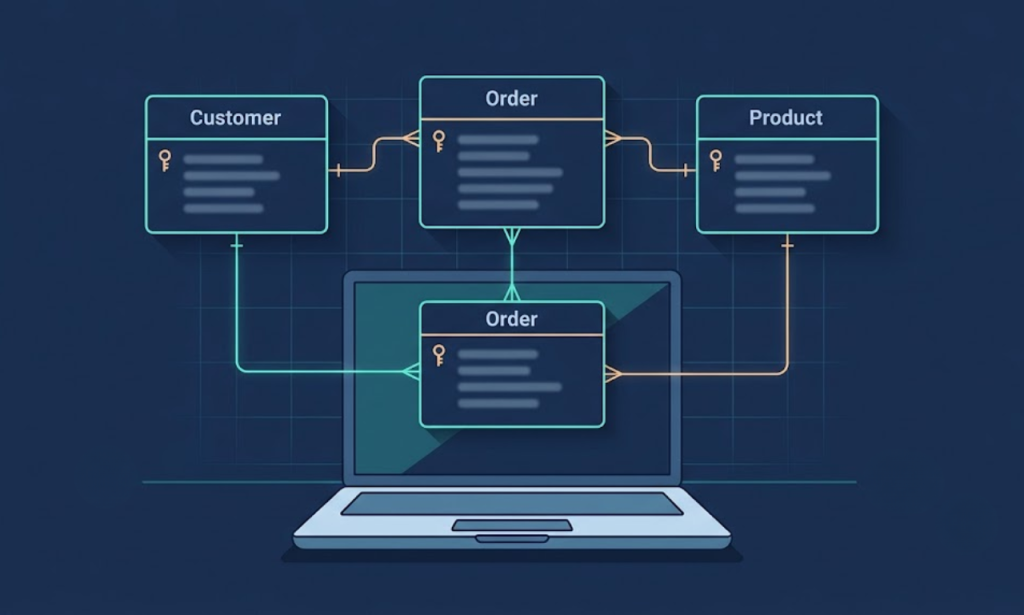
Good data modeling doesn’t happen in one step. It moves through three layers, each one getting more technical and more specific. Skipping a layer is like sketching a house, then immediately pouring concrete without checking if the foundation actually fits the plot of land.
| Layer | What It Answers | Example for an Online Store | Who Usually Owns This Step |
|---|---|---|---|
| Conceptual | What does the business need to track? | “We need Customers, Products, Orders” | Business owner + developer (whiteboard stage) |
| Logical | How do these things relate, what are the keys? | “Customer has-many Orders, Order has-many Products” | Developer / database architect |
| Physical | What does this look like in the actual database engine? | “MySQL table wp_orders with customer_id INT FOREIGN KEY“ | Backend developer |
The conceptual model is the business conversation. It’s where a factory owner says, “I need to track raw materials, finished goods, and which supplier sent what.” No tech jargon yet — just the real-world entities.
The logical model translates that into structure. This is where things start looking like diagrams — boxes connected by lines, primary keys, foreign keys, the works. It’s still technology-agnostic at this point. You could implement this logical model in MySQL, PostgreSQL, or even MongoDB.
The physical model is where rubber meets road. This is the actual schema sitting inside your WordPress database, with real column names, real data types (VARCHAR, INT, DATETIME), real indexes, and real constraints tailored to whichever database engine you’re running.
Here’s a habit we see constantly at vision.pk: agencies jump straight to the physical layer because it’s faster to “just start coding.” That shortcut feels productive for about two weeks. Then a new feature request comes in — say, adding subscription billing — and the whole schema has to be torn apart because nobody mapped the relationships properly at the conceptual or logical stage. Proper planning prevents that entire mess.
SQL vs NoSQL: Choosing the Right Data Modeling Approach
This is probably the most common question we get from clients who are technical enough to be dangerous (said with love): “Should my data modeling approach be SQL or NoSQL?”
The honest answer: it depends on your data’s personality. Some data is rigid and structured, like a filing cabinet. Some data is messy and ever-changing, like a junk drawer that somehow still works. Your data modeling strategy needs to match which one you’re dealing with.
| Factor | Relational (SQL) | Non-Relational (NoSQL) |
|---|---|---|
| Best for | Highly structured data, strict relationships | Flexible, fast-changing, unstructured data |
| Examples | E-commerce orders, banking, bookings | Social feeds, real-time chat, logs |
| Transaction Safety | Strong (ACID-compliant) | Often relaxed for speed |
| Scaling Style | Vertical (bigger server) | Horizontal (more servers) |
| Common Engines | MySQL, PostgreSQL, MariaDB | MongoDB, Firebase, DynamoDB |
| WordPress/WooCommerce Fit | Native fit (WordPress runs on MySQL) | Rare, usually a custom add-on |
For most of the businessmen, factory owners, and store builders we work with, the answer leans heavily toward relational data modeling — simply because WordPress and WooCommerce are built on MySQL. That’s not a limitation; it’s actually a strength. MySQL’s relational structure forces good schema discipline: every order needs a real customer, every line item needs a real product, every relationship gets enforced instead of left to chance.
NoSQL data modeling earns its place when your data genuinely doesn’t fit neat rows and columns — think real-time booking calendars with constantly shifting availability, or activity feeds that grow by the second. We’ve used a document-style approach for exactly these cases inside custom WooCommerce booking systems, storing session and slot data as flexible structures inside the cart and order metadata, while keeping the core commerce logic relational.
👉 Not sure which fits your business? That’s literally what a 15-minute conversation solves. Message vision.pk on WhatsApp and skip the guesswork.
Entity Relationships 101
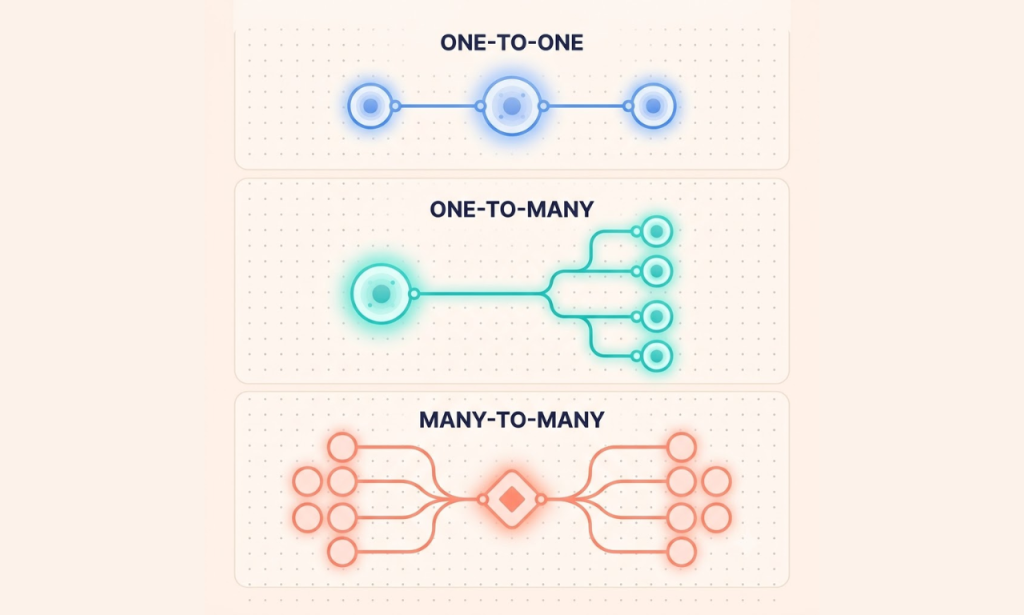
If data modeling has a grammar, relationships are its verbs. Every entity in your system — Customer, Product, Order, Booking, whatever — connects to other entities in one of three ways.
One-to-One (1:1). A user has exactly one profile, and that profile belongs to exactly one user. Simple, clean, rarely the source of headaches.
One-to-Many (1:M). This is the workhorse of almost every business website. One customer places many orders. One blog author writes many posts. One category holds many products. Most of the schema work on a typical WooCommerce store revolves around getting these one-to-many relationships exactly right.
Many-to-Many (M:M). A student can enroll in many courses, and a course can hold many students. A product can belong to many categories, and a category can hold many products. This relationship type can’t be stored directly — it needs a junction table (sometimes called a join table) sitting in between, holding pairs of foreign keys that link the two sides together.
Picture it like a wedding seating chart. Guests (Entity A) need to sit at tables (Entity B), but a guest can move between conversations, and a table holds multiple guests. You can’t write “guest = table” directly on either side — you need a separate seating chart (the junction table) that says “this guest, that table” for every single combination.
Getting these relationships wrong is sneaky because it often works fine with 10 test records. It breaks at 10,000 real records, usually during a sale, usually on the one day your client needed everything to work flawlessly.
Normalization vs Denormalization in Data Modeling
Here’s where data modeling starts feeling like a tug-of-war between two genuinely good goals: keeping data clean versus keeping queries fast.
Normalization is the process of organizing your schema structure to reduce duplication and protect data integrity. Instead of storing a customer’s address inside every single order row (and risking ten different versions of the same address floating around), you store it once in a customers table and reference it everywhere else. Clean. Logical. Textbook data modeling.
But normalization has a cost: more joins. If your storefront needs to pull data from six related tables just to show one order summary, that’s six lookups every single time a page loads. On a small site, nobody notices. On a high-traffic store, that’s the difference between a page loading in 200 milliseconds versus 2 seconds — and 2 seconds is roughly the point where shoppers start abandoning carts.
That’s where denormalization comes in — intentionally duplicating some data to make reads faster, accepting slightly messier writes in exchange for a snappier storefront. A well-built data modeling strategy doesn’t pick one side forever. It normalizes where data integrity matters most (payments, inventory counts, customer records) and denormalizes selectively where read speed matters more (product listing pages, search results, dashboards).
This balance is honestly where experience separates a solid developer from a dangerous one. Anyone can normalize a database following a textbook. Knowing exactly where to denormalize — and where absolutely not to — comes from having broken (and fixed) enough real production sites to know better.
ORMs and Modern Data Modeling Tools
Object-Relational Mappers, or ORMs, changed the game for data modeling by letting developers describe their database structure using actual programming code instead of raw SQL statements.
Tools like Prisma, Sequelize, and Mongoose let a developer write something that looks like a regular code object, and the ORM handles translating that into real database tables, columns, and relationships behind the scenes. For full-stack JavaScript and TypeScript projects, this has become the default approach to schema design because it brings type safety into the picture — your code literally won’t compile if you try to save a product without a price, for example.
Inside the WordPress ecosystem specifically, data modeling looks a little different. WordPress doesn’t typically use a JavaScript ORM — instead, custom schema design happens through WordPress’s own hooks and APIs: custom post types, custom tables, and (critically, for anything involving WooCommerce) the cart and order item filters like woocommerce_add_cart_item_data, woocommerce_get_cart_item_from_session, and woocommerce_checkout_create_order_line_item. These filters are the correct, durable way to carry custom booking or product data all the way from “added to cart” through to the final order record — far more reliable than stuffing everything into post meta and hoping it survives checkout.
This is the exact pattern we used recently building a custom booking system for a wellness client — session selection, persistent cart data, and a properly styled checkout and thank-you page summary, all wired together through correct data modeling at the cart-item level instead of fragile workarounds.
Indexes, Integrity, and Redundancy
Let’s talk about the unglamorous parts of data modeling that nobody brags about at dinner parties but that absolutely determine whether your site feels fast or feels like wading through mud.
Indexes are like the tabbed index at the back of a thick textbook. Without one, finding a single customer by email means flipping through every single page (every single row) until you find it. With a proper index, the database jumps almost straight to the answer. Good data modeling means identifying, ahead of time, which columns will be searched constantly — email addresses, order statuses, SKUs — and indexing exactly those.
Data integrity is the promise that your data tells the truth. An order shouldn’t be able to reference a customer that doesn’t exist. A product shouldn’t show “in stock” while secretly having zero units left. Strong data modeling enforces these promises at the database level — through foreign key constraints — instead of hoping the application code remembers to check every time.
Redundancy, the evil twin of integrity, happens when the same fact lives in two places and eventually disagrees with itself. A customer updates their email on their profile, but an old, duplicated copy sitting in a different table still shows the previous one. Customer support gets confused emails go to the wrong inbox, and trust quietly erodes. Solid data modeling, paired with real normalization, is how you prevent this from ever becoming a problem in the first place.

Database Migrations: How Data Models Grow Up
No data modeling decision is permanent, and that’s a feature, not a flaw. Businesses grow, add new offerings, and need their database schema to grow with them.
Say your store starts simple — just one-time product purchases. Six months in, you want to add subscriptions. That means your data modeling has to evolve: new tables for subscription plans, new relationships connecting customers to recurring billing cycles, new fields tracking renewal dates.
This evolution happens through database migrations — versioned scripts that alter your schema safely, without wiping out the orders, customers, and products you already have sitting in production. A migration might add a column, create a new table, or restructure a relationship, all while preserving every byte of existing data.
The businesses that suffer here are the ones whose original schema was so rigid, or so undocumented, that nobody dares touch it without holding their breath. The businesses that thrive are the ones whose database was modeled with growth in mind from day one — flexible enough to extend, structured enough to stay reliable.
The Real Cost of Bad Data Modeling (In Time and Money)
Let’s talk numbers for a second, because “it’ll slow your site down eventually” doesn’t land the same way as an actual invoice.
We’ve seen a client come to us with a WooCommerce store that “worked fine” for the first year. Sales were modest, traffic was light, and nobody noticed that products and categories had been wired together with a messy, ad-hoc relationship instead of a proper many-to-many junction structure. Then a marketing push hit, traffic tripled overnight, and suddenly category pages were timing out. The fix wasn’t a quick patch — it meant rebuilding the underlying relationships from scratch, migrating thousands of existing products without losing a single SKU, and doing it all while the store was actively taking orders. That’s weeks of work and real money that proper data modeling at launch would have made completely unnecessary.
Here’s the pattern we see over and over: the cost of fixing a broken schema rises sharply the longer it’s left alone. Catch a flawed relationship before launch, and it’s a five-minute conversation. Catch it after six months of live orders, real customers, and accumulated data, and it’s a careful, expensive migration project with real risk attached — risk of downtime, risk of data loss, risk of a launch deadline slipping because the “quick fix” turned into a rebuild.
There’s also a quieter cost that rarely makes it into anyone’s budget spreadsheet: developer time spent fighting the database instead of building features. Every hour a developer spends writing workarounds for a poorly modeled schema is an hour not spent on something that actually grows the business — a new payment gateway, a loyalty program, a faster checkout flow. Multiply that across months, and a weak foundation quietly becomes the single biggest hidden expense on the project.
This is exactly why we treat the planning phase as non-negotiable on every engagement, whether it’s a brand-new store or a messy inherited codebase we’re brought in to fix. A few extra days mapping entities and relationships properly at the start consistently saves weeks of pain later — and that math holds true whether you’re a one-product Shopify-style storefront or a multi-vendor catalog with thousands of SKUs.
Real-World Example: Data Modeling for an Online Store
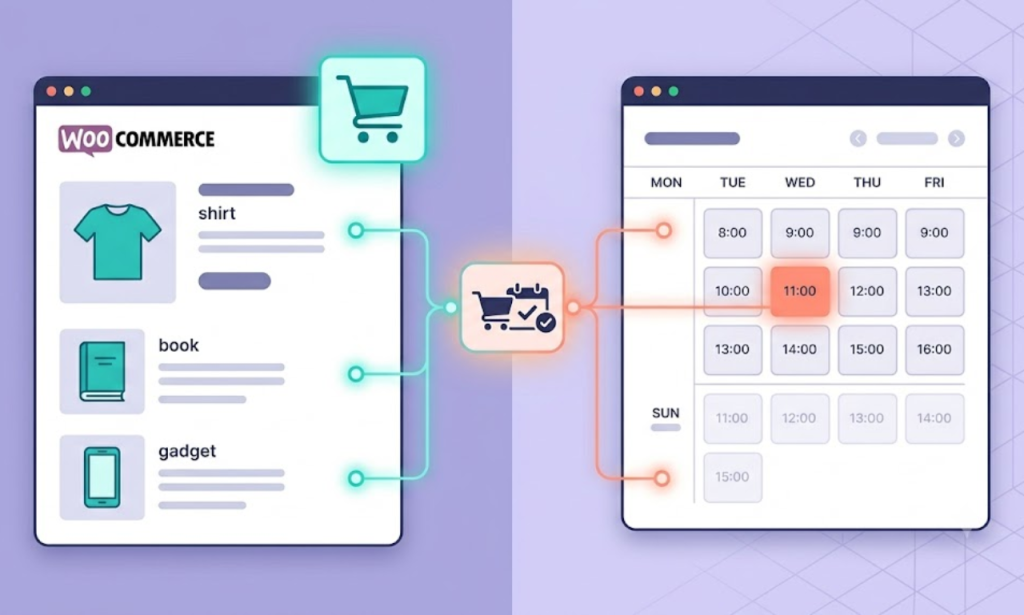
Let’s make this concrete instead of theoretical. Imagine you’re opening a WooCommerce store that sells both physical products and bookable services — say, skincare products plus spa appointment slots. (Sound familiar? We’ve built almost exactly this.)
Proper data modeling for this setup needs to track:
- Customers — one record per shopper, with order history attached
- Products — physical SKUs with stock counts, prices, categories
- Bookings — appointment slots tied to a specific service, date, and time
- Orders — the connective tissue linking a customer to whatever they bought, whether it’s a product or a booking
- Cart Session Data — temporary information (like the chosen appointment slot) that must survive the trip from “add to cart” all the way to a finished order
Here’s where weak data modeling quietly breaks things: a customer picks a 2 PM Tuesday slot, adds it to their cart, then their session data gets lost somewhere between cart and checkout. The order goes through — but the appointment slot info is gone. Now you’ve got a paid booking with no actual booking attached to it, and a very confused customer showing up to an appointment nobody scheduled.
The fix is exactly that pattern we mentioned earlier — persisting booking data through WooCommerce’s cart item filters so it survives all the way to the order line item, then displaying it cleanly on a styled checkout and thank-you page. That’s not a “nice to have.” That’s the entire difference between a booking system that works and one that quietly loses appointments.
This is the kind of real, hands-on data modeling and WooCommerce development work vision.pk does daily — not generic theory, actual production fixes for actual businesses.
👉 Building something with bookings, subscriptions, or custom checkout logic? Talk to vision.pk on WhatsApp — we’ve already solved the weird edge cases you’re about to run into.
Common Data Modeling Mistakes That Wreck Websites
After enough projects, you start seeing the same data modeling mistakes on repeat. Here are the ones that cause the most damage:
- Skipping the conceptual stage entirely. Jumping straight into code without a single diagram. Fast at first, painful later.
- Storing everything as text fields. Dates as plain text, prices as strings — modeling your data without proper types is a bug factory waiting to open for business.
- No foreign key constraints. Letting the application “promise” to keep data consistent instead of letting the database enforce it.
- Over-normalizing everything. Technically correct, practically slow, because every page load needs ten joins to render one screen.
- Ignoring indexes until performance complaints start. By then, you’re optimizing under pressure instead of by design.
- Storing temporary cart/session data in the wrong place. A classic WooCommerce trap — relying only on post meta instead of proper cart-item filters, and watching custom data vanish at checkout.
- No migration strategy. Treating the database schema as something you edit directly in production and hope for the best.
If even two of these sound familiar, your current schema probably has a ticking clock on it. The good news: almost all of them are fixable without a full rebuild, if caught early enough.
The trickiest part is that most of these mistakes are invisible during development and testing. A schema with no indexes still returns results in a fraction of a second when there are only fifty test rows in the table. A missing foreign key constraint doesn’t cause a single error until the day someone accidentally deletes a customer record that three hundred live orders still depend on. That’s the uncomfortable truth about weak planning at this stage — it doesn’t announce itself early. It waits for the worst possible moment, usually right when traffic and orders are at their highest, to make itself known.
Why vision.pk for Your Data Modeling & WordPress Needs
We’ll be straightforward about this part, because that’s how we’d want a vendor to talk to us.
vision.pk isn’t a generic “we build websites” shop. We specialize in WordPress and WooCommerce development, and that specialization starts with data modeling, not page design. Before we touch a single template, we map out exactly what entities your business needs, how they relate, and where your specific growth plans will eventually push against the schema.
That’s how we approach every project — whether it’s a factory owner moving a catalog online, a freelancer who needs a fast-loading domain and hosting setup, a Shopify partner exploring WordPress as an alternative, or a developer who needs an extra pair of hands on a messy legacy schema. Real schema discipline, not shortcuts. Custom WooCommerce logic — like cart-item persistence, booking systems, and CRM integrations — built the correct way the first time, instead of patched together and prayed over.
We’ve done this for booking-based service sites, multi-vendor catalogs, subscription stores, and standard product-based shops alike. The common thread across every single one is the same: get the schema right at the start, and everything built on top of it — speed, reliability, scalability — falls into place naturally.
👉 Ready to stop guessing and build it properly? Reach out to vision.pk right now on WhatsApp. Tell us what you’re building, and we’ll tell you honestly what it needs.
Frequently Asked Questions
1. What is the difference between conceptual, logical, and physical data modeling? Conceptual data modeling is the high-level business view — identifying what data matters (Customers, Orders) without technical detail. Logical modeling defines structure and relationships, like keys and connections, independent of any specific database technology. The physical layer is the final implementation, tailored to a real database engine like MySQL or PostgreSQL, complete with actual data types and indexes.
2. Should I use SQL or NoSQL for my website’s data modeling? If your data is structured and relationship-heavy — orders, customers, inventory — relational data modeling with SQL (like MySQL, which powers WordPress) is the safer, more proven choice. If your data is unstructured and rapidly changing, NoSQL can be a better fit, though it’s far less common for standard WooCommerce stores.
3. What are the different types of entity relationships in data modeling? There are three: one-to-one, one-to-many, and many-to-many. Most business websites lean heavily on one-to-many relationships (one customer, many orders), while many-to-many relationships (like products and categories) need a junction table to connect properly.
4. What is database normalization, and why does it matter in data modeling? Normalization organizes your schema structure to reduce duplicate data and protect accuracy, typically by splitting information into smaller, connected tables instead of one giant, repetitive one.
5. When should I denormalize my data model? Denormalization makes sense when read speed matters more than perfectly clean structure — for example, product listing pages that need to load instantly. It’s a deliberate trade-off, not a shortcut, and good data modeling uses it selectively.
6. How do ORMs affect data modeling? ORMs like Prisma, Sequelize, or Mongoose let developers define their schema structure using regular code instead of raw SQL, adding type safety and handling migrations automatically. WordPress generally uses its own hook-based approach instead.
7. What is data redundancy, and how do I prevent it in data modeling? Redundancy happens when the same fact is stored in multiple places and eventually contradicts itself. Proper data modeling, supported by normalization and foreign key constraints, prevents this from happening.
8. What role do indexes play in data modeling? Indexes let a database find specific rows quickly instead of scanning every record. Good data modeling identifies which columns — like email addresses or SKUs — need indexes before performance problems ever appear.
9. How are many-to-many relationships handled in data modeling? In SQL-based data modeling, a junction table holds foreign keys from both connected entities. In NoSQL systems, you typically embed an array of references or nest a sub-document directly.
10. How does data modeling evolve as a website grows? Through database migrations — versioned scripts that safely alter the schema to support new features without losing existing production data. Strong initial schema design makes these migrations far less risky down the line.
Final Thoughts
If there’s one thing worth remembering from everything above, it’s this: data modeling is not a “developer detail” you can safely ignore as a business owner. It’s the foundation everything else — speed, reliability, your ability to add new features later without a full rebuild — gets built on top of.
You don’t need to become a database architect overnight. You just need to know enough to ask the right question before your next project starts: “How is our data modeling being handled, and by whom?”
If the answer is vague, that’s your sign to get a second opinion.
👉 Want that second opinion? Message vision.pk on WhatsApp right now and let’s talk through exactly what your website’s database structure should look like — no jargon, no upsell pressure, just a straight answer from people who build this for a living.
Suggested Links
- Prisma official documentation (https://www.prisma.io/docs) — for the ORM section
- WooCommerce developer documentation on cart item data (https://woocommerce.com/document/) — for the cart-item filters mentioned
- MySQL official documentation on indexing (https://dev.mysql.com/doc/) — for the indexing section