
Contact Info
Saeed Colony No 2, Dogar Street Corner, Behind Lyallpur Galleria, Faisalabad - Pakistan
+92-300-9657744
khalil@vision.pk
Get StartedRecommended Services


Supported Scripts

Table of Contents
1. Why Google Gemini CLI Is the Developer’s Secret Weapon of 2025

Let me ask you something. How many times have you jumped between your terminal, your browser, and your code editor — copy-pasting context back and forth like some kind of digital courier pigeon?
Yeah, I thought so. We’ve all been there.
That’s exactly the pain that Gemini CLI was built to kill. Google dropped this open-source AI terminal agent on the world in 2025 and, quietly, it started rearranging how developers think about their daily workflow. No more tab-switching. No more copy-paste marathons. The Gemini CLI sits right inside your terminal — the place you already live — and brings Gemini’s full multimodal intelligence along for the ride.
And the crazy part? It’s free for most developers. Like, actually free. Not “free with an asterisk” free.
Whether you’re a solo freelancer building client sites, a factory owner looking to digitize operations, or a tech enthusiast who just wants to play with the future — Google Gemini CLI is worth your time. Stick around, because I’m going to walk you through everything: what it is, how to install it, what it can actually do, and — most importantly — how you can put it to work.
2. What Exactly Is Gemini CLI? (No Fluff, Just the Good Stuff)
Google Gemini CLI is an official, open-source AI agent from Google that runs directly in your command-line interface. Think of it as having a senior developer sitting next to you, except this one never gets tired, never asks for a coffee break, and can read your entire codebase in seconds.
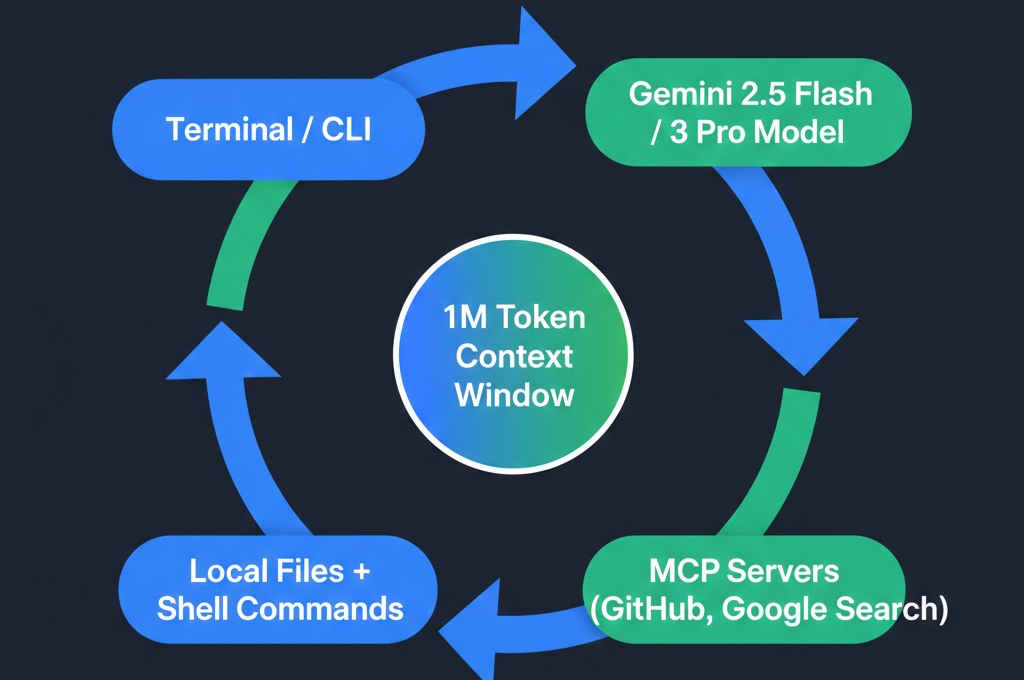
Here’s the key thing that makes it different from just “chatting with an AI”:
- It can read your local files and entire project directories
- It can execute shell commands like git, npm, kubectl — with your permission
- It has a 1 million token context window (roughly 1,500 pages of code)
- It supports Model Context Protocol (MCP) for connecting external tools
- It understands images, PDFs, and text files — not just code
The Google Gemini CLI isn’t just a chatbot you happen to run in a terminal. It’s an agentic coding assistant — meaning it can take multi-step actions, reason about your project, and actually do things on your behalf. That 1M token context window means you can literally point it at your entire monorepo and it’ll understand the whole thing.
That’s not science fiction. That’s Tuesday in 2025.
3. How to Install Google Gemini CLI in Under 2 Minutes
Method 1: npm (Recommended for Most Developers)
This is the fastest way to get Google Gemini CLI running. You need Node.js 18+ installed, then:
npm install -g @google/gemini-cli
Once it’s installed, just type gemini in your terminal. You’ll be asked to sign in with your Google account. That’s literally it.
Method 2: Homebrew (for macOS Users)
brew install gemini-cli
Method 3: MacPorts or Anaconda
Both MacPorts and Anaconda support the Google Gemini CLI install — perfect if you’re in a scientific computing or data science environment.
Keeping It Updated
npm install -g @google/gemini-cli@latest
This gets you the newest features, including pseudo-terminal (PTY) support for interactive commands like vim, which came in a recent update.
| 🔑 Pro Tip: You can also authenticate with a Gemini API key instead of a Google account. This is especially useful if you’re building automated pipelines or CI/CD workflows where browser-based login isn’t practical. |
4. Google Gemini CLI Features: The Full Breakdown
| Feature | Details |
| Models Supported | Gemini 2.5 Flash (default), Gemini 3 Pro (Pro/Ultra) |
| Context Window | 1,000,000 tokens (~1,500 pages of code) |
| Free Tier Requests | 1,000/day, 60/minute with personal Google account |
| File Support | Code, text, images, PDFs, entire project directories |
| Shell Command Execution | Yes — runs git, npm, kubectl, and more (with confirmation) |
| MCP Integration | Full Model Context Protocol support for external tools |
| GEMINI.md Support | Project-specific context and instructions file |
| PTY Support | Interactive terminal commands (vim, htop, etc.) |
| Open Source | Yes — available on GitHub under Apache 2.0 license |
| Data Training | No training on data for paid plan users |
One thing I want to highlight specifically — that 1 million token context window is a game-changer. Most AI tools cap out at 32K or 128K tokens. The Google Gemini CLI blows past those limits entirely. You can drop an entire Django project, a React frontend, and a database schema into its context and ask it to audit everything for security vulnerabilities. That’s not a use-case — that’s a superpower.
5. Google Gemini CLI Free Tier vs Paid — What Do You Actually Get?
| Plan | Daily Requests | Model Access | Data Privacy | Best For |
| Free (Google Account) | 1,000/day | Gemini 2.5 Flash | Standard Google terms | Individual developers, freelancers |
| Paid API Key | Rate limit based on tier | Gemini 2.5 Flash + Pro | Standard Google terms | Teams, CI/CD, automation |
| AI Pro / Ultra | Higher limits | Gemini 3 Pro | No ML training on data | Power users, enterprises |
| Enterprise License | Custom | All models | No ML training, enterprise SLA | Large teams, sensitive projects |
For most freelancers and small business owners? The free tier of Google Gemini CLI is more than enough to start. 1,000 requests per day is generous. That’s roughly one request every 1.4 minutes if you work an 8-hour day — and trust me, you won’t be that aggressive with it.
The paid tiers make sense if you’re running automated pipelines, have a team using it simultaneously, or need guaranteed data privacy for client projects.
6. 7 Real Power Moves With Google Gemini CLI
Power Move #1: Understand a New Codebase Instantly
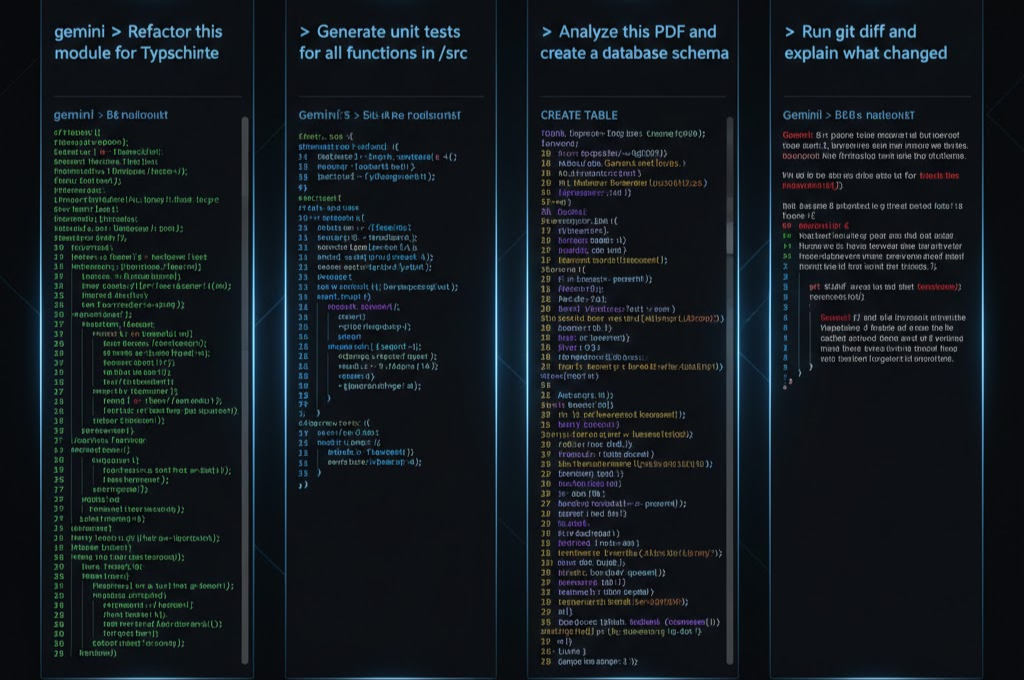
Clone a repo you’ve never seen before. Run gemini and say: “Read the entire project and give me a 5-minute mental map of how everything connects.” The Google Gemini CLI will read every file, trace dependencies, and hand you a coherent architecture overview. What used to take a junior dev 2 days now takes 2 minutes.
Power Move #2: Auto-Generate Unit Tests
Say goodbye to writing boilerplate test code. Ask Google Gemini CLI: “Generate pytest tests for every function in the /api folder.” It reads the source, understands the logic, and writes the tests. You review. Everyone’s happy.
Power Move #3: Git Commit Messages That Actually Make Sense
Run git diff and pipe the output to Google Gemini CLI. Ask it to write a conventional commit message. Never write “fixed stuff” again.
Power Move #4: Refactor Legacy Code
Have a 4,000-line PHP file from 2009 that nobody wants to touch? Feed it to Google Gemini CLI and ask it to refactor it into clean, modern code with proper separation of concerns. It’ll do it. Carefully.
Power Move #5: Interactive Documentation
Point Google Gemini CLI at your codebase and say “Generate README documentation for this project.” It reads everything, identifies the project’s purpose, and writes comprehensive docs. Then ask it to generate a CHANGELOG from your git history.
Power Move #6: Debug Production Errors
Paste a stack trace and say “Here’s the error. Find the root cause and suggest a fix.” The CLI reads your actual local files — not some hypothetical code — so its suggestions are grounded in reality.
Power Move #7: MCP-Powered Workflows
Connect Google Gemini CLI to a GitHub MCP server and ask it to “Review all open pull requests and summarize which ones are safe to merge.” This is agentic coding at its finest — the CLI reaching out to external services, gathering data, and synthesizing it for you.
7. GEMINI.md: The Hidden Config File That Makes Google Gemini CLI 10x Smarter
Here’s something a lot of tutorials skip over entirely: the GEMINI.md file. This is a plain markdown file you create in your project root that tells Google Gemini CLI how to behave in that specific project.
Think of it as the “house rules” for your AI assistant. Every time you run the CLI in that directory, it reads this file first. You can define:
- Coding standards (“Always use TypeScript strict mode”)
- Tech stack details (“This is a Next.js 14 app with Prisma ORM”)
- Forbidden patterns (“Never use any. Use unknown instead.”)
- Custom workflows (“Before any refactor, run the test suite first”)
- Context about the business (“This is a multi-tenant SaaS app. Each query must be scoped to tenantId”)
The GEMINI.md file is what transforms Google Gemini CLI from a generic AI tool into a project-specific coding expert. It’s the difference between a contractor who shows up knowing nothing and one who studied your blueprints the night before.
| 💡 Vision.pk Tip: If you’re building a WordPress site and want to leverage AI-powered development workflows, Vision.pk’s WordPress development team builds sites with modern tooling and can help you set up development environments that integrate seamlessly with tools like Google Gemini CLI. Curious? Reach out at Vision.pk. |
8. Google Gemini CLI vs Claude Code vs GitHub Copilot — The Honest Comparison
| Tool | Where It Runs | Context Window | Free Tier | Agentic Mode | Open Source |
| Google Gemini CLI | Terminal / CLI | 1M tokens | Yes (1K req/day) | Yes (Shell + MCP) | Yes |
| Claude Code | Terminal / CLI | 200K tokens | API credit based | Yes | No |
| GitHub Copilot CLI | Terminal / IDE | Limited | Trial only | Limited | No |
| ChatGPT (GPT-4o) | Web / API | 128K tokens | Limited | Basic tools | No |
Google Gemini CLI wins on three fronts: context window size, free tier generosity, and open-source transparency. Claude Code is arguably more polished in certain reasoning tasks, and GitHub Copilot has deeper IDE integration — but for pure terminal-based agentic workflows on a budget, Google Gemini CLI is the clear leader in 2025.
9. MCP Servers + Google Gemini CLI = Unlimited Superpowers
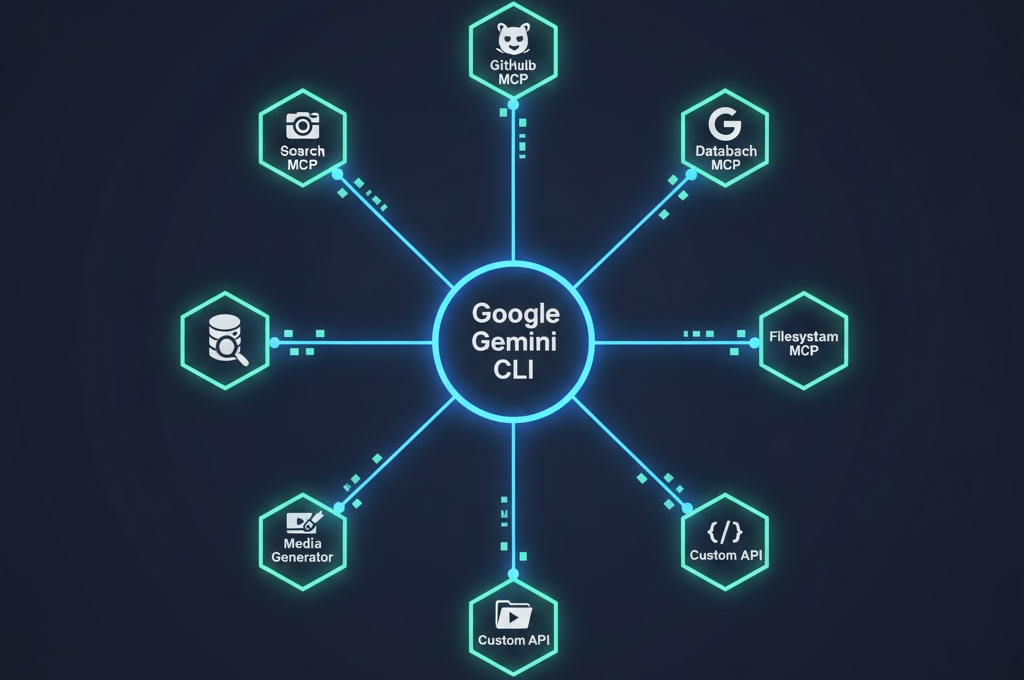
Model Context Protocol (MCP) is what turns Google Gemini CLI from a capable tool into an orchestration engine. By connecting MCP servers, you extend the CLI’s reach beyond your local machine.
Some powerful MCP integrations worth knowing about:
- GitHub MCP — Read issues, PRs, and repositories directly
- Google Search MCP — Real-time web search within your terminal session
- Filesystem MCP — Enhanced file operations across multiple drives
- Database MCP — Query your databases in natural language
- Media generation MCP — Generate images or audio as part of a workflow
Setting up an MCP server in Google Gemini CLI is straightforward. You add the server configuration to your settings file, and the CLI handles the rest. You can chain multiple MCP servers together for complex agentic pipelines.
For example: “Search GitHub issues for any bug reports mentioning ‘payment’, then cross-reference our internal database for affected user IDs, then draft a status update email.” That’s three MCP servers working in concert, all orchestrated by Google Gemini CLI.
10. Data Privacy & Security in Google Gemini CLI
This is the question every developer and business owner needs to ask before feeding their codebase to any AI tool: who sees my data?
Here’s the straight answer for Google Gemini CLI:
- Free tier (personal Google account): Standard Google privacy terms apply. Google may use interaction data to improve models.
- Paid API key tier: Review the Google Cloud API terms for your specific plan.
- AI Pro / Ultra or Enterprise license: Google does NOT use your data to train machine learning models. This is explicitly stated in the terms.
For individual developers and freelancers working on personal projects, the free tier is fine. For businesses handling client data, proprietary code, or sensitive systems — go with the paid Enterprise plan. The peace of mind is worth the cost.
One more note: Google Gemini CLI always shows you what shell commands it wants to run before executing them. You have the final say. It’s not going to silently delete your database — it’ll ask first. That’s a deliberate safety design choice, and a smart one.
11. FAQs About Google Gemini CLI (Answered Plainly)
Q1: What is Google Gemini CLI?
Google Gemini CLI is an official AI agent from Google that runs in your terminal. It brings Gemini’s multimodal intelligence to your command line, letting you interact with files, execute shell commands, and build automated AI-powered workflows.
Q2: How do I install Google Gemini CLI?
The easiest way is via npm: npm install -g @google/gemini-cli. You’ll need Node.js 18 or higher. Homebrew, MacPorts, and Anaconda are also supported.
Q3: Is Google Gemini CLI free to use?
Yes! Google Gemini CLI offers a generous free tier: 1,000 requests per day and 60 requests per minute using a personal Google account. You can also use it with a paid Gemini API key for higher limits and additional models.
Q4: What models are supported?
Currently Google Gemini CLI supports Gemini 2.5 Flash (the default, available on the free tier) and Gemini 3 Pro (available for AI Ultra subscribers or via a paid API key). Switch models with the -m flag, e.g., gemini -m gemini-2.5-flash.
Q5: How does Google Gemini CLI handle large codebases?
Google Gemini CLI reads your entire project directory and loads it into its 1 million token context window — approximately 1,500 pages of code. Unlike web-based AI chats, it understands your project’s actual structure, dependencies, and standards.
Q6: Can Google Gemini CLI execute shell commands on my computer?
Yes, and it does so carefully. In Agent Mode, it can run shell commands like git, npm, kubectl, and more. It always shows you the command and asks for permission before execution. You’re always in control.
Q7: What is a GEMINI.md file?
It’s a project-specific configuration file you create in your project root. Google Gemini CLI reads it every time you run the CLI in that directory, applying your custom coding standards, tech stack context, and workflow rules automatically.
Q8: Can I use Google Gemini CLI with MCP servers?
Absolutely. Google Gemini CLI has full MCP (Model Context Protocol) support, letting you connect external tools like GitHub, Google Search, databases, and custom APIs. This is what enables truly agentic, multi-step workflows.
Q9: How do I update Google Gemini CLI?
Run: npm install -g @google/gemini-cli@latest. This gets you the latest features, including pseudo-terminal support for interactive commands like vim.
Q10: How is my data handled in Google Gemini CLI?
For free tier users, standard Google privacy terms apply. For paid AI Pro/Ultra or Enterprise users, Google explicitly does not use your data to train ML models. Always review the specific terms for your plan.
12. How Vision.pk Can Help You Build Your AI-Powered Website Today
Here’s the honest truth: Google Gemini CLI is a phenomenal tool for developers who already have a foundation in coding. But what about the factory owner who needs an e-commerce store? The freelancer who needs a professional portfolio? The startup that needs a full WordPress site — fast?
That’s exactly where Vision.pk comes in.
Vision.pk is a full-service digital agency based in Pakistan specializing in WordPress development, online store building, and digital transformation. Whether you want to harness tools like Google Gemini CLI in your development workflow or just need a stunning, high-performance website built by professionals — Vision.pk’s team has you covered.
What Vision.pk Offers:
- Custom WordPress Development — From simple blogs to complex multi-vendor stores
- WooCommerce & E-Commerce Solutions — For factory owners, retailers, and anyone selling online
- Domain Registration & Hosting — Fast, secure, and affordable
- Shopify Development — For businesses that prefer Shopify’s ecosystem
- AI-Integrated Development Workflows — Leveraging tools like Google Gemini CLI to build faster
- SEO-Optimized Websites — So you actually get found on Google
- Ongoing Support & Maintenance — Because launching is just the beginning
| 🚀 Ready to Build Something Great? Whether you’re a tech enthusiast who loves experimenting with Google Gemini CLI or a business owner who just needs a beautiful, fast website — Vision.pk is your partner. Don’t overthink it. Contact Vision.pk today and let’s build something that actually grows your business. |
Think about this: every hour your business spends without a professional online presence is an hour your competitor is capturing your potential customers. Vision.pk helps you close that gap — quickly, affordably, and with genuine expertise. Stop Googling “how to build a website” at 2am. Just reach out to Vision.pk. Seriously.
13. Final Thoughts: Is Google Gemini CLI Worth It?
Let me be direct: yes. Google Gemini CLI is absolutely worth adding to your developer toolkit in 2025. The combination of a 1 million token context window, generous free tier, open-source transparency, and genuine agentic capabilities makes it one of the most impactful AI tools released this year.
Is it perfect? Not yet. The ecosystem is still maturing. Some edge cases in agentic mode need refinement. But as a free, powerful, terminal-native AI agent? It’s hard to beat.
Here’s your action plan:
- Install Google Gemini CLI today (2 minutes, literally)
- Create a GEMINI.md in your most important project
- Try one of the 7 power moves from this article
- If you need a professional website to showcase your work — contact Vision.pk
The future of development is agentic, context-aware, and deeply integrated with your actual workflows. Google Gemini CLI is one of the clearest glimpses of that future available today. Don’t be the developer who reads about it and does nothing. Install it. Use it. Let it change how you work.
Useful External Resources
Google Gemini CLI — Official GitHub Repository
Google AI Studio — Get Your API Key
Model Context Protocol (MCP) Official Documentation
Vision.pk — Professional WordPress Development Services
─────────────────────────────────────────
Have questions about Google Gemini CLI or need a professional website built? Contact Vision.pk — Pakistan’s trusted WordPress development team.