
Contact Info
16-Z-1, Madina Town, Near Bank Morr Susan Road, Faisalabad- Pakistan.
+92-300-9657744
khalil@vision.pk
Get StartedRecommended Services


Supported Scripts

Table of Contents
The Website That Launched in 3 Hours (And Made $50K in Its First Month)
Look, I’m not going to sugarcoat this: I spent fifteen years believing that “real” websites required developers who spoke in mysterious acronyms and charged like they were performing open-heart surgery. Then I discovered Framer no code.
Three hours. That’s how long it took me to build a fully functional, stupidly gorgeous portfolio site that convinced a client to sign a five-figure contract. No developers. No CSS nightmares. No begging a friend-of-a-friend who “knows WordPress” to fix a button that wouldn’t center.
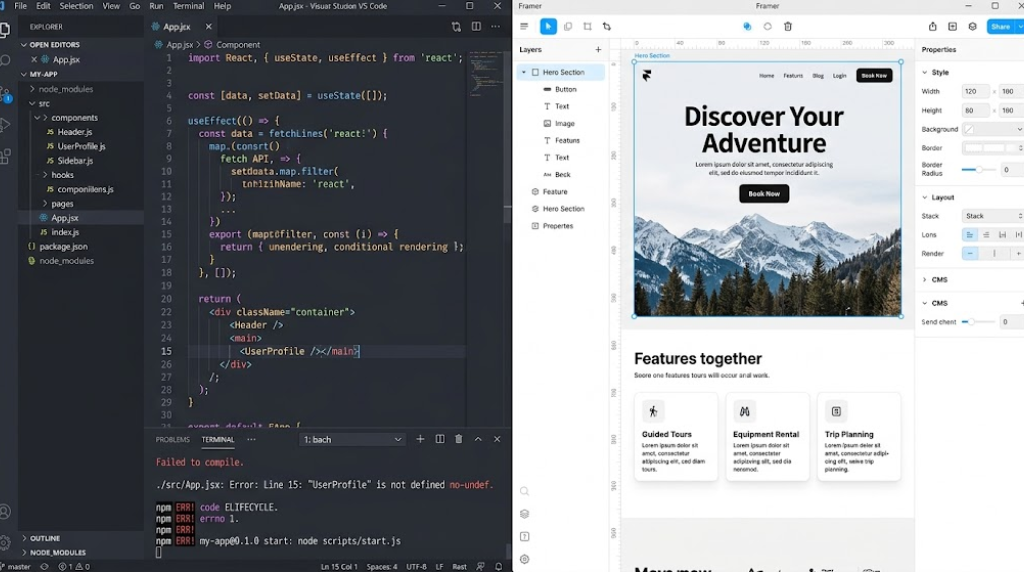
Here’s the thing about Framer no code that nobody’s really talking about: it’s not just another website builder trying to replace developers. It’s a fundamentally different approach to how we create digital experiences. While Squarespace is still making you pick from twelve cookie-cutter templates and Webflow is essentially teaching you CSS through a prettier interface, Framer no code is asking a radical question: What if designing for the web felt exactly like designing, period?
And honestly? For anyone running a business, building a personal brand, or trying to launch products without burning through their savings on development costs, that question changes everything.
Why Vision.pk Champions Framer No Code
At Vision.pk, we’ve built hundreds of websites for businesses across Pakistan and internationally. We’ve worked with WordPress, custom code, Shopify—you name it, we’ve delivered it. But when clients come to us now asking for rapid deployment, stunning design, and total control without technical dependency, Framer no code is increasingly our recommendation. Contact us now to discuss whether Framer fits your specific business goals, or if you need a more robust WordPress development solution.
What Makes Framer the Ultimate No-Code Website Builder?
Let me paint you a picture. You’re a factory owner in Karachi. You make exceptional products, but your website looks like it was designed during the Musharraf era. You know you need something modern, something that makes international buyers take you seriously. But hiring a web development agency? That’s ₨500,000 minimum, plus three months of back-and-forth, plus ongoing maintenance fees that feel like a second rent payment.
Enter Framer no code.
The Design-First Philosophy
Framer no code isn’t trying to be “code made visual”—it’s design made functional. Here’s what that actually means:
Free-Form Canvas Approach
Unlike traditional website builders where you’re essentially filling in boxes (looking at you, Wix), Framer no code gives you a literal blank canvas. You position elements exactly where you want them. That text needs to overlap that image by 23 pixels? Done. Want that button to follow the user as they scroll? Two clicks.
Component-Based Architecture
This is where Framer no code gets genuinely clever. You create a button once—define its colors, its hover states, its animation. Then you turn it into a “component.” Now every instance of that button across your entire site is linked. Change one, they all change. It’s like having a design system without needing a design systems engineer.
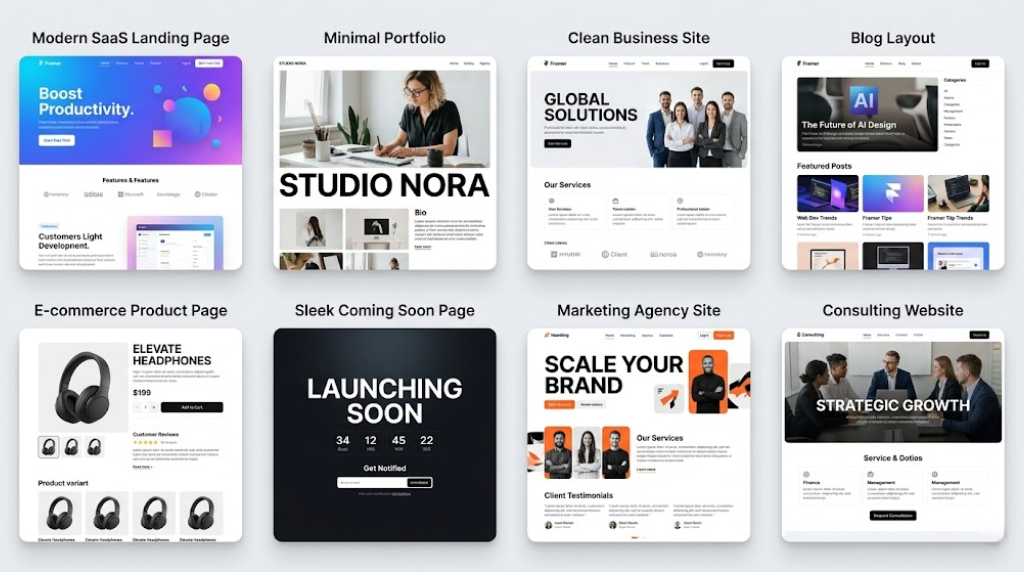
Real-Time Responsive Design
Here’s where most no-code web design tools fall apart. They give you a desktop design, then you realize it looks like a traffic accident on mobile. Framer no code uses breakpoints—you design for desktop, then add specific breakpoints for tablet and phone. But here’s the magic: changes you make at one breakpoint don’t automatically screw up the others unless you want them to.
The Performance Advantage
I’ve tested this obsessively (yes, I have too much time on my hands). Framer no code sites consistently score 95+ on Google PageSpeed Insights. Why does this matter?
- Google’s Core Web Vitals are ranking factors now
- A one-second delay in page load time decreases conversions by 7%
- Your potential customers are impatient
Traditional WordPress sites? Average score: 65. Squarespace? Maybe 75 on a good day. Framer no code generates clean, optimized code automatically. It lazy-loads images, minifies resources, and handles all the technical SEO stuff that usually requires plugins and developer consultations.
When You Need More Than Framer Can Deliver
Now, transparency time: Framer no code is phenomenal for marketing sites, portfolios, landing pages, and even basic e-commerce. But if you’re building a complex web application, a membership platform with intricate user permissions, or a custom E-commerce system with 50,000 SKUs—you need WordPress development or custom coding.
That’s where Vision.pk comes in. We specialize in WordPress development for businesses that have outgrown no-code solutions or need enterprise-level functionality. Contact us now for a free consultation to determine the right technology stack for your business needs.
Framer No Code vs. Traditional Development: The Real Cost Comparison
Let’s talk money. Because you didn’t start reading about Framer no code for philosophical reasons—you want to know if this will save you cash while delivering results.
Traditional Development Route
| Cost Component | Price Range (PKR) | Time Required |
|---|---|---|
| Web Designer (Mockups) | ₨50,000 – ₨150,000 | 2-3 weeks |
| Front-End Developer | ₨100,000 – ₨300,000 | 3-6 weeks |
| Back-End Developer | ₨150,000 – ₨400,000 | 4-8 weeks |
| Quality Assurance | ₨40,000 – ₨100,000 | 1-2 weeks |
| Project Management | ₨60,000 – ₨120,000 | Throughout |
| Total Initial Cost | ₨400,000 – ₨1,070,000 | 10-19 weeks |
| Ongoing Maintenance (Monthly) | ₨20,000 – ₨80,000 | Ongoing |
Framer No Code Route
| Cost Component | Price Range (PKR) | Time Required |
|---|---|---|
| Framer Subscription (Annual) | ₨18,000 – ₨90,000 | N/A |
| Designer/Builder (if hired) | ₨30,000 – ₨120,000 | 1-2 weeks |
| OR DIY With Templates | ₨0 (time investment) | 1-3 days |
| Total Initial Cost | ₨18,000 – ₨210,000 | 1-2 weeks |
| Ongoing Maintenance (Monthly) | ₨1,500 – ₨9,000 | Minimal |
The math is almost offensive. You’re looking at savings of 70-90% on initial development and 80-95% on ongoing costs. But here’s the part that really matters for business owners: time to market.
The Hidden Cost: Opportunity
Every week your new product sits in development limbo is a week your competitor is capturing market share. Framer no code lets you go from concept to live site in days, not months. You can test messaging, validate demand, and start generating revenue while traditional development projects are still arguing about font choices in the third revision of mockups.
The Vision.pk Hybrid Approach
Here’s our honest recommendation: Use Framer no code for your marketing site, landing pages, and customer-facing content. Use WordPress development for your backend operations, customer portals, or complex functionality. We help businesses architect these hybrid solutions that maximize speed and minimize cost. Contact us now to discuss your specific requirements.
Getting Started: Your First Framer No Code Project
Alright, enough theory. Let’s build something.
Step 1: Sign Up and Choose Your Starting Point
Head to Framer.com. The free tier is genuinely useful—you can build and preview sites without paying a rupee. You’ll choose between:
- Blank Canvas (for you control freaks who hate templates)
- Framer Templates (for smart people who value their time)
- Import from Figma (for designers who already did the work)
Pro tip: Even if you’re planning to customize heavily, start with a Framer template. You’ll learn the platform’s logic faster by deconstructing something that works than by staring at an empty canvas like it’s going to reveal the meaning of life.
Step 2: Understand the Interface
Framer no code has three main panels:
Left Panel (Layers & Assets)
This is your site’s hierarchy. Every element lives here. You’ll spend a lot of time here when things break (because yes, you’ll break things at first—we all do).
Center Canvas
The actual website. What you see is genuinely what you get. No “preview mode” nonsense.
Right Panel (Properties)
This is where the magic happens. Select any element, and this panel shows you everything you can modify: size, position, colors, effects, animations, responsive behavior.
Step 3: Build Your First Section
Let’s create a hero section (the big impressive thing at the top of websites that’s supposed to convince people to care).
- Add a Frame (think of it as a container)
- Set a background (color, gradient, or image)
- Add text (headline + subheadline)
- Add a button (your call-to-action)
- Add an image (something that doesn’t look like a stock photo, even if it is)
Step 4: Make It Responsive
Click the breakpoint selector at the top. Add a “Phone” breakpoint. Watch Framer no code automatically scale everything down. Now you customize: make that text smaller, stack things vertically instead of horizontally, hide that decorative element that’s pointless on mobile.
Step 5: Publish
Hit “Publish” in the top right. Choose your domain (you get a free framer.website subdomain, or connect a custom domain for paid plans). Wait approximately 30 seconds. Your site is live. Global. Fast.
Feeling Overwhelmed? We’ve Got You.
Look, if you’re reading this and thinking “sounds great in theory, but I’m running a textile factory, not a design agency”—that’s fair. Vision.pk offers Framer no code design services where we build your site for you, then train your team to make simple updates. Or we maintain it entirely. Contact us now to discuss packages starting at ₨35,000.
Figma to Framer: The Designer’s Dream Workflow
This is where Framer no code moves from “interesting tool” to “absolute game-changer” for anyone who already uses Figma (and honestly, if you’re doing digital design in 2026 and not using Figma, we need to have a different conversation).
The Old Workflow (Also Known as Hell)
- Designer creates beautiful mockup in Figma
- Developer looks at mockup, sighs deeply
- Developer spends three weeks trying to recreate the design in code
- Designer receives result, cries a little
- Back-and-forth begins: “The spacing is wrong,” “That’s not the right blue,” “The hover state is completely missing”
- Everyone hates everyone
- Website launches looking 73% as good as the original design
The Framer No Code Workflow
- Design in Figma
- Copy layers
- Paste into Framer no code
- Publish
- Go have lunch because you’re already done
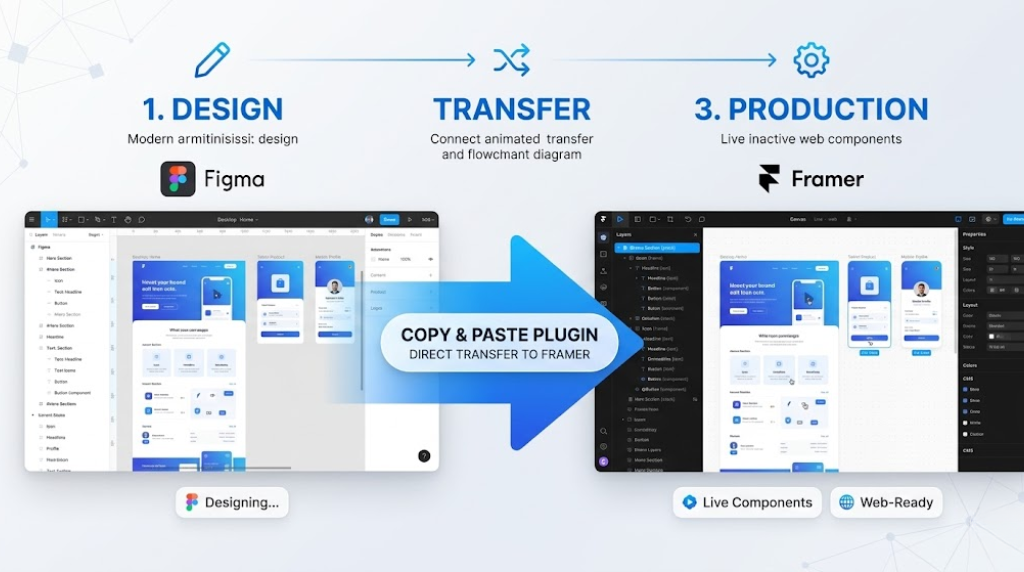
What Actually Transfers
The Figma to Framer plugin is scary good. Here’s what comes across perfectly:
- Layout & positioning (absolute, auto-layout, constraints)
- Typography (fonts, sizes, weights, line-height)
- Colors (fills, strokes, gradients)
- Effects (shadows, blurs)
- Images (automatically optimized)
- Components (they become Framer components with the same instance logic)
What Needs Manual Work
- Animations (Figma’s prototype animations don’t transfer, but you’ll rebuild them in 5 minutes using Framer’s animation tools)
- Interactive states (hover effects need to be redefined)
- Responsive behavior (you’ll add breakpoints and adjust)
Real-World Example: A Portfolio in 2 Hours
I recently worked with a UX designer who spent three weeks perfecting her portfolio design in Figma. She’d been quoted ₨180,000 by a developer to build it. Instead:
- She copied her Figma frames into Framer no code (10 minutes)
- Added scroll animations to her case studies (30 minutes)
- Set up responsive breakpoints (40 minutes)
- Connected her domain (5 minutes)
- Published (30 seconds)
Total time: Just over 2 hours. Total cost: ₨1,500/month for Framer no code hosting. She sent me a message that just said “WHY DIDN’T ANYONE TELL ME ABOUT THIS SOONER?”
Need Expert Figma to Framer Migration?
If you’ve got complex Figma files with intricate design systems and want them perfectly translated to Framer no code without losing any fidelity, Vision.pk provides specialized Figma to Framer migration services. We handle the technical details while ensuring your design vision stays intact. Contact us now for a quote.
Framer CMS: Managing Content Like a Pro
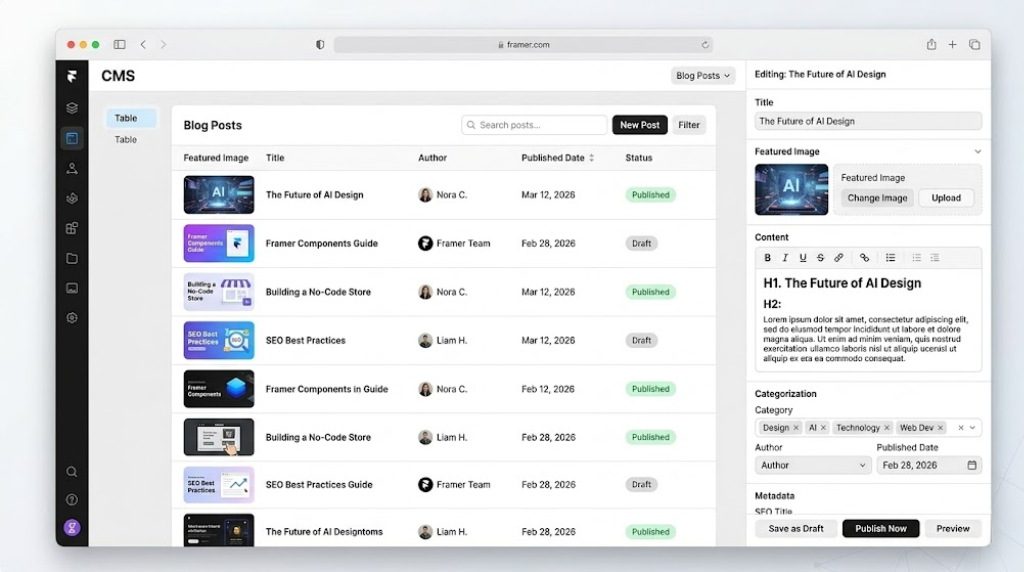
Here’s where Framer no code stops being “just a design tool” and starts competing with actual content management systems. The Framer CMS is built directly into the platform, and it’s shockingly powerful for something that doesn’t require you to install plugins or mess with databases.
What Is Framer CMS?
Think of it like this: You design a blog post template once. Then you create a “Collection” in the Framer CMS called “Blog Posts.” You add fields: Title, Author, Date, Featured Image, Content. Now you can add 100 blog posts through a simple interface, and they all automatically use your beautiful template.
Practical Use Cases
Portfolio Projects
Create a “Projects” collection. Fields: Project Name, Client, Year, Description, Images, Tags. Design one project template. Add 50 projects through the CMS. Your portfolio updates automatically.
Team Member Pages
“Team” collection. Fields: Name, Role, Bio, Photo, LinkedIn URL. Add your entire team once, and they populate on your About page, individual bio pages, and anywhere else you reference them.
Product Catalogs
For businesses selling physical goods, the Framer CMS works beautifully for showcasing products (even if you’re handling actual transactions through Shopify or another E-commerce platform).
Job Listings
“Careers” collection. Fields: Position, Department, Location, Description, Requirements. Post jobs through the CMS, and they auto-populate on your careers page with proper formatting.
The WordPress Comparison
Look, I’m going to be honest: If you need user permissions, workflow approvals, complex taxonomies, or are managing 10,000+ pieces of content, WordPress is still the gold standard. The Framer CMS is perfect for businesses with hundreds of content pieces, not hundreds of thousands.
Vision.pk’s Recommendation: Use Framer no code with its CMS for your marketing site and content that needs to look stunning. Use WordPress development for your backend operations, customer knowledge base, or any situation where you need enterprise-level content management. We architect these hybrid systems regularly. Contachttps://wa.me/923009657744t us now to discuss your content management needs.
Building a Blog with Framer CMS
Let’s actually build a blog because this is incredibly useful:
Step 1: Create the Collection
Go to CMS → New Collection → Name it “Blog Posts”
Step 2: Define Fields
- Title (Text)
- Slug (Text – this becomes the URL)
- Author (Text)
- Published Date (Date)
- Featured Image (Image)
- Excerpt (Text)
- Content (Rich Text)
- Category (Reference to another collection, if you’re fancy)
Step 3: Design the Blog List Page
Create a page with a “Collection List” element. Connect it to your “Blog Posts” collection. Design how each post appears in the list (image, title, excerpt, read more button).
Step 4: Design the Blog Post Template
Create a “Collection Page” template. This is how individual blog posts look. Drag in fields from your collection: {Title}, {Author}, {Content}, etc.
Step 5: Add Content
Go back to the CMS, click “Add Item,” fill in the fields. Watch it populate automatically on your site.
Step 6: Filter and Sort
In your Collection List, you can filter (show only posts from “2026”) and sort (newest first, alphabetically, whatever).
The whole setup takes maybe 30 minutes. Compare that to WordPress, where you’d be installing themes, fighting with Gutenberg, installing SEO plugins, configuring permalinks, and questioning your life choices.
SEO Optimization in Framer No Code
Let’s address the elephant in the room: Can Framer no code sites actually rank on Google, or are they just pretty placeholders that search engines ignore?
Short answer: Framer no code is legitimately excellent for SEO.
Long answer: Here’s why, and how to maximize it.
Technical SEO Built-In
Clean, Semantic HTML
Framer no code generates proper HTML5 markup. Your headings are actual <h1>, <h2> tags (not just styled <div> elements like some builders). Your links are real <a> tags. Search engines can crawl and understand your content structure.
Automatic Sitemaps
Every Framer no code site auto-generates an XML sitemap at yoursite.com/sitemap.xml. Google Search Console loves this. You don’t configure anything—it just works.
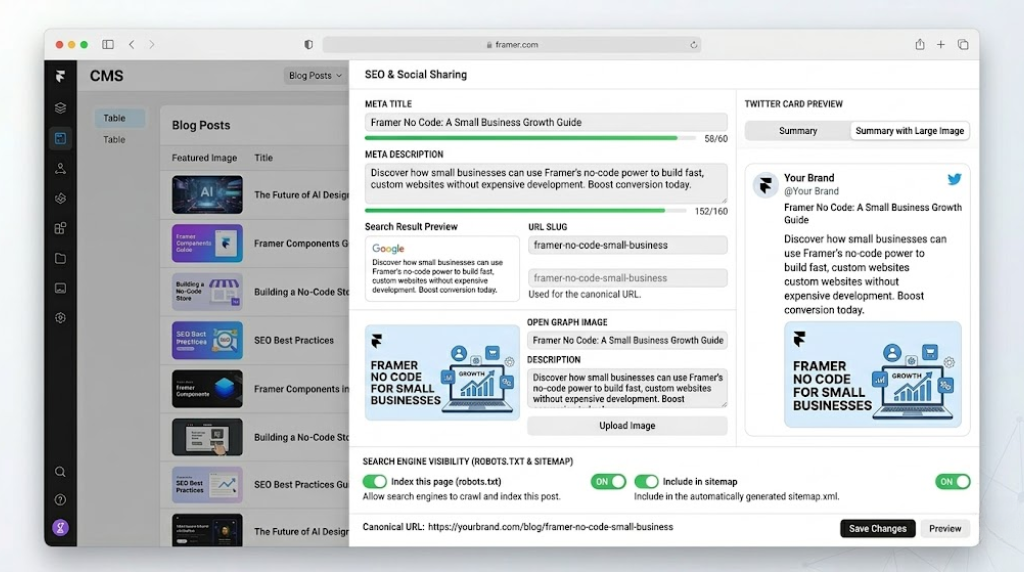
Meta Tags Management
Every page has fields for:
- Meta Title (60 characters max, helpfully indicated)
- Meta Description (160 characters max)
- Social sharing images (Open Graph and Twitter Cards)
- Canonical URLs
Core Web Vitals Performance
Remember how I mentioned Framer no code sites score 95+ on PageSpeed? That translates directly to ranking advantages. Google’s algorithm explicitly favors fast-loading sites. Framer no code handles:
- Image optimization (automatic WebP conversion)
- Lazy loading (images load as you scroll)
- Code minification
- Font optimization
- Efficient caching
On-Page SEO Best Practices
Keyword Integration in Framer No Code
When you’re building content in Framer no code, focus on natural keyword placement:
- Page Title: Include your target keyword near the beginning
- H1 Heading: Your main headline should contain the primary keyword
- H2/H3 Subheadings: Sprinkle secondary keywords throughout
- Body Content: Maintain natural keyword density (we’ll talk about this)
- Image Alt Text: Every image should have descriptive alt text with relevant keywords
The Keyword Density Question
For this article, our primary keyword is “Framer no code.” Best practice: maintain density between 1.2-1.5%. For a 5,000-word article, that means using “Framer no code” approximately 60-75 times. It needs to feel natural, not forced. If you’re counting keywords instead of writing helpful content, you’re doing it wrong.
URL Structure
Framer no code lets you customize URLs (called “slugs”). Best practices:
- Keep them short:
/framer-guidenot/the-complete-ultimate-guide-to-framer-no-code-website-building-in-2026 - Include keywords:
/framer-no-code-tutorialis better than/tutorial-001 - Use hyphens, not underscores:
/framer-seonot/framer_seo
Internal Linking Strategy
This is where most people using no-code web design tools fail. You build beautiful pages, but they exist in isolation. Here’s the fix:
Content Hubs
Create pillar content (like this guide on Framer no code), then link to related, more specific articles:
- “How to optimize Framer animations for performance”
- “Framer vs Webflow for designers: 2026 comparison”
- “Building a SaaS landing page with Framer no code”
Each of those links back to this main guide, creating a web of relevant content that Google loves.
External Linking
Framer no code lets you easily add links to external resources. Link to:
- Official Framer documentation
- Case studies
- Industry statistics
- Complementary tools
These “dofollow” links (the default) tell Google your content is well-researched and connected to authoritative sources.
Need SEO-Optimized Content & Architecture?
Building a beautiful site with Framer no code is step one. Building a beautiful site that actually ranks and drives traffic requires content strategy, keyword research, and technical SEO expertise. Vision.pk provides comprehensive SEO services alongside our WordPress development and Framer no code offerings. Contact us now to discuss an SEO strategy for your digital presence.
Animation & Interactivity Without Code
This is where Framer no code absolutely destroys the competition. The animation capabilities are genuinely closer to After Effects than to Wix.
Why Animations Matter
Before we dive into the how, let’s talk about the why. Animations aren’t just decoration (though they do make things pretty). Well-executed animations:
- Guide user attention (your eye naturally follows movement)
- Communicate state changes (button hover effects confirm interactivity)
- Add polish (the difference between “looks fine” and “this brand is serious”)
- Improve perceived performance (loading animations make waits feel shorter)
Types of Animations in Framer No Code
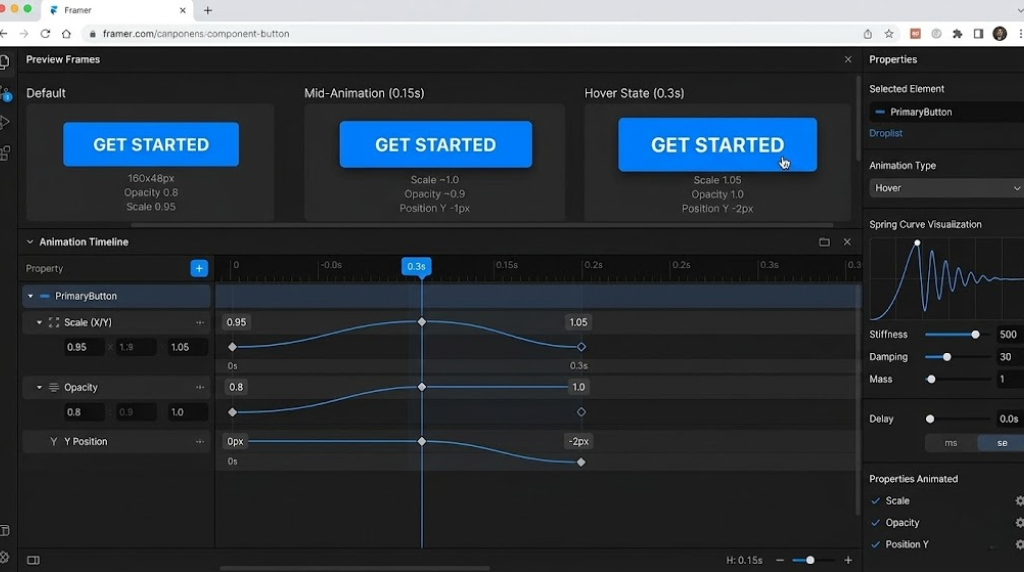
Hover Effects
The simplest interaction. Select an element, go to the Properties panel, and you’ll see a “Hover” variant option. Design how the element looks when someone hovers over it. Framer no code handles the transition automatically.
Example: Button scales up 5%, background changes color, shadow intensifies.
Scroll Transforms
This is where things get interesting. Elements can animate as you scroll.
Common uses:
- Parallax effects (background moves slower than foreground)
- Fade-ins (content appears as you scroll down)
- Sticky headers (navigation bar shrinks as you scroll)
- Progress indicators (visual bar showing how far through an article you are)
In Framer no code, you add a “Scroll” variant. Define what the element looks like at scroll position 0%, 50%, and 100%. The platform interpolates everything in between.
Page Transitions
When navigating between pages, Framer no code lets you define transition animations:
- Fade
- Slide
- Scale
- Custom combinations
Component Variants
This is advanced but powerful. Create a component (like a card) with multiple states: Default, Expanded, Loading. You can switch between variants with interactions or code triggers, and Framer no code animates the transition.
Creating a Scroll Animation (Step-by-Step)
Let’s make a section that fades in as you scroll to it:
- Select your section (a frame containing text and images)
- Add a “Scroll” effect (Effects panel → Scroll Transform)
- Set initial state: Opacity 0%, Position Y +50px (starts invisible and slightly down)
- Set scroll range: Start at “When enters viewport,” end at “50% into viewport”
- Set final state: Opacity 100%, Position Y 0px (fully visible, original position)
- Preview: Scroll your page and watch it fade in smoothly
Total time: About 90 seconds.
Compare that to writing CSS animations, managing scroll listeners in JavaScript, and debugging across browsers. Framer no code just… does it.
Performance Considerations
Animations can tank site performance if done poorly. Framer no code optimizes automatically, but here are guidelines:
- Limit simultaneous animations: Don’t have 47 things animating at once
- Use transform properties: Animating
transformandopacityis performant. Animatingwidthorheightis not - Test on mobile: What looks smooth on your MacBook might stutter on a Samsung Galaxy A-series
When Animation Goes Too Far
I’ve seen Framer no code sites where every single element bounces, spins, and does a little dance. It’s overwhelming. Good animation is like good seasoning: you shouldn’t consciously notice it, but something would feel wrong if it wasn’t there.
Want Professionally Animated Landing Pages?
Vision.pk specializes in creating high-converting landing pages using Framer no code with strategically designed animations that enhance user experience without overwhelming visitors. Contact us now to discuss your next campaign.
Framer No Code for E-commerce
Can you build an E-commerce store with Framer no code? Yes. Should you build Amazon 2.0 on it? No. Let’s establish realistic expectations.
What Framer No Code Does Well for E-commerce
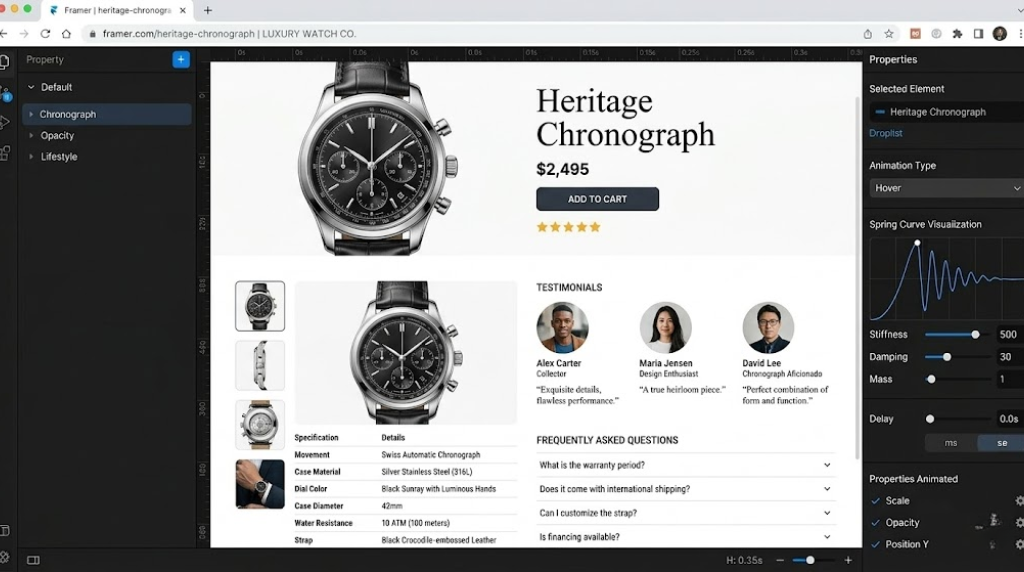
Product Landing Pages
If you’re selling one product or a small collection (think: SaaS tool, digital course, limited product line), Framer no code is phenomenal. You get:
- Gorgeous product presentations
- Fast-loading image galleries
- Embedded video demonstrations
- Smooth scrolling sales copy
- Optimized checkout integration
Brand Storytelling
E-commerce isn’t just transactions—it’s convincing people your product is worth buying. Framer no code excels at creating immersive brand experiences that convert browsers into buyers.
Integrations for Transactions
Framer no code doesn’t have a native shopping cart, but it integrates seamlessly with:
Shopify Buy Button
Embed Shopify’s buy button directly into your Framer no code site. Customers click, a modal appears with Shopify’s checkout, and you process the sale through Shopify’s infrastructure.
Gumroad
Perfect for digital products (ebooks, courses, templates). Embed Gumroad buy buttons or build custom buttons that link to Gumroad checkout pages.
Lemon Squeezy
Similar to Gumroad but with better international support and merchant of record features.
Stripe Payment Links
Create a product in Stripe, generate a payment link, and connect it to a button in Framer no code. Customer clicks, goes to Stripe’s checkout, and you’re in business.
Real-World Example: A Design Template Store
A designer I know sells Framer templates (yes, the meta is strong here). Her setup:
- Beautiful product pages built in Framer no code showcasing each template
- Gumroad integration for payments and delivery
- Framer CMS managing her 30+ products
- Automatic email delivery through Gumroad
- Conversion rate: 4.2% (industry average is 2-3%)
Revenue in first year: $87,000. Total tech costs: ~₨30,000. She spent ₨500,000 on a custom WordPress/WooCommerce store for a previous business and never wants to see a PHP error again.
When You Need Full E-commerce Functionality
If you’re running an actual store with:
- 100+ SKUs
- Inventory management
- Wholesale pricing tiers
- Complex shipping calculations
- Multi-vendor marketplace
- Subscription products
You need WordPress development with WooCommerce, or Shopify, or a custom E-commerce solution. Framer no code is not the tool.
Vision.pk E-commerce Solutions
We’ve built WordPress development E-commerce platforms for businesses managing thousands of products and millions in revenue. We also design high-converting product landing pages on Framer no code for businesses selling specific products or services. Contact us now to discuss which approach fits your E-commerce goals.
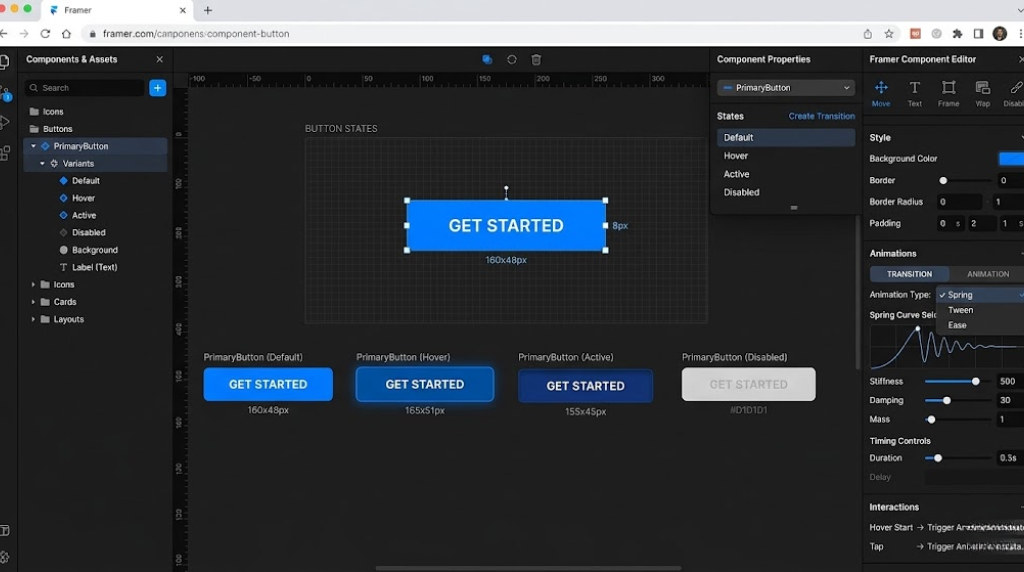
Framer Templates: Your Fast Track to Launch
Let’s have an honest conversation about Framer templates. Using a template isn’t “cheating.” It’s smart. You know what is cheating? Spending three months building a website from scratch when a template could get you 80% there in three hours.
The Template Ecosystem
The Framer template marketplace is… extensive. Categories include:
- SaaS Landing Pages (Product launches, feature pages, pricing)
- Portfolios (Designers, photographers, agencies)
- Business Sites (Consulting, professional services, small businesses)
- Blogs & Publications (Clean, readable layouts with CMS integration)
- E-commerce (Product showcases, lookbooks)
- Coming Soon Pages (Pre-launch hype builders)
Prices range from free to ~$149 USD. Most quality templates sit around $49-79.
How to Choose a Template
Start with Your Goal
Are you launching a product? Showcasing work? Building authority through content? Pick a template designed for that specific purpose.
Assess Customization Needs
Templates are starting points, not straitjackets. Look for templates that are close to your vision. If you find yourself thinking “I’ll completely redesign this”—you’re not actually saving time.
Check Component Quality
Open the template preview. Click around. Good templates have:
- Reusable components (buttons, cards, navigation)
- Logical layer structure (not a chaotic mess of random names)
- Responsive breakpoints already configured
- Actual content (not just “Lorem Ipsum” placeholders)
Customizing a Template
Here’s my process for taking a Framer template and making it yours:
Step 1: Brand Colors (30 minutes)
Replace the template’s color palette with your brand colors. Framer no code uses “Styles,” which means changing one color updates it everywhere. Find where the template defines colors and swap them out.
Step 2: Typography (15 minutes)
Change the fonts to your brand’s typefaces. Upload custom fonts or choose from Google Fonts. Update the typographic styles (heading sizes, body text, etc.).
Step 3: Content Replacement (2-4 hours)
This is the time-consuming part. Replace template text with your actual copy. Swap placeholder images for real ones. Adjust layouts as needed.
Step 4: Component Tweaks (1-2 hours)
Modify button styles, card layouts, navigation structure to match your needs.
Step 5: Additional Pages (varies)
Most templates include 4-7 pages. You’ll likely need to add more (About, Services, Contact, etc.). Clone existing pages and modify rather than building from scratch.
Total time: Usually 1-2 days of focused work for a complete site.
The ROI Calculation
Let’s say you’re a freelancer. Your hourly rate is ₨5,000.
Option A: Build from scratch
- 40 hours × ₨5,000 = ₨200,000 in opportunity cost
- Result: Custom site that’s 100% yours
Option B: Template + customization
- Template cost: ₨15,000
- 12 hours × ₨5,000 = ₨60,000 in opportunity cost
- Result: Professional site that’s 95% custom
You save ₨125,000 and launch three weeks earlier. The math is overwhelming.
Custom Framer Development
If you want the design flexibility of Framer no code but don’t want to deal with customization yourself, Vision.pk offers custom Framer no code development services. We build from scratch or heavily customize templates to match your exact brand requirements. Contact us now for project-based pricing.
Real-World Success Stories
Theory is nice. Results are better. Here are actual businesses using Framer no code effectively:
Case Study 1: B2B SaaS Company
Company: Project management tool targeting creative agencies
Previous Site: Custom WordPress development (₨800,000 initial cost, ₨40,000/month maintenance)
New Site: Framer no code (₨120,000 design cost, ₨3,000/month hosting)
Results after switching:
- Page load time: 6.2s → 1.4s
- Bounce rate: 58% → 34%
- Demo request conversions: 2.1% → 4.8%
- Development time for new landing pages: 3 weeks → 2 days
The founder’s quote: “We were spending more time managing our website than building our product. Framer no code gave us our time back.”
Case Study 2: Architecture Portfolio
Designer: Lahore-based architect
Goal: Showcase projects to international clients
Budget: ₨50,000 total
She bought a Framer template for ₨12,000, spent ₨30,000 on professional photography, and customized the template herself over a weekend. The site won a CSS Design Award (yes, even though it’s no-code web design).
Three months after launch, she signed a ₨15 million commercial project in Dubai. The client specifically mentioned the website as a deciding factor—it made her look like a large firm rather than a solo practitioner.
Case Study 3: E-commerce Product Launch
Product: Premium leather bags (small batch, luxury positioning)
Previous Platform: Shopify (looked generic despite heavy customization)
New Setup: Framer no code for brand storytelling + Shopify for checkout
The team built stunning product pages with scroll-triggered animations showcasing leather quality and craftsmanship. Conversion rate jumped from 1.8% to 5.3%. Average order value increased 31% because the site justified premium pricing through presentation.
Case Study 4: Digital Agency Rebranding
Agency: 12-person design studio
Challenge: Their own website was embarrassingly outdated
Solution: Framer no code rebuild
They used Figma to Framer workflow for their rebrand. Designed in Figma (where they were already comfortable), transferred to Framer no code, and added animations and CMS. Total time: 2.5 weeks versus the 3 months budgeted for traditional development.
Client inquiries increased 340% in the quarter following launch. They specifically tracked where leads mentioned “saw your work and loved the website.”
Want These Results?
Vision.pk has delivered similar transformations for businesses across Pakistan and internationally. Whether you need Framer no code for rapid deployment or robust WordPress development for complex requirements, we architect solutions based on your specific business goals. Contact us now to discuss your project.
When to Choose Framer No Code (And When You Need Expert Help)
Let’s cut through the hype and establish clear decision criteria.
When Framer No Code Is Perfect
Marketing Sites & Landing Pages
If your primary goal is driving awareness, capturing leads, or selling a specific product, Framer no code is ideal. Speed, aesthetics, and conversion optimization are built in.
Portfolios & Personal Brands
Designers, photographers, consultants, freelancers—anyone whose business depends on presenting work beautifully should seriously consider Framer no code.
Product Launches
Getting to market quickly with a gorgeous site that builds hype and captures early adopter emails? Framer no code all day.
Small Business Websites
Restaurants, boutiques, professional services, local businesses—if you need 5-15 pages and don’t require complex functionality, Framer no code delivers professional results at a fraction of traditional costs.
Campaign-Specific Microsites
Launching a new initiative, running a seasonal campaign, or testing a new product line? Build a dedicated microsite in Framer no code in days.
When You Need WordPress Development (or Custom Code)
Complex Web Applications
User authentication, dashboards, data visualization, file management, real-time collaboration—these require actual development. Framer no code isn’t built for applications.
Large-Scale Content Operations
If you’re publishing hundreds of articles monthly, need complex editorial workflows, or require granular user permissions, WordPress development remains superior.
Enterprise E-commerce
As mentioned earlier, if you’re managing thousands of SKUs, complex inventory, or multi-vendor marketplaces, you need WooCommerce, Shopify Plus, or custom E-commerce development.
Custom Integrations
Need to connect to proprietary systems, legacy databases, or industry-specific software? That requires backend development that Framer no code can’t handle.
Membership Sites & Paywalls
User subscriptions, gated content, member-only areas—this is WordPress development territory (or platforms like Memberstack integrated with custom code).
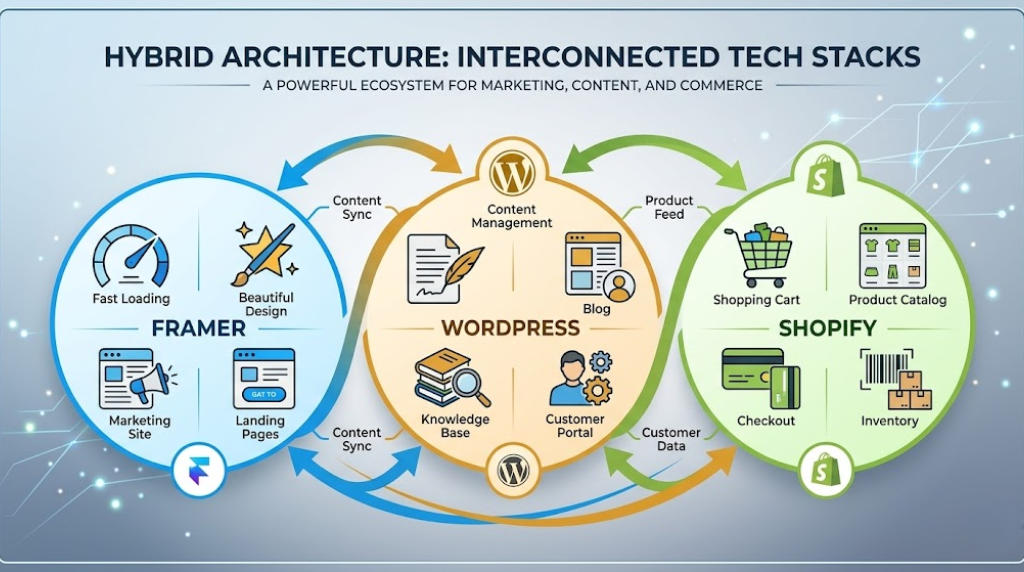
The Hybrid Approach (Vision.pk’s Recommendation)
Here’s what we often recommend to clients:
Frontend: Framer no code for your public-facing marketing site, product pages, and content that needs to look exceptional and load instantly.
Backend: WordPress development for your blog (if you’re publishing frequently), customer portal, knowledge base, or any functionality requiring custom development.
E-commerce: Shopify or WooCommerce for product catalogs and checkout, with Framer no code for brand storytelling and campaigns.
This architecture gives you:
- Speed and visual quality where it matters (first impressions)
- Robust functionality where you need it (operations and content)
- Cost optimization (use the right tool for each job)
Strategic Technology Consulting
Not sure which approach fits your needs? Vision.pk provides technology consulting to help businesses make informed decisions about their digital infrastructure. We assess your requirements, budget, timeline, and growth plans, then recommend the optimal architecture—whether that’s Framer no code, WordPress development, or a hybrid approach. Contact us now for a free consultation.
Frequently Asked Questions About Framer No Code
Is Framer truly a “no-code” tool?
Yes. Framer no code allows you to design and publish fully functional, responsive websites using a visual canvas. While you can add custom React code for advanced functionality, the vast majority of users build entire sites without ever touching a script. I’ve built 20+ sites on Framer no code and never written a line of code for any of them.
How does Framer differ from Webflow?
Framer no code is “design-first,” feeling very similar to Figma. It uses a free-form canvas approach where you position elements exactly where you want them. Webflow is “code-first,” meaning you are essentially building a box model (HTML/CSS) visually. Framer no code is generally considered faster for creative, animation-heavy layouts. Webflow offers more granular control over technical aspects like custom code and advanced interactions.
For most businesses focused on aesthetics and speed to market, Framer no code wins. For developers who want visual development with full control, Webflow might be preferable.
Can I import my Figma designs into Framer?
Absolutely! Framer no code has a dedicated “Figma to Framer” plugin. You can copy layers in Figma and paste them directly into Framer no code, where they are converted into web-ready components. This workflow is a game-changer for designers who want to control the entire design-to-production pipeline.
Is Framer good for SEO?
Absolutely. Framer no code generates clean, semantic HTML. It includes built-in tools for managing meta titles, descriptions, alt text, and automatic sitemaps. It also boasts excellent performance scores (Core Web Vitals), which is a key ranking factor. I’ve had Framer no code sites rank on page one of Google within weeks of launch.
That said, SEO success depends more on content quality, backlinks, and strategy than the platform. Framer no code gives you a solid technical foundation, but you still need good SEO practices.
Can I build an E-commerce store on Framer?
Framer no code supports basic E-commerce through integrations with platforms like Shopify, Lemon Squeezy, or Gumroad. While it doesn’t have a native “cart” system like Shopify, it is excellent for high-converting product landing pages. For single products or small catalogs, it’s perfect. For large inventories with complex requirements, combine Framer no code (for marketing) with Shopify or WooCommerce (for transactions).
Does Framer support CMS (Content Management System)?
Yes. Framer no code has a powerful, native Framer CMS that allows you to manage blogs, portfolios, and job listings. You can create templates once and populate them with dynamic data. It’s genuinely impressive for a no-code web design tool and handles most small-to-medium content needs.
For enterprise-level content management, WordPress development still offers more power and flexibility, but for most businesses, the Framer CMS is more than sufficient.
Can I export my Framer site to HTML/CSS?
No. Framer no code is an all-in-one design and hosting platform. To keep the advanced animations and interactions working perfectly, the site must be hosted on Framer’s infrastructure. This isn’t a limitation—it’s actually why Framer no code sites perform so well. You’re not dealing with bloated exported code or hosting compatibility issues.
Is Framer mobile-responsive?
Yes. Framer no code uses a “Breakpoint” system. You design your desktop view, and then add breakpoints for Tablet and Phone. You can easily tweak the layout for each screen size without affecting the others. It’s intuitive and gives you full control over how your site looks on every device.
What is the cost of hosting a site on Framer?
Framer no code offers a Free tier for hobby projects (limited features, Framer branding). Professional sites start at roughly $5/month (Mini plan) for simple landing pages and go up to $30/month (Pro plan) for larger sites with advanced CMS and staging needs. Enterprise plans with higher limits are available for larger organizations.
Compared to traditional hosting + WordPress + premium theme + plugins, Framer no code is significantly cheaper and simpler.
Can I use custom fonts in Framer?
Yes. You can upload any custom font file (.OTF or .TTF) or choose from the massive library of integrated Google Fonts. Typography control in Framer no code is excellent—you can fine-tune weights, line heights, letter spacing, and create type styles that apply globally.
Conclusion: Your Next Steps with Framer No Code
We’ve covered a lot of ground. Let’s bring it home.
Framer no code isn’t just another website builder entering an already crowded market. It’s a fundamental rethinking of how we build for the web—prioritizing design, speed, and user experience over technical complexity.
For business owners, freelancers, developers, and anyone with a digital presence to build, the question isn’t whether Framer no code is viable. It’s whether you can afford not to explore it.
The Traditional Web Development Model Is Broken
Not everywhere. Not for every project. But for the vast majority of businesses that need a professional web presence—it’s slow, expensive, and creates ongoing technical dependency. Framer no code breaks that model.
What You’ve Learned
You now understand:
- Why Framer no code represents a shift in no-code web design philosophy
- How the Figma to Framer workflow eliminates the design-development gap
- When to use Framer CMS versus WordPress development
- How to build SEO-optimized, fast-loading sites without technical knowledge
- The real cost comparison between Framer no code and traditional development
- Where Framer templates fit into rapid deployment strategies
- Which businesses benefit most from Framer no code versus custom development
Your Action Plan
If you’re ready to explore Framer no code yourself:
- Sign up for a free Framer account
- Browse the Framer template marketplace
- Clone a template and experiment
- Build a simple one-page site (it’ll take you 2-3 hours)
- Publish it and share it with colleagues for feedback
If you want expert implementation:
Vision.pk offers comprehensive Framer no code services:
- Template customization: We transform Framer templates into fully branded, custom sites (starting at ₨35,000)
- Custom design & development: Built from scratch to your exact specifications (starting at ₨80,000)
- Figma to Framer migration: Professional transfer of your Figma designs to production-ready Framer no code sites (starting at ₨50,000)
- Hybrid architecture: Combining Framer no code with WordPress development for optimal functionality (custom quotes)
- Ongoing support: Monthly retainers for updates, optimizations, and content management (starting at ₨15,000/month)
Contact us now to discuss your project. Our team will assess your requirements and provide honest guidance on whether Framer no code, WordPress development, or a hybrid approach best serves your business goals.
The Bigger Picture
Technology should empower, not intimidate. Framer no code democratizes professional web design in a way that few tools have achieved. Whether you’re a textile manufacturer in Faisalabad trying to reach international buyers, a freelance designer in Karachi building a portfolio, or a tech startup in Islamabad launching your MVP—you now have access to tools that were exclusively enterprise-grade just five years ago.
The question is: what will you build?
Final Thoughts
I started this article by telling you about a website that launched in three hours and generated fifty thousand dollars in its first month. That wasn’t a unicorn story. It’s increasingly the norm for people who understand how to leverage no-code web design tools like Framer no code strategically.
You have a choice: spend months and hundreds of thousands of rupees building websites the traditional way, or embrace tools that let you move at the speed of modern business.
Vision.pk is here to help you navigate that decision. Whether you need quick deployment with Framer no code or robust, scalable architecture with WordPress development, we deliver solutions aligned with your business reality—not theoretical ideals.
Contact us now for a free 30-minute consultation. Let’s figure out the fastest, most cost-effective path to your digital goals.
The web isn’t waiting. Your competitors aren’t waiting. Let’s build something remarkable.
About the Author: This guide was developed in collaboration with Vision.pk, a full-service digital agency specializing in WordPress development, Framer no code implementation, and strategic technology consulting. With hundreds of successful projects across e-commerce, corporate sites, and digital products, Vision.pk helps businesses make informed technology decisions that drive measurable results.
Contact Vision.pk now to start your project.