
Contact Info
16-Z-1, Madina Town, Near Bank Morr Susan Road, Faisalabad- Pakistan.
+92-300-9657744
khalil@vision.pk
Get StartedRecommended Services


Supported Scripts

Table of Contents
1. Let’s Be Real — Your Website Is Probably Due for an Upgrade
WordPress Version 7 just landed, and honestly? I’ve been in the WordPress world for a long time. I’ve seen updates come and go. Some add a button here, fix a bug there. But every once in a while, a version drops that genuinely shifts how the entire platform works.
This is one of those times.
Released on April 9, 2026, right at WordCamp Asia, WordPress Version 7 didn’t just roll out a couple of new blocks. It reimagined how teams work, how AI fits into your workflow, how your admin dashboard looks and behaves, and how your site performs under the hood.
Whether you’re a business owner who’s been running the same WordPress site for three years, a developer juggling multiple client projects, or someone who’s been thinking about finally launching that online store — WordPress Version 7 is the version that makes you stop and pay attention.
And if you’re someone who would rather have a professional team handle all this? That’s where Vision.pk comes in. But first — let’s dig into what WordPress Version 7 actually brings to the table.
2. What Is WordPress Version 7 and When Did It Drop?
WordPress Version 7 is the latest major release of the world’s most popular content management system. As of this writing, WordPress powers over 43% of all websites on the internet. That’s not a niche tool — that’s the internet’s backbone.
The WordPress Version 7 release date was officially April 9, 2026, and it was unveiled at WordCamp Asia, which added a pretty exciting energy to the announcement. If you follow WordPress development, you’ll know this release marks the full fruition of Gutenberg Phase 3 — a multi-year effort to transform WordPress from a simple blogging platform into a full, collaborative site-building ecosystem.
Think of WordPress Version 7 as the version where Gutenberg Phase 3 finally graduates. It’s not “coming soon” anymore. It’s here.
3. The #1 Feature Nobody Saw Coming: Real-Time Collaboration
Okay, I lied. People did see this coming — it was on the Gutenberg Phase 3 roadmap. But nobody quite expected it to feel this polished.
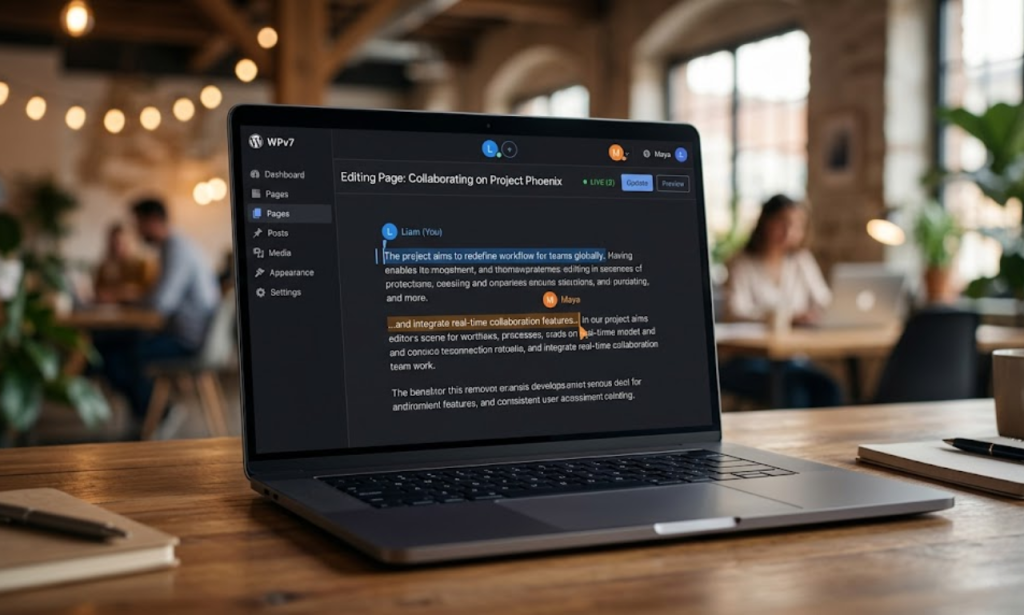
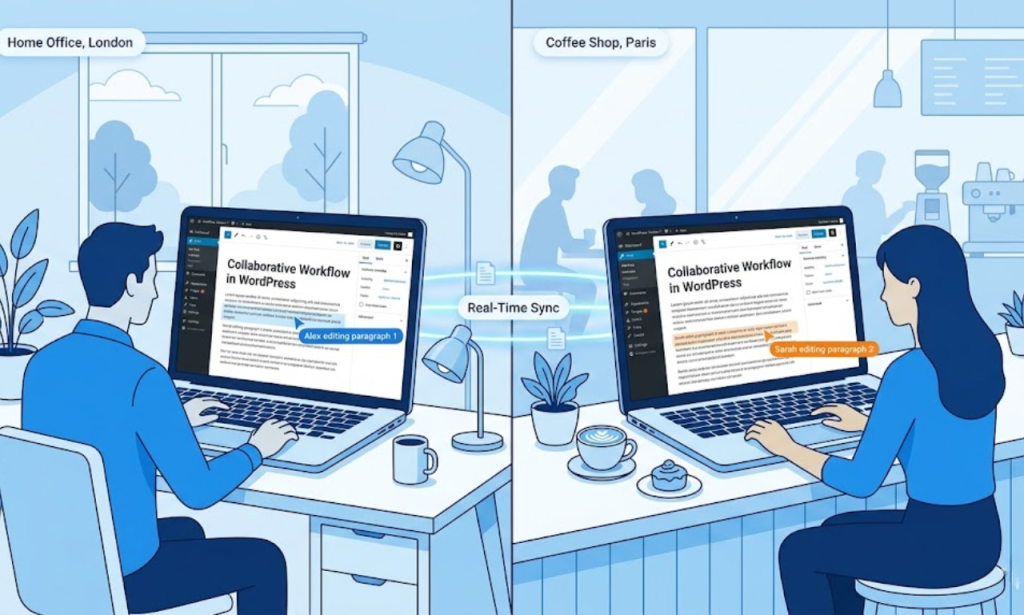
Real-Time Collaboration (RTC) is the headline feature of WordPress Version 7, and it works almost exactly like Google Docs. Multiple users can now open the same post or page and edit it simultaneously. You can see other users’ cursors on screen — color-coded, labeled with their names — and every keystroke syncs instantly across all connected sessions.
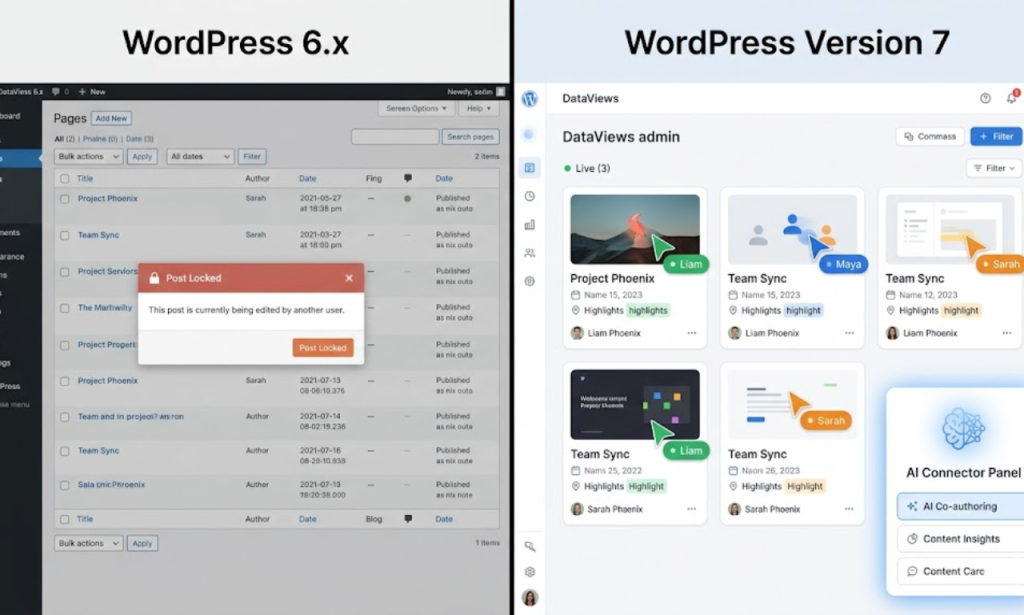
If you’ve ever worked with a content team and dealt with the dreaded “This post is currently locked” message, you know how frustrating that was. Someone opens a draft, gets pulled into a meeting, and now nobody else can touch it for hours. WordPress Version 7 kills that workflow problem entirely.
Here’s why this matters beyond the obvious:
- Content teams can collaborate in real-time without Slack or Google Docs as an intermediary
- Designers and copywriters can work on the same page together, each handling their domain
- Editors can leave suggestions while writers are still drafting — no more back-and-forth email chains
- Agency teams can onboard clients live, walking them through content changes on the actual site
The multi-user editing in WordPress experience is genuinely smooth. It uses WebSocket-based syncing, which means you’re not just refreshing — you’re actually watching changes appear in real time.
One important note: Plugins that still rely on legacy meta boxes (the old-school input fields below the editor) may temporarily disable Real-Time Collaboration for that specific post. WordPress.org is encouraging developers to migrate to the Plugin Sidebar format. More on plugin compatibility later.
This single feature alone is worth the update. And if you want a WordPress site built by people who understand these collaborative workflows deeply, contact Vision.pk today — our team builds WordPress sites that are ready for how modern teams actually work.
4. WordPress Version 7 and AI — What’s Actually in There?
Here’s where I want to set the record straight, because a lot of people have been asking: “Does WordPress Version 7 have built-in AI writing tools?”
Short answer: Not exactly. And honestly? That’s a good thing.
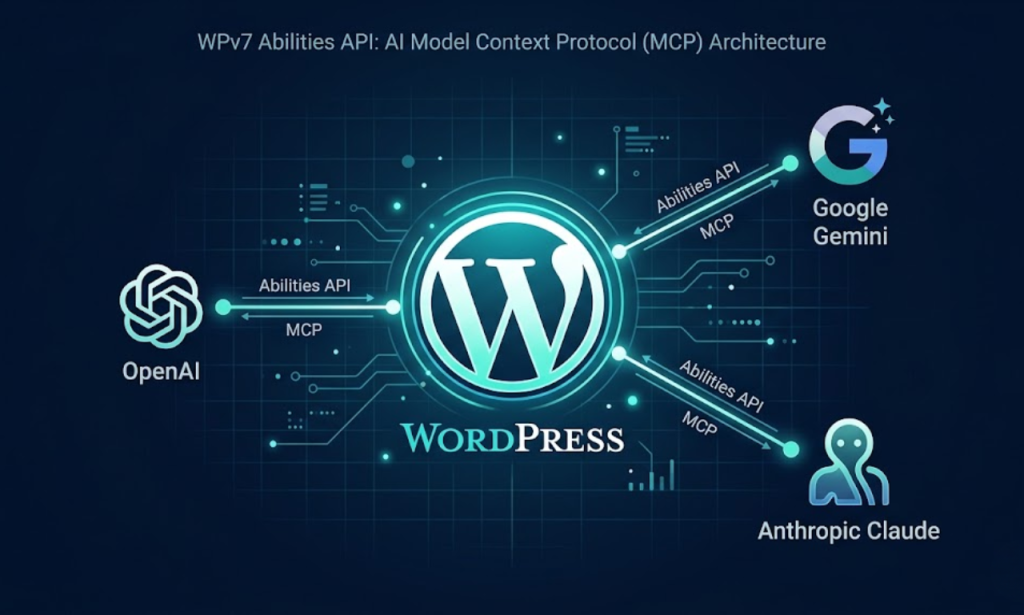
Instead of shipping its own chatbot (which would immediately feel dated and limiting), WordPress Version 7 introduces the WP AI Client and Connectors API. Think of it as a standardized socket into which any AI service can plug in.
What this means practically:
- Plugin developers can now connect OpenAI, Anthropic, Google Gemini, or any other AI provider to your WordPress backend in a standardized, consistent way
- You’re not locked into one AI provider — you choose
- The experience across AI-powered plugins becomes consistent, because they’re all working within the same WP AI Client framework
- Developers building AI tools for WordPress no longer have to reinvent the wheel — the infrastructure is already there
Think of WordPress Version 7 as having installed the electrical wiring for AI. The specific appliances (AI writing assistants, image generators, SEO tools) are your choice.
This is a genuinely sophisticated approach to AI integration. Rather than forcing a single AI experience on every user, WordPress Version 7 becomes the platform for AI — open, flexible, and forward-compatible.
5. DataViews: The Admin Dashboard Got a Serious Glow-Up
Let’s talk about something that doesn’t get enough attention: the WordPress admin dashboard is kind of old.
If you’ve used WordPress for any length of time, you know the List Tables — those paginated tables of posts, pages, and media that load a full page every time you want to filter or sort anything. They work fine. But “fine” isn’t what you want from a tool you use every single day.
WordPress Version 7 replaces those traditional admin list tables with DataViews — a modern, React-based interface that operates more like an app than a webpage.
Here’s the WordPress DataViews vs traditional tables breakdown:
| Feature | Traditional Admin Tables | DataViews (WordPress Version 7) |
|---|---|---|
| Filtering | Full page reload | Instant, inline filtering |
| Layout | Fixed table view only | Table, Grid, or List views |
| Speed | Slow on large datasets | Fast React rendering |
| Transitions | Hard page reloads | Smooth, app-like transitions |
| Bulk actions | Clunky, limited | Streamlined and modern |
| Media management | Separate media library | Unified management |
The difference isn’t subtle. If you manage a site with hundreds of posts or a shop with thousands of products, DataViews is going to save you real time every single day. It feels like using a proper web app — snappy, responsive, intuitive.
This is part of the broader WordPress Admin Redesign that’s been happening gradually through Gutenberg’s evolution. WordPress Version 7 makes it official and default for everyone.
6. The Abilities API and Model Context Protocol
This one is for the forward-thinkers. If you’ve been paying attention to how AI is evolving — not just as a chatbot, but as an agent that can actually do things — the Abilities API in WordPress Version 7 is going to excite you.
Here’s the concept: AI assistants are getting better at taking actions, not just answering questions. But for an AI to take action on your WordPress site, it needs to know what your site can do. Can it create posts? Can it update product prices? Can it manage users?
The Abilities API solves this by acting as a bridge. It lets AI services discover your WordPress site’s capabilities in a standardized way. Under the hood, it uses the Model Context Protocol (MCP) — an emerging open standard for AI-to-application communication.
Practically speaking, this means you could tell an AI assistant: “Publish my draft about summer sales with tomorrow’s date and add it to the promotions category” — and it could just do it. On your actual WordPress site. Without you touching the dashboard.
This is genuinely new territory. WordPress Version 7 isn’t just AI-enhanced — it’s AI-connectable. And as AI agents become more capable, having a WordPress Version 7 site means you’re already positioned for that future.
7. New Native Blocks You’ve Been Waiting For
Every WordPress Version 7 update brings new blocks, and this version finally answers some of the most loudly requested community wishes. Three new blocks are now built into core:
Icons Block
No more installing a separate plugin just to add SVG icons to your pages. WordPress Version 7 ships with a native Icons Block that gives you access to a built-in icon library. You can drop icons inline, resize them, colorize them, and style them — all without touching a plugin.
For business sites and landing pages, this is a quiet but massively useful addition.
Native Breadcrumbs Block — WordPress Version 7’s Navigation Win
Site hierarchy and breadcrumb navigation have always required third-party plugins or theme-level customization. The native Breadcrumbs Block in WordPress Version 7 changes that. Now you can add auto-generated breadcrumb trails anywhere on your site directly from the editor.
For SEO, breadcrumbs aren’t just nice to have — they help search engines understand your site structure and can add structured data to your search results. Having this natively is a meaningful SEO improvement.
Responsive Grid Block
Layout flexibility has been one of WordPress’s weaker points compared to dedicated page builders. The Responsive Grid Block in WordPress Version 7 addresses this directly. It gives you advanced layout controls that adapt intelligently to different screen sizes — proper responsive columns, gap controls, and alignment options — all without a plugin.
For anyone who’s been using page builders like Elementor or Divi just for their grid systems, this native option is worth exploring seriously.
8. Visual Revisions: Finally, a Revision System That Makes Sense
Here’s a WordPress Version 7 feature that’s going to quietly save a lot of headaches.
The old revision system in WordPress showed you a “diff” — a code-level comparison of what text was added and removed. Useful for developers. Confusing for everyone else. If you’re a business owner or content manager who just wants to know what the page looked like before, the old system was frustrating.
Visual Revisions in WordPress Version 7 replace that with a proper side-by-side visual comparison. You see two versions of the actual page — rendered, color-coded, with changes clearly highlighted. Green for additions. Red for removals. No code. No diff notation.
This is what revision history should look like. You can now scroll through a living timeline of how your page evolved, see exactly what each version looked like to visitors, and revert with total confidence.
For client websites — especially those where clients occasionally make changes that break things — this is invaluable. You can roll back safely without any guesswork.
9. WordPress Version 7 System Requirements — Don’t Skip This
Before you get excited and hit “Update,” there’s a critical technical detail you need to check.
WordPress Version 7 has raised the minimum PHP requirement to PHP 7.4.
This is not optional. If your server is still running PHP 7.2 or PHP 7.3, WordPress Version 7 will not install. You need to upgrade your server environment first.
Here’s a quick breakdown of the WordPress PHP 7.4 requirement and what you need:
| Component | Minimum Requirement | Recommended |
|---|---|---|
| PHP | 7.4 | 8.2+ |
| MySQL | 5.7 | 8.0 |
| MariaDB | 10.3 | 10.6 |
| HTTPS | Required | Required |
| Apache / Nginx | Any modern version | Latest stable |
How to check your PHP version:
In your WordPress dashboard, go to: Tools → Site Health → Info → Server. Your PHP version is listed there.
If you’re on a managed host like WP Engine, Kinsta, or SiteGround, you can typically switch PHP versions from your hosting control panel in a few clicks. If you’re on cPanel, look under “PHP Selector” or “MultiPHP Manager.”
Important: Always test on a staging environment before updating your live site. Spin up a clone, update to WordPress Version 7, check everything carefully, then push to production.
10. WordPress Version 7 Compatibility Checklist
Before you update, run through this WordPress Version 7 compatibility checklist:
Server & Hosting:
- PHP version is 7.4 or higher (ideally 8.2+)
- MySQL 5.7+ or MariaDB 10.3+
- HTTPS / SSL certificate is active
- Server has enough memory (256MB+ recommended)
WordPress Environment:
- Full site backup taken (files + database)
- Staging environment created for testing
- All existing plugins are updated to their latest versions
- Active theme is updated to its latest version
Plugin Audit:
- Check if your key plugins have declared WordPress Version 7 compatibility
- Identify any plugins that use legacy meta boxes (may affect Real-Time Collaboration)
- Deactivate unnecessary plugins before updating
Post-Update Checks:
- Homepage loads correctly
- All forms submit properly
- WooCommerce / e-commerce functions work
- Site speed and Core Web Vitals tested
- Mobile responsiveness verified
This WordPress Version 7 staging environment guide approach — test first, push second — is the only safe way to handle major version updates on a live site.
Need someone to handle all of this for you? Reach out to Vision.pk right now — we do complete WordPress migrations, updates, and audits.
11. WordPress Version 7 Performance Benchmarks
Performance wasn’t the loudest talking point in the WordPress Version 7 announcement, but the improvements are genuinely meaningful — especially for media-heavy sites.
The big addition is Client-Side Media Processing.
Here’s what that means in plain English: Previously, when you uploaded an image in WordPress, your server did all the work — resizing it to multiple dimensions, compressing it, converting formats. All that processing happened on the server, which takes time and server resources.
With WordPress Version 7, your browser handles the initial image resizing before the file even leaves your computer. The image is preprocessed locally, then the already-optimized version is sent to the server.
The practical benefits:
- Faster uploads — smaller files being sent to the server
- Less server load — especially important on shared hosting
- Quicker publishing workflow — no waiting for server-side processing
- Better experience on mobile — images optimized before upload
On sites where editors publish dozens of images daily — news sites, e-commerce stores, photography portfolios — this is a meaningful workflow improvement. Combined with modern hosting and a properly configured caching setup, WordPress Version 7 performance benchmarks show tangible improvements in time-to-publish and admin responsiveness.
12. Will Your Old Plugins Break?
Honest answer: probably not catastrophically, but some things need attention.
WordPress Version 7 is broadly backward compatible. Most plugins will continue to work fine right after the update. However, there are two specific situations where you might run into friction:
Situation 1: Legacy Meta Boxes and Real-Time Collaboration
Plugins that use the traditional meta box system (the old input fields that appear below the main editor area) will cause WordPress Version 7 to disable Real-Time Collaboration mode for any post where that plugin’s meta box is active. The post will fall back to the old single-user editing experience.
This isn’t a crash — it’s a graceful fallback. But if Real-Time Collaboration is important to your workflow, you’ll want to identify which plugins use legacy meta boxes and check if they’ve released updates that migrate to the Plugin Sidebar format.
Situation 2: Admin Customizations
If you or a developer have heavily customized the WordPress admin interface — custom admin pages, custom list tables, unusual dashboard widgets — DataViews and the WordPress Admin Redesign elements may visually conflict with those customizations. A visual audit of your admin after updating is recommended.
Migrating legacy meta boxes to WordPress Version 7 is a straightforward developer task, but it does require code changes to your plugin. If you need help auditing your plugin stack for WordPress Version 7 compatibility, Vision.pk’s development team can run a complete compatibility review for you.
13. WordPress Version 7 vs Previous Versions — Full Comparison Table
Let’s put it all in one place for clarity:
| Feature | WordPress 6.x | WordPress Version 7 |
|---|---|---|
| Collaboration | Single-user with post locking | Real-Time Collaboration with live cursors |
| AI Integration | Plugin-only, inconsistent | Native WP AI Client & Connectors API |
| Admin Dashboard | Traditional list tables | DataViews (React-based, app-like) |
| AI-to-Site Communication | Not available | Abilities API + MCP support |
| Breadcrumbs | Plugin required | Native Breadcrumbs Block |
| Icon System | Plugin required | Native Icons Block |
| Grid Layouts | Limited core support | Responsive Grid Block native |
| Revision Comparison | Code “diff” view | Visual side-by-side comparison |
| Image Upload Processing | Server-side | Client-Side Media Processing |
| Min PHP Requirement | 7.2 | 7.4 |
| Gutenberg Phase | Phase 2 | Phase 3 (complete) |
The gap is significant. WordPress Version 7 isn’t just an incremental improvement — it’s a platform leap.
14. How Vision.pk Can Build Your WordPress Version 7 Site
Here’s the part I want you to pay close attention to.
WordPress Version 7 is powerful. But power only matters if you know how to use it. And for most business owners, factory operators, e-commerce entrepreneurs, and even experienced freelancers — the honest truth is that setting up and optimizing a WordPress Version 7 site correctly takes expertise.
Not just knowing where to click. Expertise.
That’s where Vision.pk comes in.
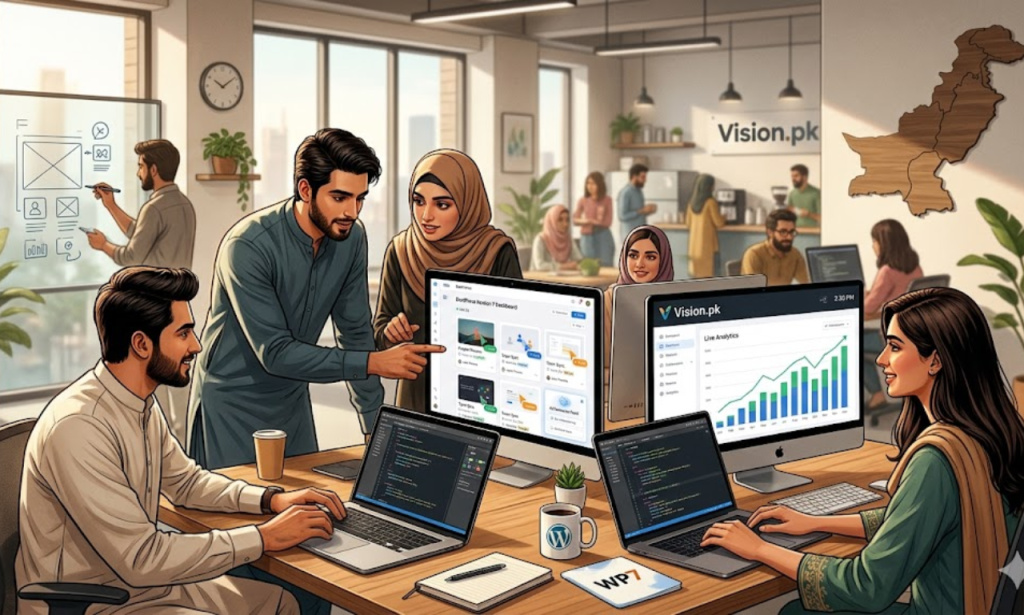
We are a Pakistani web development team that specializes in WordPress development. Our clients range from factory owners who want their business online, to e-commerce entrepreneurs building stores, to freelancers who need a professional web presence that attracts clients.
Here’s what we bring to the table:
What Vision.pk Does for Your WordPress Version 7 Site:
- ✅ Full WordPress Version 7 site builds from scratch — custom-designed, SEO-ready, mobile-first
- ✅ WooCommerce stores built on WordPress Version 7 infrastructure with Real-Time Collaboration for your content team
- ✅ Migration & upgrade services — we move your existing site to WordPress Version 7 safely, with zero downtime
- ✅ Plugin compatibility audits — we check every plugin against WordPress Version 7 and handle necessary updates
- ✅ AI integration setup — we configure the WP AI Client with your preferred AI provider
- ✅ Performance optimization — caching, CDN, image optimization, Core Web Vitals
- ✅ Ongoing maintenance — so your WordPress Version 7 site stays updated, secure, and fast
We don’t just install WordPress and hand you the keys. We build sites that work for your business goals — whether that’s generating leads, selling products, or establishing authority in your industry.
And with WordPress Version 7‘s new capabilities, there has never been a better time to invest in a properly built WordPress site.
💬 Ready to Talk About Your Project?
If you have a website idea — or an existing site that needs to be rebuilt or upgraded — let’s have a conversation.
Our team is friendly, responsive, and genuinely passionate about building great WordPress sites.
WhatsApp us directly: https://wa.me/923009657744
No pressure. No confusing technical jargon. Just a real conversation about what you need.
15. FAQs About WordPress Version 7
❓ What is the main highlight of WordPress Version 7?
The flagship feature of WordPress Version 7 is Real-Time Collaboration (RTC). It works like Google Docs — multiple editors can work on the same post or page simultaneously, with live cursors and instant syncing. The old “post locking” system is gone.
❓ When was WordPress Version 7 officially released?
WordPress Version 7 was officially released on April 9, 2026, coinciding with WordCamp Asia.
❓ Does WordPress Version 7 have built-in AI writing tools?
Not a specific AI chatbot, no. Instead, WordPress Version 7 introduces the WP AI Client and Connectors API — a core infrastructure layer that lets any plugin connect to AI providers like OpenAI, Anthropic, or Google Gemini in a standardized way.
❓ What are the new minimum system requirements for WordPress Version 7?
WordPress Version 7 requires a minimum of PHP 7.4. Sites running PHP 7.2 or 7.3 must upgrade their server environment before installing the update.
❓ What is DataViews?
DataViews is a React-based replacement for the traditional WordPress admin list tables. It allows for faster, app-like management of posts, pages, and media — with inline filtering and smooth transitions, no full page reloads.
❓ What new core blocks ship with WordPress Version 7?
Three major new blocks are now native in WordPress Version 7: the Icons Block (built-in SVG icon system), the Breadcrumbs Block (native site hierarchy navigation), and the Responsive Grid Block (advanced responsive layout controls).
❓ How does the Abilities API work?
The Abilities API allows AI services to discover what actions your WordPress Version 7 site can perform. Using the Model Context Protocol (MCP), AI assistants can then manage your site content through natural language commands — like creating a post or updating product details.
❓ Will old plugins work with Real-Time Collaboration in WordPress Version 7?
Most will. However, plugins that use legacy meta boxes may disable Real-Time Collaboration for that specific post type. Developers are encouraged to migrate these to the Plugin Sidebar.
❓ What are Visual Revisions in WordPress Version 7?
Visual Revisions replace the old code-level diff view with a side-by-side, color-coded visual comparison showing exactly how a page looks at each revision point. Much easier to understand and use.
❓ How does WordPress Version 7 improve site performance?
WordPress Version 7 introduces Client-Side Media Processing, which resizes and processes images in the browser before uploading. This reduces server load and speeds up the publishing workflow, especially on media-heavy sites.
16. Final Thoughts
I’ll be straightforward with you. WordPress Version 7 is not an update you want to sleep on.
It’s the most significant version of WordPress in years. Real-Time Collaboration alone changes how content teams operate. DataViews makes daily admin work genuinely pleasant. The WP AI Client positions WordPress at the center of the AI-powered web. Visual Revisions make site management safer and more intuitive. And client-side image processing is one of those quiet improvements that you’ll appreciate every single day.
This is Gutenberg Phase 3 fully delivered. And it’s remarkable.
But here’s the thing — all of this only matters if your site is set up to take advantage of it. A poorly configured WordPress Version 7 site is still a poorly configured site. The features are only as powerful as the implementation behind them.
That’s exactly why Vision.pk exists.
We build WordPress sites that are properly configured, SEO-ready, performance-optimized, and designed to actually grow your business. Whether you’re starting from zero or upgrading an existing site to WordPress Version 7, we handle it all — and we do it right.
Don’t Wait. Let’s Build Something Great.
Your business deserves a website that works as hard as you do. And with WordPress Version 7 available right now, there’s never been a better moment to invest in a professionally built WordPress site.
Message Vision.pk on WhatsApp — tell us about your project, and let’s figure out how to make it happen.
External resources: WordPress.org Official Version 7 Release Notes | Gutenberg Phase 3 Documentation | Model Context Protocol Specification