
Contact Info
16-Z-1, Madina Town, Near Bank Morr Susan Road, Faisalabad- Pakistan.
+92-300-9657744
khalil@vision.pk
Get StartedRecommended Services


Supported Scripts

Table of Contents
1. Wait — You’re Still Running an Outdated WordPress?
Let me be real with you for a second.
I’ve talked to dozens of business owners, factory managers, freelancers, and online store builders in the past year. And almost every single one of them has said something like “Yeah, WordPress is fine, it works, we haven’t really touched it.”
And every single time, I want to shake them gently by the shoulders.
Because “fine” in 2026? That’s not a strategy. That’s a slow leak.
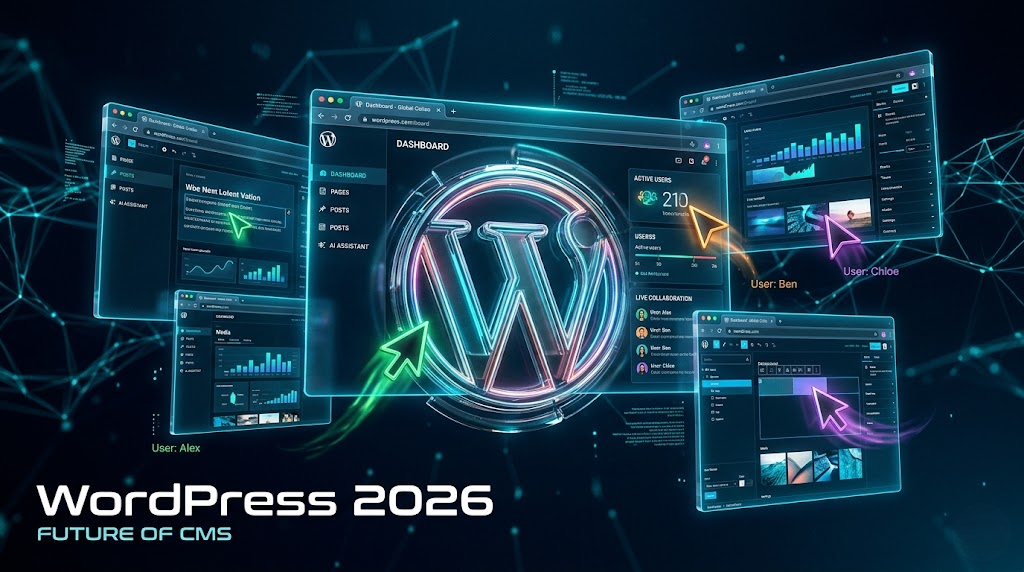
The WordPress updates 2026 aren’t just patch notes and bug fixes. This year — particularly with the landmark release of WordPress 7.0 — we are talking about a fundamental reimagining of what WordPress is and what it can do. Real-time collaboration. A native AI layer. A completely modernized admin dashboard. Faster image formats. An Interactivity API that makes your site feel like a full-blown app.
If you’re a business owner trying to dominate your niche online, a developer building client projects, a freelancer trying to offer premium services, or just someone who wants their website to not embarrass them at a pitch meeting — these WordPress updates 2026 are for you.
And if you want someone to actually implement all of this for you, without the headaches? Vision.pk is the WordPress development team I’d call first. More on that later.
For now — let’s break down everything that’s happening in WordPress updates 2026, piece by piece, in plain English.
2. What Are the WordPress Updates 2026 Actually About?
Before we get into the features, let’s zoom out for a second.
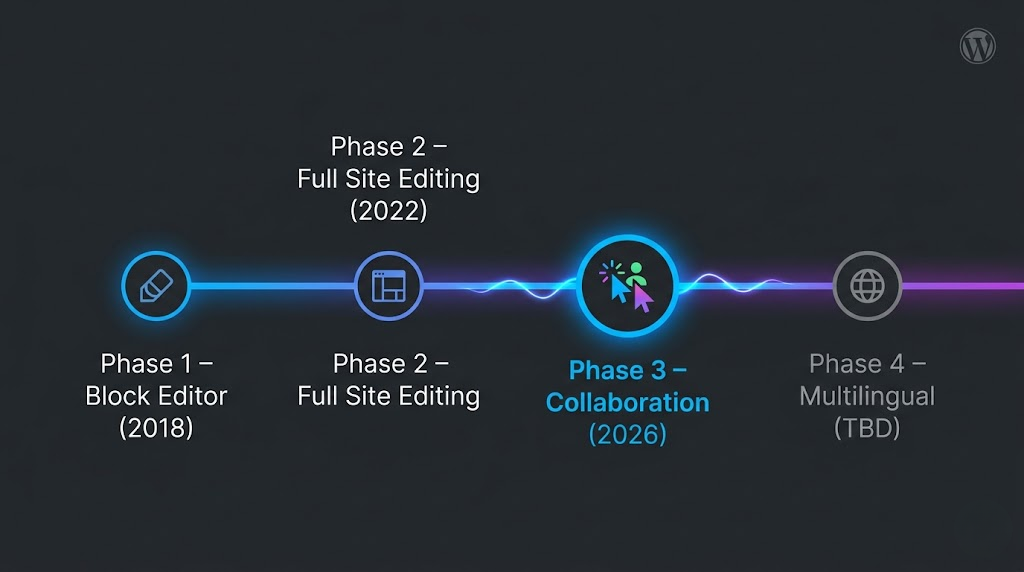
The WordPress updates 2026 are part of a multi-year roadmap that Gutenberg (WordPress’s core editing engine) has been executing since Phase 1 back in 2018. Here’s where we are now:
| Phase | Focus | Status |
|---|---|---|
| Phase 1 | The Block Editor | ✅ Complete |
| Phase 2 | Full Site Editing | ✅ Complete |
| Phase 3 | Collaboration | 🔄 Active (2026) |
| Phase 4 | Multilingual Support | 🔜 Coming |
The WordPress updates 2026 sit squarely in Phase 3 — which means collaboration, performance, AI integration, and enterprise-grade architecture are all center stage.
The headline release is WordPress 7.0, scheduled for April 9, 2026, timed to coincide with WordCamp Asia. After that, WordPress 7.1 is expected mid-2026, and WordPress 7.2 is slated for late 2026.
So yes — this is a big year. Let’s dig in.
3. WordPress 7.0: The Release That Changes Everything
April 9, 2026. Mark it in your calendar. Set a reminder. Tell your web developer about it.
WordPress 7.0 is not just a version number bump. It is — and I don’t say this lightly — the most significant WordPress update in 2026 and arguably in the platform’s history since the introduction of the block editor.
Here’s what 7.0 brings to the table at a high level:
- ✅ Real-time multi-user collaboration (the Google Docs moment for WordPress)
- ✅ DataViews replacing the legacy admin List Tables
- ✅ Native AI Client (Abilities API) for developers
- ✅ Native AVIF image support for blazing-fast sites
- ✅ Inline Notes / Block-Level Comments for editorial teams
- ✅ Interactivity API v2 for app-like front-end experiences
- ✅ Minimum PHP version raised to 7.4 (with 8.2/8.3 recommended)
Each of these is a chapter of its own. So let’s go through them one by one.
4. Real-Time Collaboration — Google Docs Just Got Jealous
Okay, this one genuinely excited me when I first read about it.
You know that feeling when you’re on a Google Doc with your team and you can see their cursors moving, their changes appearing live, and everyone’s working on the same document in real time? That seamless, almost magical experience?
WordPress 7.0 brings that to your website editor.
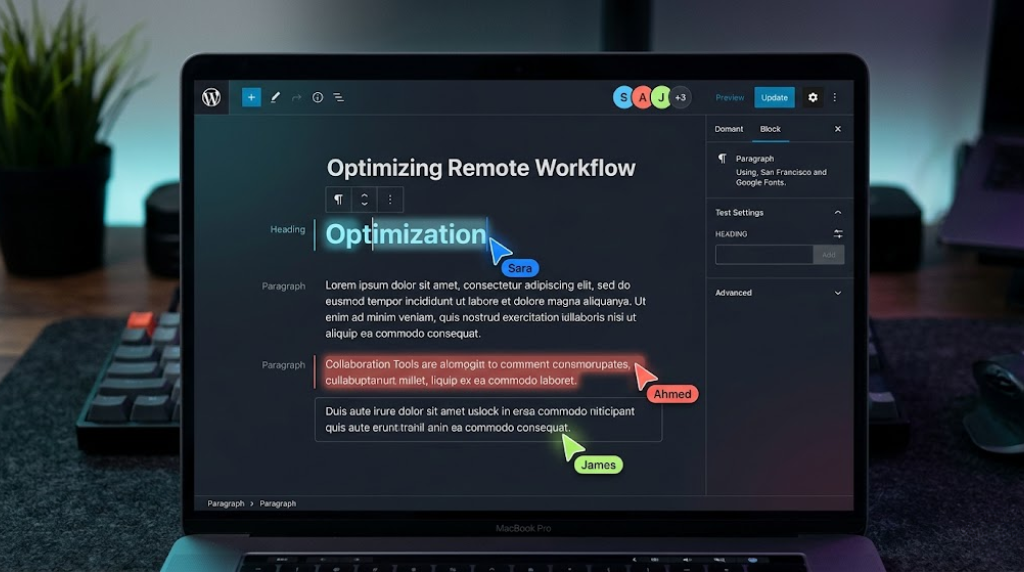
The WordPress updates 2026 introduce real-time collaboration as the crown jewel of Phase 3. Multiple users can now edit the same post, page, or template simultaneously — with live colored cursors showing where each person is, synced changes appearing in real time, and no more “whoops, I accidentally overwrote your edits” disasters.
For agencies, editorial teams, and businesses with content teams, this is massive.
Think about it: right now, if two people try to edit the same post in WordPress, one of them has to wait. Or you end up with version conflicts. It’s a workflow nightmare that most teams solve with Slack messages like “hey, are you done editing that post? Cool, I’ll take over.” Which is… not exactly enterprise-grade.
With the WordPress updates 2026, that’s gone. Your team works together, live, in the editor. Period.
“It’s the kind of collaboration feature that makes you wonder why it took this long — and then immediately grateful that it’s finally here.”
What Does It Look Like in Practice?
- Each user gets a unique colored cursor visible to all collaborators
- Changes sync in real time without page refreshes
- Presence indicators show who’s currently in the document
- Conflict resolution is handled gracefully — no more lost work
If you’re running a content-heavy business, a news site, an online store with product descriptions updated by multiple team members, or even a corporate blog — this single feature from the WordPress updates 2026 could transform your editorial workflow overnight.
Want this set up properly on your site from day one? Contact Vision.pk today — their WordPress development team can migrate, configure, and optimize your site for all the new collaboration features in WordPress updates 2026. Don’t fumble through it alone.
5. The New Admin Dashboard (DataViews) — Finally, It Doesn’t Look Like 2009
Let’s be honest. The classic WordPress admin List Tables have looked the same since your parents were on Facebook.
You know the ones. That grid of posts with tiny checkboxes, a “Title” column, a “Date” column, a dropdown for “Bulk Actions,” and pagination at the bottom that somehow manages to feel both cluttered and sparse at the same time.
It worked. Sort of. But it never felt good.
The WordPress updates 2026 fix this — completely — with DataViews.
What Are DataViews?
DataViews is a modern, app-like interface replacing the legacy List Tables across WordPress admin. Think of it as the difference between using a spreadsheet from 2005 versus using Notion or Airtable today.
With DataViews, you get:
- Multiple view modes — switch between list, grid, and gallery views
- Advanced filtering and sorting — find your content faster without fumbling through pagination
- Visual transitions and animations — the interface feels fast and responsive, not clunky
- Consistent experience across Posts, Media, Pages, and custom content types
This isn’t just cosmetic. DataViews is built on a modern React architecture, which means it’s dramatically faster than the PHP-rendered tables it replaces.
For businesses managing hundreds of products, posts, or pages — this WordPress update in 2026 alone will save your team hours every week.
Quick Comparison: Old vs. New
| Feature | Old List Tables | DataViews (2026) |
|---|---|---|
| View modes | List only | List, Grid, Gallery |
| Filtering | Basic dropdowns | Advanced, real-time |
| Performance | PHP-rendered, slow | React-powered, instant |
| Visual appeal | Dated | Modern, app-like |
| Bulk actions | Clunky dropdown | Contextual actions |
If you’re the kind of person who judges a platform by how good it feels to use — and you should be — DataViews is the WordPress updates 2026 feature that’ll make you actually enjoy logging into your admin panel.
6. WordPress AI Client: The Abilities API Explained Simply
AI. Everyone’s talking about it. Most people are confused by it. And WordPress 7.0 just made it a native part of the platform.
Let me explain the WordPress AI Client in plain English, because the official docs can get a bit… dense.
The Abilities API: What It Actually Is
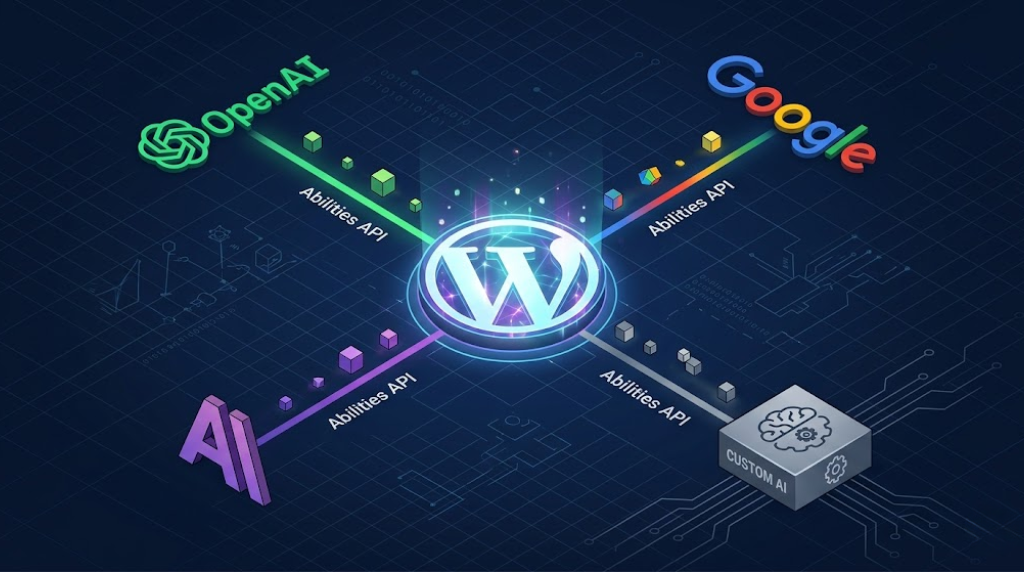
The Abilities API (sometimes called the “WordPress AI Client”) is a standardized infrastructure layer built into WordPress core that allows developers to connect any AI provider — OpenAI, Anthropic Claude, Google Gemini, whatever you prefer — to WordPress features through a single, consistent interface.
Think of it like a universal power adapter for AI. Instead of each plugin hacking together its own connection to ChatGPT or writing bespoke integrations for every AI tool, there’s now one standardized “socket” in WordPress that all AI providers plug into.
Why Does This Matter for You?
If you’re a business owner, it means AI-powered features in WordPress (writing assistants, image generation, content suggestions, SEO tools) will be more reliable, more consistent, and more likely to actually work rather than break with every update.
If you’re a developer, it means you can build AI-powered plugins and features without reinventing the wheel for every project.
If you’re a freelancer or agency, it means you can offer AI-enhanced WordPress sites to your clients without stitching together five different plugins and praying they don’t conflict.
The WordPress updates 2026 with the Abilities API represent a shift from AI as an add-on afterthought to AI as a first-class citizen of the platform. And that’s a big deal.
💡 Pro tip: The Abilities API doesn’t lock you into any specific AI provider. You choose which model powers your WordPress features. OpenAI today, Anthropic tomorrow, a local model next year — the infrastructure stays the same.
Curious how to implement AI features on your WordPress site in 2026? Reach out to Vision.pk — they’re already building AI-integrated WordPress solutions for businesses across Pakistan and beyond.
7. AVIF Images, Core Web Vitals & Why Speed is Now Non-Negotiable
Here’s a stat that should make any business owner sit up straight: a 1-second delay in page load time can reduce conversions by up to 7%.
Now imagine your competitor’s WordPress site loads in 1.2 seconds, and yours loads in 3.8. That’s not a technical detail. That’s lost revenue.
The WordPress updates 2026 take page speed seriously — and the introduction of native AVIF image support in WordPress 7.0 is a major part of that story.
What is AVIF, and Why Should You Care?
AVIF (AV1 Image File Format) is the next generation of image compression — developed by the Alliance for Open Media and now supported natively by all major browsers.
Here’s how it compares to older formats:
| Image Format | Compression Efficiency | Quality | Browser Support |
|---|---|---|---|
| JPEG | Baseline | Good | Universal |
| WebP | ~25–35% better than JPEG | Better | Very wide |
| AVIF | ~50% better than JPEG | Excellent | All major browsers |
So with AVIF support in the WordPress updates 2026, your images can be half the file size of a JPEG with equal or better visual quality. That means faster load times, better Core Web Vitals scores, and happier Google rankings — all without sacrificing how your site looks.
For online store owners with dozens or hundreds of product images, this is a particularly big win. Smaller images = faster pages = more sales. It really is that simple.
Core Web Vitals in 2026: The Stakes Are Higher
Google has made Core Web Vitals an official ranking factor. In 2026, the bar keeps rising. Specifically:
- LCP (Largest Contentful Paint): How fast your main content loads. AVIF images help massively.
- INP (Interaction to Next Paint): Replaced CLS as a key metric. DataViews and the Interactivity API help here.
- CLS (Cumulative Layout Shift): How stable your page is while loading. Better image handling in WordPress 7.0 reduces this.
The WordPress updates 2026 are designed with these metrics in mind. A properly updated and optimized WordPress 7.0 site can realistically hit “Good” scores across all three Core Web Vitals without heroic technical effort.
But “properly updated and optimized” is doing a lot of work in that sentence. This is exactly where a team like Vision.pk earns their keep — configuring your WordPress environment for peak performance so you’re not leaving speed (and SEO rankings) on the table.
8. Interactivity API v2 — Fast Front-Ends Without the JavaScript Headache
Let me paint you a picture.
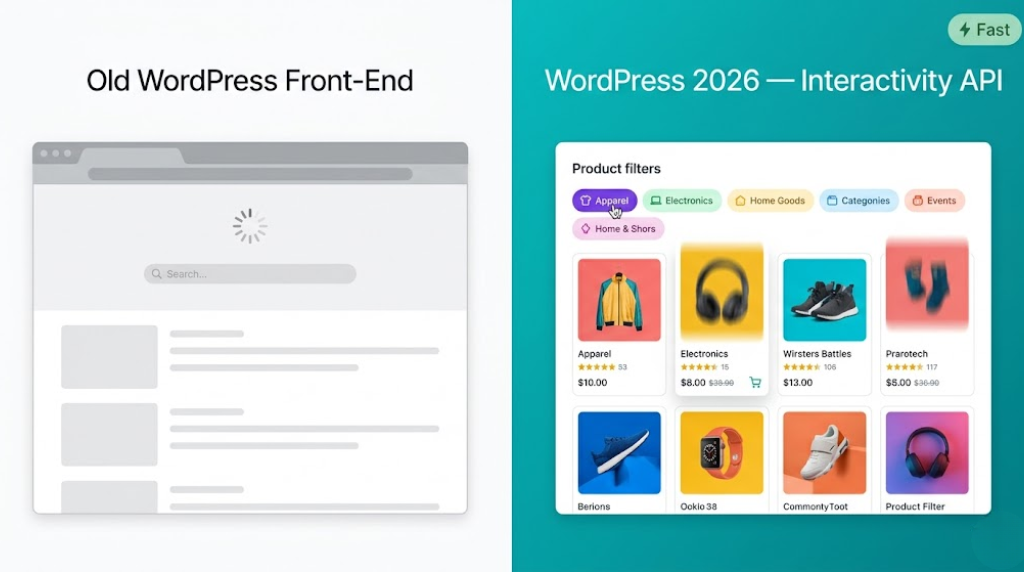
You visit a website. You type in a search box. The page reloads. You wait. Results appear. You filter by category. The page reloads again. You click a tab. Another. Reload.
This is the experience that the Interactivity API in the WordPress updates 2026 is designed to eliminate entirely.
What is the Interactivity API?
Introduced in earlier WordPress versions and now reaching maturity in version 2 as part of the WordPress updates 2026, the Interactivity API allows developers to build highly dynamic, “instant” front-end experiences — live search, tabbed interfaces, accordions, filters, carousels, interactive forms — without loading heavy external JavaScript frameworks like React or Vue on the front end.
The result? Sites that feel like apps. Snappy. Instant. No jarring page reloads.
Why This Matters for Your Business
If you’re running:
- An online store → product filters that update without reloading
- A service website → interactive quote calculators or booking forms
- A news or content site → live search and category filtering
- A portfolio → smooth animated galleries and case study tabs
…then the Interactivity API v2 from the WordPress updates 2026 is a direct upgrade to your user experience. And better user experience = lower bounce rate = better conversions.
The magic here is performance. Heavy JavaScript frameworks add weight to your pages. The Interactivity API is lean, native to WordPress, and plays beautifully with the new DataViews architecture.
Think of it as giving your site the personality of a polished mobile app while keeping the reliability of WordPress. Pretty compelling combination, right?
9. Inline Notes & Block-Level Comments — Your Editorial Team Will Thank You
Here’s a scenario every content team knows too well.
Your editor reviews a blog post draft. She has feedback on paragraph 4, a question about the image in section 2, and a concern about the headline. So she… copies the text into a Slack message, pastes her notes, and sends it across. The writer now has to cross-reference the Slack thread with the WordPress editor, guessing which paragraph “paragraph 4” refers to.
It’s the editorial workflow equivalent of playing telephone. And it’s been the WordPress reality for years.
The WordPress updates 2026 fix this with Inline Notes (Block-Level Comments).
How Block-Level Comments Work
Building on features introduced in WordPress 6.9, version 7.0 now lets you leave comments directly attached to specific blocks — a paragraph, an image, a heading, a button — right inside the editor.
Your editor can click on any block and leave a note: “This CTA needs to be more urgent” or “Check the data source for this stat” or “Love this section, keep it.”
The writer sees those notes in context, resolves them, and moves on. No Slack ping-pong. No lost feedback. No “which paragraph did you mean?” confusion.
For content teams, marketing agencies, and businesses that produce regular content — Inline Notes is one of those quiet WordPress updates in 2026 that doesn’t make headlines but makes your Monday significantly less chaotic.
10. Full Site Editing Grows Up: From Page Building to System Building
Remember when Full Site Editing (FSE) launched and everyone lost their minds trying to figure out what it was and whether it would kill page builders?
We’re past that phase now. In 2026, FSE has grown up. It’s not called FSE anymore — it’s simply the Site Editor. And its focus has fundamentally shifted.
Earlier, FSE was about giving users a visual way to edit their entire site — header, footer, templates, everything — through the block editor. That part is done. Mature. Stable.
The WordPress updates 2026 move the conversation from page building to system building.
Synced Patterns & Block Bindings: The Enterprise Power Move
Two features define this shift:
Synced Patterns are reusable blocks or groups of blocks that, when edited in one place, update everywhere they’re used across the site. This is huge for brands maintaining consistency at scale — update your CTA block once, and it’s updated on every page that uses it.
Block Bindings allow blocks to pull data dynamically from custom fields, ACF, or external sources — turning static templates into data-driven layouts.
Together, these features make WordPress in 2026 a legitimate enterprise CMS. We’re not just talking about blogs and brochure sites anymore. We’re talking about scalable content architecture for complex businesses.
Site Editor vs. Page Builders in 2026
This question comes up constantly, so let’s address it directly:
| Feature | Site Editor (2026) | Traditional Page Builders |
|---|---|---|
| Performance | Native, lightweight | Often adds bloat |
| Flexibility | High (with Synced Patterns) | Very high |
| Learning curve | Moderate | Low to moderate |
| Long-term viability | Official WordPress roadmap | Depends on plugin support |
| AI integration | Native (Abilities API) | Via plugin |
The honest answer: for most new WordPress projects in 2026, starting with the Site Editor makes more sense than adding a page builder. The ecosystem has matured enough that the tradeoffs now favor native tools.
11. PHP 7.4 Is the New Minimum — Here’s What That Means for You
This one is less glamorous but potentially the most urgent item in the WordPress updates 2026 for many site owners.
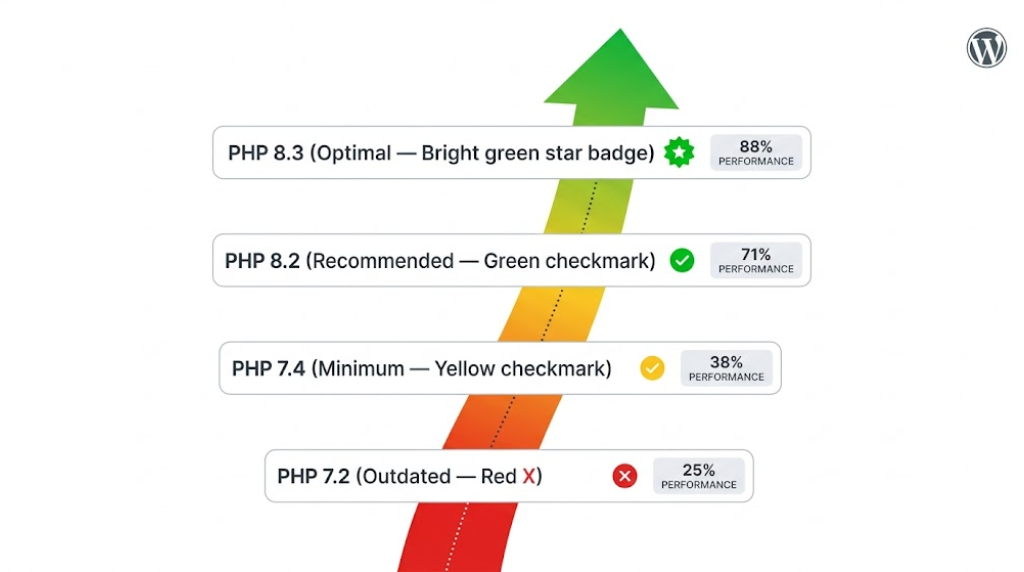
Starting with WordPress 7.0, the minimum required PHP version is 7.4. No more support for PHP 7.2 or 7.3.
And while the minimum is 7.4, the recommended versions are PHP 8.2 or 8.3 — which offer significant security patches, performance improvements, and compatibility with modern WordPress development patterns.
Why This Matters
If your hosting environment is still running PHP 7.2 or 7.3 (and more sites than you’d think are), your site may break or behave unpredictably after updating to WordPress 7.0.
Here’s a quick checklist:
- ✅ Log into your hosting control panel and check your PHP version
- ✅ If it’s below 7.4, upgrade immediately (most hosts make this a one-click change)
- ✅ Ideally, move to PHP 8.2 or 8.3 for maximum performance
- ✅ After upgrading PHP, test your site thoroughly — some older plugins may not be compatible
PHP 8.x Performance: The Numbers
| PHP Version | Performance vs. 7.4 | Security |
|---|---|---|
| PHP 7.4 | Baseline (minimum for WP 7.0) | Limited support |
| PHP 8.1 | ~10–15% faster | Active support |
| PHP 8.2 | ~15–20% faster | Full support |
| PHP 8.3 | ~18–22% faster | Full support (recommended) |
The WordPress updates 2026 are optimized for modern PHP. Running on 8.2 or 8.3 isn’t just a security best practice — it’s a performance upgrade you can actually feel in your site’s responsiveness.
Not sure how to check or upgrade your PHP version? Contact Vision.pk — their WordPress hosting and technical setup service handles exactly this kind of environment configuration so you don’t have to dig through cPanel documentation at midnight.
12. WordPress 7.1 & 7.2: What’s Coming After?
The WordPress updates 2026 don’t stop at 7.0. The roadmap continues through the year with two more major releases.
WordPress 7.1 — Mid-2026
Expected in the summer of 2026, WordPress 7.1 is anticipated to focus on:
- Refinements to the collaboration features introduced in 7.0 — expect better conflict handling, notification systems, and broader collaboration support across different content types
- Phase 4 groundwork — early multilingual infrastructure work begins
- Performance continued — further Interactivity API enhancements and admin speed improvements
- Accessibility improvements — DataViews and new editor features get deeper keyboard navigation and screen reader support
WordPress 7.2 — Late 2026
Late 2026 brings WordPress 7.2, which is expected to:
- Advance Phase 4 multilingual features — finally, native multilingual support has been a community request for years
- Deepen Block Bindings — more native data source connections for enterprise use cases
- AI feature expansion — more native AI tools powered by the Abilities API established in 7.0
- Mature DataViews — extending the new admin interface to more areas of WordPress admin
The full WordPress roadmap 2026 represents a platform that is genuinely evolving — not standing still. And if you’re building a long-term digital presence, aligning with this roadmap from the start is one of the smartest strategic decisions you can make.
13. How to Prepare Your Site for WordPress Updates 2026
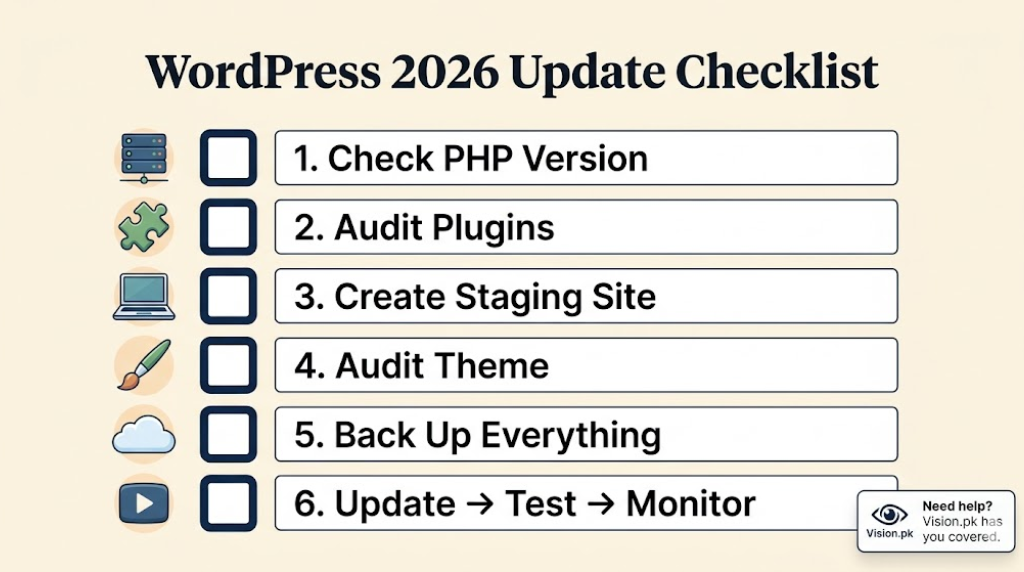
Alright, let’s get practical. Here’s your step-by-step guide to getting ready for the WordPress updates 2026.
Step 1: Check Your PHP Version
Go to your hosting control panel → PHP settings → confirm you’re on 7.4 minimum (ideally 8.2 or 8.3).
Step 2: Run a Plugin Compatibility Audit
Some older plugins — especially those that hook deeply into List Tables or use deprecated WordPress functions — may have issues with the new DataViews interface or collaboration features in WordPress updates 2026.
- Go to your plugin list
- Check if each plugin has been updated in the last 6 months
- Test on a staging site before updating production
Step 3: Create a Staging Environment
This cannot be stressed enough: never test a major WordPress update on your live site.
Most quality hosting providers offer one-click staging environments. Use one. Update there first. Test everything. Then push to production.
Step 4: Audit Your Theme
If you’re still on a classic PHP theme (non-block theme), now is a good time to evaluate whether migrating to a block theme makes sense for your site — especially to take advantage of the Site Editor features in the WordPress updates 2026.
Step 5: Back Up Everything
Before any major update: full backup of files + database. Non-negotiable.
Step 6: Update, Test, Monitor
Run the update. Test every core user journey on your site. Monitor your error logs for 24–48 hours after updating.
The honest truth? This process sounds simple but has a dozen ways to go sideways if your site has custom code, complex plugin configurations, or a non-standard hosting setup. If that sounds like you, this is exactly when you want professionals handling it.
Book a WordPress update consultation with Vision.pk — they’ve handled WordPress migrations and major version updates for businesses across multiple industries and know exactly what pitfalls to watch for.
14. Why Vision.pk Is the Only WordPress Team You’ll Ever Need
Okay. I’ve been hinting at this throughout the article, and now let’s talk about it directly.
You’ve just read about real-time collaboration, DataViews, AI infrastructure, AVIF images, PHP upgrades, and a complete Site Editor evolution. That’s a lot of change happening in the WordPress updates 2026. And for most business owners, factory owners, freelancers, and entrepreneurs — the honest response is:
“This sounds amazing. I have absolutely no idea how to implement any of it.”
That’s completely normal. And that’s exactly where Vision.pk comes in.
Who Is Vision.pk?
Vision.pk is a Pakistani digital agency specializing in WordPress development — and when I say specializing, I mean it’s their core focus, not an afterthought service they throw on their pricing page to pad out their portfolio.
They work with:
- 🏭 Business owners and factory owners who need professional digital presence
- 🛒 Online store builders who want WooCommerce setups that actually convert
- 💻 Tech enthusiasts and developers who want clean, modern WordPress architecture
- 🎯 Freelancers and agencies who need a reliable WordPress partner for client projects
- 🌐 Anyone serious about online earning who understands that a fast, well-built website is the foundation
What Makes Vision.pk Different?
A lot of agencies will update your WordPress installation and call it done. Vision.pk goes further:
- Full environment optimization — PHP version upgrades, server configuration, caching setup
- WordPress 7.0 feature implementation — collaboration tools, DataViews configuration, Site Editor customization
- Performance-first development — Core Web Vitals optimization, AVIF image setup, Interactivity API integration
- Ongoing support — not a one-and-done project, but a long-term partnership
- Transparent communication — you know what’s being done, why it’s being done, and what the results are
Whether you need a fresh WordPress site built from the ground up on version 7.0, or you need an existing site migrated and optimized for the WordPress updates 2026, Vision.pk is the team to call.
🚀 Ready to Build Something Remarkable?
Don’t let your competitors get to WordPress 7.0 before you do. The businesses that adapt early to WordPress updates 2026 will have a real advantage in search rankings, user experience, and content workflow.
Contact Vision.pk now and let’s talk about what the right WordPress strategy looks like for your business in 2026.
15. FAQs: WordPress Updates 2026
❓ When is the next major WordPress release in 2026?
WordPress 7.0 is scheduled for general release on April 9, 2026, coinciding with WordCamp Asia. Following that, WordPress 7.1 is expected mid-2026 and WordPress 7.2 in late 2026. The WordPress updates 2026 are clearly on a structured, ambitious schedule.
❓ What is the biggest feature coming to WordPress in 2026?
The headline feature of the WordPress updates 2026 is real-time collaboration — allowing multiple users to edit the same post simultaneously with live cursors and synced changes, similar to Google Docs. It’s the centerpiece of Phase 3 of the Gutenberg roadmap and a major leap for teams of all sizes.
❓ Has the minimum PHP requirement changed for 2026?
Yes. Starting with WordPress 7.0, the minimum required PHP version is 7.4, though PHP 8.2 or 8.3 is highly recommended for security and performance. This is one of the most technically urgent aspects of the WordPress updates 2026 for site owners on older hosting environments.
❓ What is the “WordPress AI Client” appearing in updates?
Introduced in WordPress 7.0 as part of the WordPress updates 2026, the AI Client refers to the Abilities API — a native infrastructure that allows developers to connect WordPress to AI providers like OpenAI, Anthropic, or Google through a standardized interface. It’s not one specific AI tool, but rather a universal socket that all AI tools can plug into.
❓ How is the admin dashboard changing in 2026?
The traditional “List Tables” are being replaced by DataViews — a modern, app-like interface for managing posts, media, and pages with faster filtering, sorting, and better visual transitions. This is one of the most immediately visible changes in the WordPress updates 2026.
❓ What are “Inline Notes” in the block editor?
Expanding on features from WordPress 6.9, the WordPress updates 2026 now support block-level comments (Notes). Teams can leave feedback directly on specific blocks — paragraphs, images, headings — to streamline editorial workflows without leaving the editor.
❓ Does WordPress 2026 support better image formats?
Yes. Native AVIF image support is now standard in the WordPress updates 2026, offering approximately 50% better compression than JPEG with equal or better visual quality — improving site speed and Core Web Vitals scores significantly.
❓ What is the “Interactivity API” update?
The Interactivity API v2 in the WordPress updates 2026 allows developers to create high-speed, “instant” front-end experiences — like live search, tabbed interfaces, or dynamic filters — without relying on heavy external JavaScript frameworks. The result is app-like user experiences with minimal performance cost.
❓ Is Full Site Editing (FSE) still the focus?
FSE has matured into the Site Editor. In the WordPress updates 2026, the focus has shifted from page building to system building — emphasizing Synced Patterns and Block Bindings for enterprise-scale, data-driven design.
❓ How do I prepare my site for the WordPress 7.0 update?
- Ensure your hosting environment supports PHP 7.4+ (ideally 8.2 or 8.3)
- Audit your plugins for compatibility with new DataViews and Collaboration features
- Create a staging environment and test the update there first
- Back up everything before updating
- Or simply contact Vision.pk and let professionals handle it for you.
16. Final Word: Don’t Watch 2026 Happen — Build In It
Here’s the thing about the WordPress updates 2026 that nobody really says out loud.
Every major update cycle creates a gap. A gap between the businesses that adapt quickly and the ones that wait and see. The ones who get real-time collaboration running, who upgrade to PHP 8.3, who implement AVIF images and watch their Core Web Vitals scores climb — they pull ahead. And the ones who stay on WordPress 6.2 with PHP 7.3 and a plugin list that hasn’t been audited in two years? They slowly drift backward.
The WordPress updates 2026 — with WordPress 7.0 launching in April, 7.1 in mid-year, and 7.2 by year’s end — represent one of the biggest opportunities for WordPress site owners in recent memory. Not because the features are shiny (though they are). But because the platform is genuinely maturing into something that can compete with enterprise CMS solutions at a fraction of the cost.
Real-time collaboration. Native AI infrastructure. A modern admin experience. Lightning-fast images. App-like front-ends. These aren’t gimmicks. These are competitive advantages, wrapped up in the world’s most widely-used content management system.
The question isn’t whether to embrace the WordPress updates 2026. The question is whether you want to do it alone or with a team that’s already navigated every update, every migration, every PHP headache, and every plugin conflict — and knows exactly how to build you something that lasts.
That team is Vision.pk.
🔥 Contact Vision.pk Now — And Let’s Build Your 2026 WordPress Site Right
Whether you’re starting fresh or upgrading an existing site, Vision.pk’s WordPress team is ready to implement everything covered in this guide — properly, efficiently, and with the kind of attention to detail that makes a real difference.
👉 Get in touch with Vision.pk today
Don’t wait for your competitors to get there first.
📎 External Resources:
- WordPress.org Official Blog — Official release announcements and roadmap updates
- Gutenberg GitHub Repository — Track feature development in real time
- Web.dev Core Web Vitals Guide — Understanding and improving your performance metrics
- PHP.net Supported Versions — Check PHP support status for your hosting environment