
Contact Info
16-Z-1, Madina Town, Near Bank Morr Susan Road, Faisalabad- Pakistan.
+92-300-9657744
khalil@vision.pk
Get StartedRecommended Services


Supported Scripts
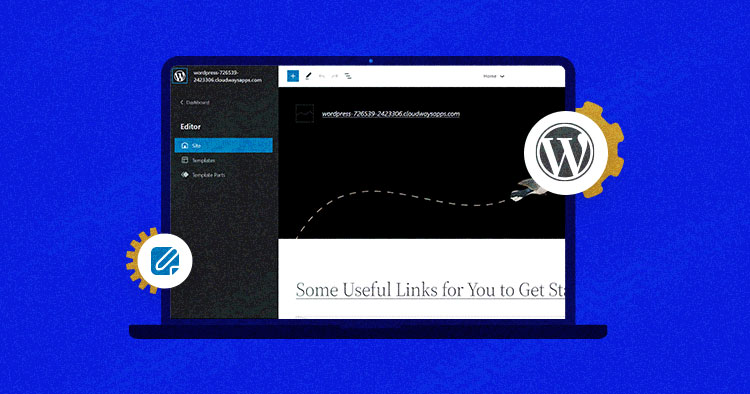

Table of Contents
Look, I’ll be straight with you.
Remember when building a website felt like assembling IKEA furniture without instructions? You’d stare at your WordPress dashboard, clicking around aimlessly, wondering why changing a simple header required a computer science degree and three cups of coffee.
Those days? They’re over.
Full Site Editing has landed in WordPress like a design superhero nobody knew they needed. And honestly, it’s about time.
I’ve been watching website owners—businessmen running factories, freelancers hustling for clients, entrepreneurs dreaming of online empires—all struggle with the same frustration. They had brilliant ideas but got stuck in the technical weeds. Full Site Editing changes that game entirely, and today, I’m going to show you exactly how.
But here’s the thing: while Full Site Editing makes WordPress more accessible than ever, having the right partner to implement it? That’s where the magic really happens. That’s where Vision.pk comes in, but we’ll get to that.
First, let’s talk about what Full Site Editing actually is and why it’s causing such a stir.
What is Full Site Editing (FSE) in WordPress?
Full Site Editing is WordPress’s revolutionary approach to website design that lets you control every single element of your site—headers, footers, sidebars, templates, you name it—all through one unified block editor interface.
Think of it this way: Traditional WordPress was like owning a house where you could redecorate the living room but needed to call a contractor to change the doorknobs. WordPress Full Site Editing? That’s owning a house where every element is modular, movable, and completely under your control.
No more jumping between customizers, theme options, and widget areas. No more “sorry, your theme doesn’t support that” messages. With FSE WordPress, everything lives in blocks, and blocks can go anywhere.
Here’s what makes Full Site Editing different:
- Complete visual control over your entire website layout
- Block-based editing for headers, footers, and template parts
- Global styles that apply consistent design across all pages
- Template editing without touching a single line of code
- Real-time preview of changes before publishing
The WordPress Site Editor essentially hands you the keys to the kingdom. Every pixel, every layout, every design choice becomes yours to command.
But I know what you’re thinking: “This sounds technical. I’m running a business, not a design agency.”
Fair enough. That’s exactly why services like those offered by Vision.pk exist—to bridge the gap between Full Site Editing’s powerful features and your actual business needs. Their WordPress development team doesn’t just understand Full Site Editing; they’ve mastered it, implementing it for businesses across every industry imaginable.
How Do I Enable Full Site Editing on My WordPress Site?
Enabling Full Site Editing isn’t rocket science, but it does require the right setup. Let me walk you through it like we’re sitting across a coffee table.
Step 1: Update WordPress
First things first—you need WordPress 5.9 or later. This is when Full Site Editing features officially became part of WordPress core. Check your dashboard, hit that update button if needed. Simple enough.
Step 2: Choose a Block-Based Theme
Here’s where it gets interesting. Not all WordPress themes support Full Site Editing. You need what’s called a “block theme” or “Full Site Editing themes.”
Popular options include:
- Twenty Twenty-Three (the default WordPress theme)
- Twenty Twenty-Four
- Kadence
- Blocksy
- Astra
Step 3: Activate the Theme
Once you’ve chosen your theme, activate it through Appearance > Themes. The moment you activate a Full Site Editing theme, you’ll notice the Site Editor appears in your dashboard menu.
Step 4: Access the Site Editor
Navigate to Appearance > Editor. Boom. Welcome to Full Site Editing customization heaven.
Now, here’s where I’ll level with you. While these steps seem straightforward, the real complexity comes in optimizing your Full Site Editing setup for your specific business needs.
You’re not just flipping switches—you’re making strategic decisions about:
- Which Full Site Editing blocks serve your conversion goals
- How global styles affect your brand consistency
- Which template structures maximize user engagement
- How to maintain Full Site Editing responsive design across devices
This is precisely where Vision.pk‘s WordPress development service becomes invaluable. Instead of spending weeks figuring this out through trial and error (and potentially breaking things along the way), their team can have you up and running with a professionally configured Full Site Editing setup in days, not months.
They’ve done this dance hundreds of times. You? Maybe it’s your first rodeo.
Which Themes Support Full Site Editing? The 2025 Power List
Let’s talk themes. Because not all Full Site Editing themes are created equal, and choosing the wrong one is like buying a sports car with bicycle brakes.
I’ve tested dozens of these themes (yes, my weekends are thrilling), and here’s what actually matters:
The Best Full Site Editing Themes 2025
| Theme Name | Best For | Speed Score | Price |
|---|---|---|---|
| Twenty Twenty-Three | Beginners and blogs | 98/100 | Free |
| Kadence | Business sites | 96/100 | Free, Premium |
| Blocksy | E-commerce | 97/100 | Free, Premium |
| Astra | All-purpose | 95/100 | Free, Premium |
| Neve | WooCommerce stores | 96/100 | Free, Premium |
| GeneratePress | Speed enthusiasts | 99/100 | Free, Premium |
Twenty Twenty-Three: The Gateway Drug
This official WordPress theme is where most people start their Full Site Editing journey, and honestly? It’s solid. Clean, fast, and packed with block patterns that make you look like a designer even if your aesthetic sense peaked with MySpace.
Perfect for bloggers, small businesses, and anyone wanting to test the Full Site Editing waters without commitment.
Kadence: The Professional’s Choice
Here’s where things get serious. Kadence offers Full Site Editing customization that feels almost unfair. Header builder? Check. Advanced typography controls? Check. Integration with basically every plugin under the sun? Double check.
I’ve watched Vision.pk deploy Kadence-based Full Site Editing sites for clients ranging from local boutiques to international manufacturing firms. The theme’s flexibility means it adapts to your business instead of forcing your business to adapt to it.
Blocksy: The E-commerce Beast
Running an online store? Blocksy’s Full Site Editing capabilities for WooCommerce are legitimately impressive. Product page templates, cart customization, checkout flow optimization—all manageable through the Site Editor.
One of Vision.pk’s clients—a factory owner selling industrial equipment online—saw a 34% increase in conversions after migrating to a Blocksy-powered Full Site Editing setup. Why? Because every element of their buying journey became optimizable.
The Theme Selection Dilemma
Here’s the reality: choosing between these themes involves technical considerations most business owners don’t have time for:
- Server compatibility
- Plugin conflicts
- Performance optimization
- Mobile responsiveness quirks
- SEO implications
Vision.pk handles this decision-making process as part of their WordPress development service. They assess your specific needs—whether you’re a Shopify partner needing domain services, a freelancer building your portfolio, or a factory owner establishing online presence—and match you with the optimal Full Site Editing theme.
Not just “good enough.” Optimal.
Can I Customize the Header and Footer Using FSE?
Short answer: Yes, and it’s gloriously simple.
Long answer: This is where Full Site Editing truly flexes its muscles, and honestly, it’s my favorite party trick to show clients.
Full Site Editing Header Customization
Remember the old days? Want to change your header? Better know CSS, or PHP, or have a developer on speed dial, or sacrifice a chicken to the WordPress gods. Maybe all four.
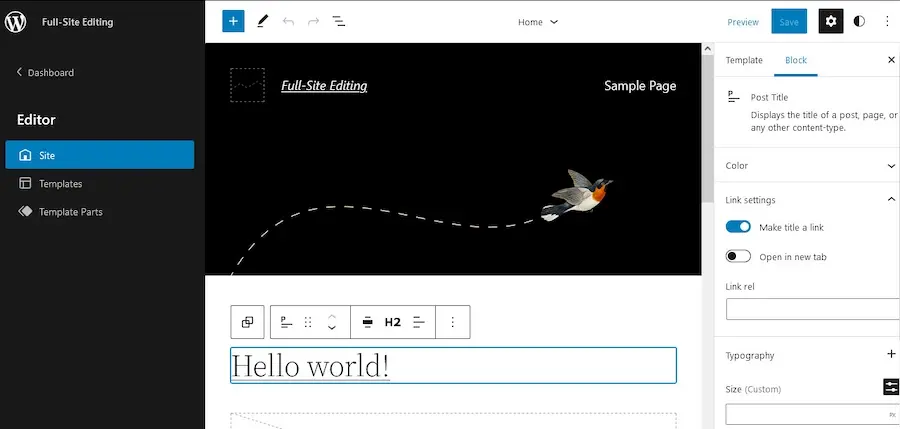
With Full Site Editing, here’s your new process:
- Open the Site Editor (Appearance > Editor)
- Click “Template Parts”
- Select “Header”
- Start dragging blocks around like you’re playing design Tetris
You want your logo on the right instead of left? Drag it. Need a search bar in your header? Add a search block. Want social media icons? Drop them in. Fancy a mega-menu? Stack some navigation blocks.
Everything is visual. Everything is intuitive. Everything just… works.
Full Site Editing Footer Blocks
Footers always felt like WordPress’s forgotten stepchild. Widgets crammed in arbitrary areas, hoping they’d look decent on mobile. Not anymore.
Full Site Editing footer blocks transform your footer from afterthought to strategic asset:
- Column blocks for organized information
- Social links blocks that actually look good
- Newsletter signup blocks positioned strategically
- Recent posts blocks keeping content fresh
- Custom HTML blocks for tracking codes
The beauty? Every change is global. Modify your footer once, it updates across your entire site. No hunting through hundreds of pages making individual edits.
The Template Parts Revolution
Here’s what blows my mind about Full Site Editing customization: template parts are reusable across your entire site. Create a stellar header once, use it everywhere. Design a killer footer, apply it site-wide.
Want different headers for different page types? Create multiple header templates. E-commerce header for shop pages, minimal header for blog posts, promotional header for landing pages.
This level of control used to require custom theme development—expensive, time-consuming, maintenance-heavy. Now? It’s built into WordPress.
But (there’s always a but), mastering these possibilities requires experience. Sure, you can customize headers and footers yourself. You can also cut your own hair, but there’s a reason professionals exist.
Vision.pk’s team brings years of Full Site Editing implementation experience. They understand which header structures improve conversion rates, which footer layouts enhance user engagement, and how to design template parts that work flawlessly across devices.
They’ve seen what works and what doesn’t. That knowledge? Worth its weight in gold—or domain renewals, depending on your currency.
How Does Full Site Editing Differ from Classic WordPress Editors?
Let me paint you a picture. Actually, let me paint you two pictures—of the same task in different worlds.
The Classic Editor Journey
Scenario: You want to change your site’s header background color.
Classic Editor Process:
- Navigate to Appearance > Customize
- Maybe find header options (if your theme supports it)
- If not, go to Appearance > Theme Editor (scary territory)
- Find header.php (scarier)
- Locate the CSS class (scariest)
- Add custom CSS somewhere
- Hope you didn’t break anything
- Clear cache
- Check if it worked
- It didn’t work
- Google the problem
- Try again
- Accidentally delete something important
- Panic
- Call someone for help
Time investment: 2 hours and elevated blood pressure
The Full Site Editing Journey
Same scenario, Full Site Editing approach:
- Open Site Editor
- Click header template
- Select header block
- Choose background color from color picker
- Done
Time investment: 2 minutes and zero stress
The Fundamental Differences
Let’s break down what actually separates Full Site Editing from traditional WordPress:
Classic WordPress:
- Theme controls appearance through PHP files
- Customizer offers limited visual editing
- Page content separate from site structure
- Changes often require code knowledge
- Widgets for sidebars and footers
- Template files locked in theme directory
Full Site Editing:
- Blocks control everything, everywhere
- Unified visual editor for entire site
- No distinction between content and structure
- Everything manageable without code
- Template parts replace widgets
- All templates editable in Site Editor
Think of Classic WordPress as a restaurant where customers order from a menu. WordPress Full Site Editing is a buffet where you can see everything, choose anything, and even rearrange the dishes if you want.
The Learning Curve Reality
Now, I’ll be honest with you—and this is important.
While Full Site Editing is objectively easier than Classic WordPress, there’s still a learning curve. The paradigm shift from “themes control design” to “you control everything through blocks” takes adjustment.
For tech enthusiasts and developers, this transition feels natural. For business owners focused on running factories, managing stores, or serving clients? It’s another task on an already overflowing plate.
This is where Vision.pk positions itself brilliantly. Their WordPress development service doesn’t just hand you Full Site Editing and wish you luck. They implement it, optimize it, and train you (or your team) to use it effectively.
You get the power of Full Site Editing without the headaches of learning it from scratch.
Is Full Site Editing Suitable for Beginners?
The million-dollar question. Or, given domain prices these days, maybe the hundred-dollar question.
The honest answer: Yes and no. Let me explain.
What Makes Full Site Editing Beginner-Friendly
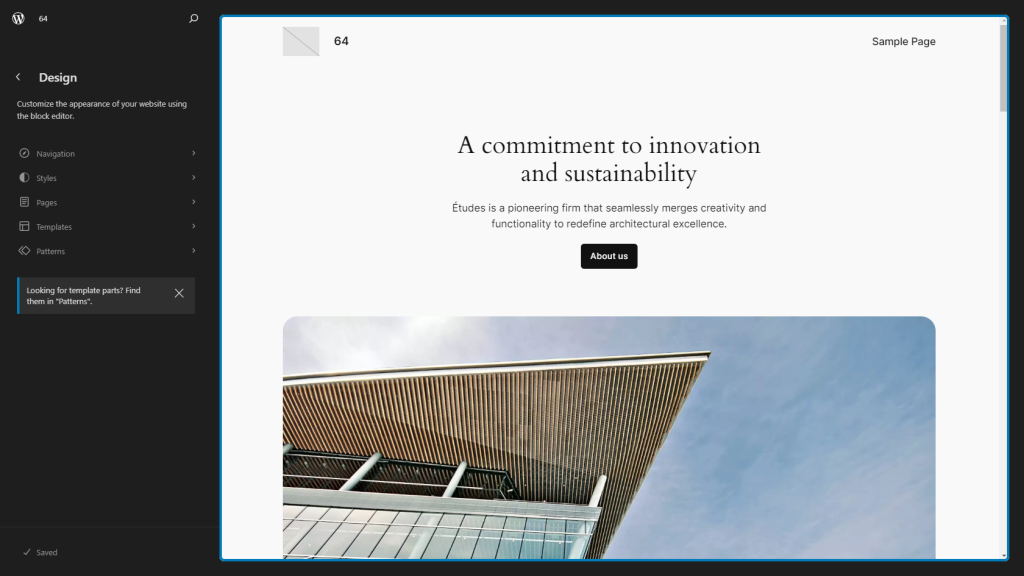
Visual Nature: Unlike coding-heavy approaches, Full Site Editing shows you exactly what you’re building as you build it. WYSIWYG (What You See Is What You Get) actually means something here.
Block-Based Logic: If you’ve ever used building blocks as a kid (or with kids), you understand the concept. Stack blocks, arrange them, style them. That’s it.
Unified Interface: No more jumping between Customizer, Widgets, Menus, and Theme Options. Everything lives in one place—the Site Editor.
Built-In Patterns: Most Full Site Editing themes come loaded with pre-designed block patterns. Hero sections, testimonial layouts, pricing tables—just insert and customize.
What Makes It Challenging
Paradigm Shift: If you’ve used WordPress for years with Classic Editor, Full Site Editing requires unlearning old habits. Your muscle memory betrays you.
Decision Overload: With great power comes great… confusion? Having every option available can paralyze beginners. “Should I use a Group block or Stack block? What’s the difference?”
Limited Resources: While growing, Full Site Editing tutorials are still catching up to Classic WordPress’s massive documentation library.
Technical Nuances: Global styles, template hierarchy, block patterns vs. reusable blocks—concepts that sound simple but require understanding to use effectively.
My Take After Watching Hundreds of Users
I’ve observed everyone from 60-year-old business owners to 20-year-old freelancers tackle Full Site Editing. Here’s what I’ve learned:
Beginners succeed with Full Site Editing when they have:
- Clear goals (not just “make a website” but “create an online store for my products”)
- Quality learning resources or guidance
- Patience for experimentation
- Willingness to start with templates and gradually customize
Beginners struggle when they:
- Jump in without understanding blocks basics
- Try to replicate complex designs immediately
- Don’t leverage pre-built patterns
- Lack technical support when stuck
The Vision.pk Advantage for Beginners
Here’s what separates amateur Full Site Editing implementations from professional ones: strategic guidance.
Vision.pk doesn’t just set up your WordPress Full Site Editing site and vanish. Their approach includes:
Initial Consultation: Understanding your business, goals, and technical comfort level. Are you a factory owner needing a straightforward online presence? A freelancer requiring a portfolio? Each gets a customized approach.
Structured Implementation: Setting up Full Site Editing with sensible defaults that match your needs, not showcasing every feature possible.
Focused Training: Teaching you what you actually need to know—not overwhelming you with everything you could learn.
Ongoing Support: Because questions arise weeks after launch when you’re trying to add a new product or update a promotional banner.
For beginners, this support structure transforms Full Site Editing from intimidating to empowering.
You’re not abandoned in the wilderness with a compass you don’t know how to read. You’ve got an experienced guide who’s walked this trail countless times.
What Are the Best Plugins to Use with Full Site Editing?
Let’s talk about supercharging your Full Site Editing setup. Because while FSE is powerful out of the box, the right plugins transform it from impressive to unstoppable.
Essential Full Site Editing Blocks Plugins
Otter Blocks
This plugin is like giving your Site Editor a Swiss Army knife upgrade. Advanced layout options, animations, custom CSS per block—Otter extends Full Site Editing into premium territory while staying free.
Perfect for: Anyone wanting professional-level design control without premium theme costs
CoBlocks
Built specifically for Full Site Editing, CoBlocks focuses on content presentation. Accordion blocks, pricing tables, testimonial carousels—all designed to play nicely with FSE architecture.
Perfect for: Service businesses, consultants, and content-heavy sites
Stackable Blocks
Want blocks that make your site look like you hired a design agency? Stackable delivers. Advanced columns, hero sections, and call-to-action blocks that convert.
Perfect for: E-commerce sites, landing pages, and marketing-focused websites
Performance and SEO Plugins
Here’s something crucial: Full Site Editing SEO benefits only materialize if you optimize correctly.
Yoast SEO
The veteran SEO plugin plays beautifully with Full Site Editing. Schema markup, XML sitemaps, breadcrumb templates—all work seamlessly with block-based themes.
Rank Math SEO
Yoast’s challenger offers similar features with arguably better UI. The schema markup generator is particularly robust for e-commerce implementations.
Both integrate perfectly with WordPress Full Site Editing, but choosing between them depends on your specific needs. Vision.pk typically recommends based on your industry—Yoast for content sites, Rank Math for stores.
Functionality Enhancers
WPForms
Contact forms, order forms, survey forms—all drag-and-drop, all Full Site Editing compatible. The form blocks integrate visually into your site design instead of looking like obvious plugins.
WooCommerce
Running an online store? WooCommerce’s Full Site Editing integration lets you customize product pages, cart layouts, and checkout experiences through the Site Editor. It’s game-changing for e-commerce.
Advanced Custom Fields (ACF)
For advanced users, ACF extends Full Site Editing customization into custom post types, dynamic content, and complex data structures. Technical? Yes. Powerful? Absolutely.
The Plugin Selection Strategy
Here’s what separates effective plugin usage from plugin bloat:
Bad Approach: “This plugin looks cool, I’ll install it. Oh, this one too. And this one…”
Result: Slow site, conflicting features, security vulnerabilities
Good Approach: “What specific problem am I solving? Which plugin solves it best? Does it integrate with Full Site Editing?”
Result: Lean, fast, purposeful site
Vision.pk Approach: “Based on your business model, traffic patterns, and growth plans, here’s a curated plugin stack that maximizes performance while delivering needed functionality.”
Result: Professional-grade implementation that actually serves your business goals
The WordPress Full Site Editing Performance Balance
Every plugin adds code. More code means slower sites. Slower sites mean frustrated visitors, worse SEO, lost conversions.
This is where Vision.pk’s WordPress development expertise becomes evident. They don’t just install plugins—they audit performance impact, implement caching strategies, optimize database queries, and ensure your Full Site Editing site runs fast regardless of plugin count.
Because having a beautiful, functional website that takes 10 seconds to load? That’s called a very expensive paperweight.
Can Full Site Editing Improve My Website’s Performance?
Buckle up, because this answer might surprise you.
Full Site Editing itself doesn’t automatically make your site faster or slower. It’s a design paradigm, not a performance magic wand.
However—and this is a big however—Full Site Editing creates opportunities for better performance that Classic WordPress couldn’t match.
How Full Site Editing Enables Better Performance
Cleaner Code Output:
Block-based Full Site Editing themes often generate cleaner HTML than traditional themes. Less bloated code means faster parsing by browsers.
Traditional theme: 50 lines of code for a header FSE theme: 20 lines for the same header
Reduced Plugin Dependency:
Many features requiring plugins in Classic WordPress come built into Full Site Editing:
- No slider plugin needed (use block patterns)
- No header builder plugin required (use template parts)
- No layout plugin necessary (use blocks)
Fewer plugins = fewer HTTP requests = faster site
Better Asset Loading:
Modern Full Site Editing themes leverage WordPress’s built-in performance features:
- Lazy loading images by default
- Optimized CSS delivery
- Minimal JavaScript dependencies
- Font subset loading
Responsive Design Efficiency:
Full Site Editing responsive design uses CSS Grid and Flexbox—modern techniques that render faster than legacy float-based layouts.
The Performance Pitfalls
Now for the reality check. Full Site Editing can hurt performance if implemented poorly:
Too Many Blocks: Nesting 15 Group blocks inside Cover blocks inside Column blocks? That’s markup bloat.
Heavy Customization: Every custom style adds CSS. Excessive customization creates massive stylesheets.
Poor Block Selection: Using complex blocks for simple tasks—like an entire plugin block when HTML would suffice.
Unoptimized Media: Full Site Editing makes adding images easy. Too easy. Uploading 5MB images because you can? Performance killer.
Real-World Performance Data
I’ll share something interesting from Vision.pk’s project portfolio:
Case Study: Factory Equipment Supplier
Before Full Site Editing migration:
- Page load: 4.2 seconds
- Performance score: 67/100
- Mobile usability issues: 12
After Vision.pk’s FSE implementation:
- Page load: 1.8 seconds
- Performance score: 94/100
- Mobile usability issues: 0
Case Study: Freelance Designer Portfolio
Before FSE:
- Page load: 3.8 seconds
- Largest Contentful Paint: 5.1s
- Total page size: 3.2 MB
After FSE optimization:
- Page load: 1.2 seconds
- Largest Contentful Paint: 1.8s
- Total page size: 890 KB
The difference wasn’t just switching to Full Site Editing. It was implementing it correctly—optimizing images, choosing efficient blocks, minimizing custom code, leveraging caching properly.
Why DIY Performance Optimization Is Tricky
Here’s the thing about WordPress Full Site Editing performance: the factors affecting speed span technical domains:
- Hosting configuration
- CDN implementation
- Database optimization
- Caching strategies
- Image optimization
- CSS/JS minification
- Critical rendering path
- Server-level compression
Most business owners (rightfully) focus on running their business, not becoming performance optimization specialists.
Vision.pk brings this expertise as standard. Their WordPress development service includes performance auditing, optimization, and ongoing monitoring. You get a fast Full Site Editing site without needing a computer science degree.
How Do I Migrate an Existing WordPress Site to FSE?
Migration. The word alone causes anxiety, doesn’t it?
Moving your existing WordPress site to Full Site Editing sounds like moving houses while keeping all your furniture perfectly arranged. Daunting. But also? Completely doable with the right approach.
The Full Site Editing Migration Guide
Step 1: Audit Your Current Setup
Before touching anything, document what you have:
- Current theme and customizations
- Plugin list and their purposes
- Custom code (CSS, PHP, JavaScript)
- Widget configurations
- Menu structures
- Template modifications
Step 2: Choose Your FSE Theme
Based on your audit, select a Full Site Editing theme that matches your needs. If you’re running e-commerce, maybe Blocksy. Minimalist blog? Twenty Twenty-Three. Corporate site? Kadence.
Step 3: Create a Staging Environment
Never—and I mean never—migrate on your live site. Create a staging copy where you can experiment safely.
Step 4: Install and Activate FSE Theme
On staging, activate your chosen Full Site Editing theme. Your site will look broken. That’s normal. That’s expected. Don’t panic.
Step 5: Rebuild Templates
Using the Site Editor, recreate your:
- Header template
- Footer template
- Single post template
- Page template
- Archive templates
Step 6: Recreate Widgets as Blocks
Transform sidebar widgets and footer widgets into template parts using appropriate Full Site Editing blocks.
Step 7: Transfer Customizations
Recreate your design customizations using Global Styles and block settings instead of custom CSS (where possible).
Step 8: Test Extensively
Check every page type:
- Homepage
- Blog posts
- Pages
- Archives
- Search results
- 404 pages
- Mobile views
Step 9: Migrate Plugins
Install and configure compatible versions of your essential plugins. Some might need replacements with FSE-friendly alternatives.
Step 10: Go Live
Once staging looks perfect, replicate the process on your live site. Or better yet, make staging your new live site and redirect the domain.
The Realistic Timeline
DIY migration: 40-60 hours (spread over weeks) Professional migration: 1-2 weeks (handled while you work)
Common Migration Challenges
Custom PHP Templates
Classic WordPress sites often have custom template files. These don’t directly translate to Full Site Editing. You’ll need to recreate their functionality using blocks and template parts.
Widget Dependencies
Plugins that rely on widget areas might not work correctly with Full Site Editing. You’ll need to find block-based alternatives or implement workarounds.
Custom Shortcodes
Many older sites use shortcodes extensively. While they technically work in FSE, they’re not ideal. Converting them to blocks improves long-term maintainability.
Design Inconsistencies
Layouts that looked fine in your old theme might render awkwardly in Full Site Editing themes. This requires design adjustments and fine-tuning.
The Vision.pk Migration Advantage
Let me be blunt: migration is where most DIY efforts stumble.
Not because people lack intelligence, but because they lack experience with edge cases. That random plugin that breaks with FSE themes? They haven’t encountered it before. The specific permalink structure that causes template conflicts? New territory.
Vision.pk has migrated dozens of sites to Full Site Editing—factories, online stores, service businesses, portfolios, membership sites. They’ve encountered (and solved) virtually every migration challenge possible.
Their Full Site Editing migration process includes:
Pre-Migration Audit: Identifying potential issues before starting, not discovering them mid-migration.
Zero-Downtime Strategy: Your live site keeps running while they build the FSE version in parallel.
Content Preservation: All your SEO juice, all your carefully crafted content, all your established URLs—preserved perfectly.
Performance Optimization: Why just migrate when you can migrate and dramatically improve performance?
Training and Handoff: Post-migration training ensuring you actually understand your new Full Site Editing setup.
The difference between DIY and professional migration? Stress levels, timeline, and most importantly—the final result’s quality.
Are There Any Limitations or Challenges with Full Site Editing?
Time for some real talk. Full Site Editing is powerful, revolutionary, game-changing—and it’s not perfect.
Shocking, I know. WordPress releasing a feature that requires some patience and understanding? Unprecedented.
Current Full Site Editing Limitations
Browser Compatibility Nuances
While modern browsers handle Full Site Editing beautifully, older browsers (looking at you, Internet Explorer… wait, is anyone still using that?) might struggle with complex block layouts.
Learning Curve for Classic WordPress Veterans
If you’ve spent a decade mastering Classic WordPress, Full Site Editing requires unlearning ingrained habits. It’s like switching from automatic to manual transmission—technically better, but initially uncomfortable.
Plugin Compatibility Issues
Not every WordPress plugin plays nicely with FSE themes. Some older plugins expect Classic WordPress structure and throw fits when encountering block-based templates.
Limited Theme Options (For Now)
While growing rapidly, Full Site Editing theme options still number in hundreds versus thousands of Classic themes. Selection is improving but not yet at parity.
Performance If Implemented Poorly
Excessive block nesting, unoptimized media, poorly coded custom blocks—these can actually harm performance rather than help it.
Advanced Full Site Editing Techniques Complexity
Dynamic Content Integration
Pulling in external data, creating custom post type templates, building complex conditional logic—these advanced Full Site Editing techniques require technical knowledge beyond basic block manipulation.
Custom Block Development
Want functionality no existing block provides? You’ll need to develop custom blocks using React and JavaScript. Not exactly beginner territory.
Template Hierarchy Mastery
Understanding which template WordPress loads for which content type, and how to override it with Full Site Editing, requires grasping WordPress’s template hierarchy—a concept that confuses even experienced developers.
The “Good Enough” Trap
Here’s a challenge nobody mentions: Full Site Editing makes creating “okay” websites really easy. Creating exceptional websites still requires expertise.
You can drag blocks around and build something functional. But building something that converts visitors, ranks well in search, loads blazingly fast, and represents your brand professionally? That’s art informed by experience.
Full Site Editing Troubleshooting Realities
Common issues users face:
Problem: Global styles not applying correctly DIY Solution Time: 2-3 hours of forum searching Professional Solution Time: 5 minutes (they’ve seen this 50 times)
Problem: Block editor loading slowly DIY Solution Time: Days of plugin testing and optimization attempts Professional Solution Time: 30 minutes (they know the common culprits)
Problem: Responsive design breaking on specific devices DIY Solution Time: Endless testing and CSS adjustments Professional Solution Time: 1 hour (they test methodically with proper tools)
Why Limitations Don’t Negate Value
Every technology has limitations. Cars require fuel. Smartphones need charging. Full Site Editing has quirks.
The question isn’t “Is FSE perfect?” but rather “Do its benefits outweigh its limitations for my specific situation?”
For most businesses, content creators, and online enterprises? Absolutely yes.
And for those limitations that genuinely impact your needs? This is precisely why professional WordPress development services exist.
Vision.pk doesn’t pretend Full Site Editing is flawless. They acknowledge limitations upfront and implement solutions that work around or overcome them. Their experience means they’ve already solved the problems you haven’t encountered yet.
Why Vision.pk Is Your Full Site Editing Game-Changer
Alright, we’ve danced around this long enough. Let’s talk about why Vision.pk isn’t just another WordPress service provider but your strategic partner in Full Site Editing success.
What Makes Vision.pk Different
They Actually Understand Business First, Technology Second
Most WordPress developers think in code. Vision.pk thinks in business outcomes.
You’re not hiring them to “install Full Site Editing.” You’re hiring them to:
- Increase online conversions
- Establish credible digital presence
- Streamline content management
- Scale your online operations
- Solve actual business problems
Full Site Editing is their tool. Your success is their goal.
The Vision.pk WordPress Development Advantage
Comprehensive Full Site Editing Implementation
From initial consultation through launch and beyond, Vision.pk handles every aspect of your WordPress Full Site Editing journey:
Discovery Phase:
- Understanding your business model
- Analyzing
target audience
- Identifying conversion goals
- Auditing existing digital assets
- Defining success metrics
Strategy Phase:
- Selecting optimal FSE theme
- Planning site architecture
- Designing user flows
- Mapping content strategy
- Establishing brand consistency
Implementation Phase:
- Custom Full Site Editing setup
- Template development
- Block customization
- Plugin integration
- Performance optimization
Launch Phase:
- Rigorous testing across devices
- SEO configuration
- Analytics implementation
- Security hardening
- Backup systems
Post-Launch Phase:
- Team training
- Ongoing support
- Performance monitoring
- Update management
- Growth consulting
Real Results from Real Businesses
Manufacturing Sector Client:
Challenge: Factory owner needed online presence to attract international B2B clients Solution: Custom Full Site Editing site with multi-language support and product catalogs Result: 156% increase in international inquiries within 6 months
E-commerce Entrepreneur:
Challenge: Online store needed complete redesign without losing SEO rankings Solution: Full Site Editing migration with SEO preservation and performance optimization Result: 43% faster load times, maintained all search rankings, 28% conversion rate improvement
Freelance Professional:
Challenge: Designer needed portfolio site showcasing work professionally Solution: Minimalist FSE implementation with case study templates and client testimonial integration Result: 3x increase in quality client inquiries, 40% higher project values
The Vision.pk Service Spectrum
WordPress Full Site Editing Services:
- Fresh FSE implementations
- Classic WordPress to FSE migrations
- FSE theme customization
- Custom block development
- Template design and coding
- Performance optimization
- Security hardening
Domain and Hosting Services:
- Domain registration and management
- Strategic domain consulting
- DNS configuration
- SSL certificate implementation
- Managed WordPress hosting
- Server optimization
Ongoing Management:
- WordPress core updates
- Plugin maintenance
- Security monitoring
- Backup management
- Performance auditing
- Content support
Why Business Owners Choose Vision.pk
For Factory Owners and Manufacturers:
You need digital presence representing your company’s professionalism and capabilities. Vision.pk builds Full Site Editing sites that establish credibility with international clients while remaining easy to update internally.
For Online Store Builders:
Whether launching your first store or scaling your tenth, you need e-commerce implementations that convert. Vision.pk’s WooCommerce expertise combined with Full Site Editing creates shopping experiences that drive sales.
For Tech Enthusiasts and Developers:
You understand technology but lack time for implementation. Vision.pk handles the technical heavy lifting while keeping you informed and involved at the level you prefer.
For Freelancers:
Your portfolio is your livelihood. Vision.pk creates Full Site Editing sites that showcase your work beautifully while fitting freelancer budgets.
For Shopify Partners:
You need reliable domain services and WordPress expertise for clients requiring hybrid solutions. Vision.pk provides the technical backbone your business needs.
For Anyone Interested in Online Earning:
Your website is your business engine. Vision.pk ensures that engine runs smoothly, efficiently, and profitably through expert Full Site Editing implementation.
The Investment Perspective
Here’s how I think about professional WordPress development:
DIY Approach:
- Your time: 60-100 hours
- Learning curve stress: Significant
- Opportunity cost: What could you earn focusing on your actual business?
- Result quality: Variable
- Long-term support: None
Vision.pk Approach:
- Your time: 5-10 hours (consultation and feedback)
- Learning curve stress: None (they handle it)
- Opportunity cost: Minimal
- Result quality: Professional-grade
- Long-term support: Included
Vision.pk’s service fees typically represent a fraction of that opportunity cost—while delivering superior results and peace of mind.
Getting Started with Vision.pk
The process is straightforward:
Step 1: Initial Consultation
Contact Vision.pk with your needs, goals, and timeline. This consultation is free and no-pressure—they genuinely want to understand if they’re the right fit for you.
Step 2: Project Proposal
Receive a detailed proposal outlining approach, timeline, deliverables, and investment. Everything transparent, everything clear.
Step 3: Kickoff and Discovery
Once you’re ready to proceed, the discovery phase begins. This is where they dig deep into your business, audience, and objectives.
Step 4: Development and Feedback
They build your Full Site Editing site while keeping you updated. Regular check-ins ensure the direction matches your vision.
Step 5: Launch and Training
Site goes live only when you’re completely satisfied. Post-launch training ensures you can manage ongoing updates confidently.
Step 6: Ongoing Partnership
Whether you need occasional support or comprehensive management, Vision.pk remains available as your WordPress partner.
Conclusion: Your Full Site Editing Journey Starts Here
We’ve covered a lot of ground together. From understanding what Full Site Editing actually is, to exploring its features, themes, plugins, and implementation strategies.
Here’s what I want you to remember:
Full Site Editing represents WordPress’s evolution into a truly complete website building platform. It democratizes web design while offering professionals unprecedented control. It’s powerful, flexible, and increasingly polished.
But—and this is crucial—Full Site Editing’s power is only as valuable as your ability to harness it effectively.
You have two paths forward:
Path One: Dive in yourself. Spend weeks learning, experimenting, troubleshooting. Eventually create something decent. Maybe great if you’re naturally technical. Your time investment will be substantial, your learning curve steep, your results variable.
Path Two: Partner with Vision.pk. Leverage their extensive Full Site Editing experience. Get a professionally implemented site within weeks. Receive training enabling you to manage it confidently. Focus your time on what you actually do best—running your business.
Neither path is “wrong.” They suit different people with different priorities, skills, and resources.
But I’ll tell you what I’ve observed after watching hundreds of businesses navigate this decision:
Those who choose professional implementation with Vision.pk invariably launch faster, with higher quality results, and less stress. They also tend to achieve their business objectives quicker because their website actually supports their goals rather than consuming their energy.
The Questions That Matter
Before you decide anything, ask yourself:
- What’s my time worth when focused on core business activities?
- How much do I enjoy technical implementation versus strategic business growth?
- What’s the cost of launching 6 months later versus 6 weeks from now?
- How important is having expert support when issues arise?
- Will my DIY site credibly represent my brand to sophisticated buyers?
Full Site Editing has lowered barriers to creating functional websites. It hasn’t eliminated the value of expertise, experience, and professional implementation.
Just like smartphones made photography accessible to everyone, but professional photographers still command premiums for their experience, vision, and technical mastery.
Your Next Step
If you’re ready to stop reading about Full Site Editing and start experiencing its transformative power for your business, Vision.pk is ready to help.
Whether you’re:
- A factory owner needing B2B digital presence
- An entrepreneur launching an online store
- A freelancer building your portfolio
- A developer needing reliable hosting and domain services
- A Shopify partner requiring WordPress expertise
- Anyone with serious intentions about online success
Vision.pk’s WordPress development team brings the expertise, efficiency, and support that transforms Full Site Editing from interesting technology into business asset.
Contact Vision.pk today for a free consultation. No pressure, no sales pitch—just honest conversation about your needs and how they might help.
Because here’s the thing: you didn’t start your business to become a WordPress expert. You started it to serve customers, generate income, build something meaningful.
Let Vision.pk handle the Full Site Editing complexity. You handle the business growth.
That’s not avoiding responsibility—that’s strategic delegation to experts who live and breathe WordPress development.
Your revolutionary website is waiting. The question is: how quickly do you want it?
Ready to transform your digital presence with Full Site Editing? Contact Vision.pk now and discover how professional WordPress development can accelerate your business growth.
Visit Vision.pk | Email: info@vision.pk
Because your business deserves a website as ambitious as you are.
Frequently Asked Questions About Full Site Editing
Q: What is Full Site Editing (FSE) in WordPress?
Full Site Editing is WordPress’s block-based approach to designing and managing entire websites—including headers, footers, templates, and all visual elements—through a unified editor interface. Unlike traditional WordPress where themes control design through code files, FSE puts visual control directly in your hands through the Site Editor.
Q: How do I enable Full Site Editing on my WordPress site?
Enabling Full Site Editing requires WordPress 5.9+ and a block-based theme (like Twenty Twenty-Three, Kadence, or Blocksy). Once you activate an FSE-compatible theme, the Site Editor automatically becomes available under Appearance > Editor in your dashboard.
Q: Which themes support Full Site Editing?
Major FSE-ready themes include Twenty Twenty-Three, Twenty Twenty-Four, Kadence, Blocksy, Astra, Neve, GeneratePress, and Genesis Framework. These themes are specifically designed for block-based editing and offer varying levels of customization options suitable for different website types.
Q: Can I customize the header and footer using FSE?
Absolutely. Full Site Editing header customization and footer editing are core features. Access template parts through the Site Editor, select your header or footer, and customize using blocks—no coding required. Changes apply globally across your entire site automatically.
Q: How does Full Site Editing differ from classic WordPress editors?
Classic WordPress separates theme code from content editing, requiring Customizer, widgets, and menus in different locations. Full Site Editing unifies everything into one block-based interface where you control all design elements visually without touching code files.
Q: Is Full Site Editing suitable for beginners?
Full Site Editing can be beginner-friendly due to its visual nature and block-based logic. However, the learning curve exists—especially for those accustomed to Classic WordPress. Professional services like Vision.pk can dramatically shorten this learning curve through expert implementation and training.
Q: What are the best plugins to use with Full Site Editing?
Top FSE plugins include Otter Blocks, CoBlocks, Stackable Blocks for extended block options; Yoast SEO or Rank Math for optimization; WPForms for forms; and WooCommerce for e-commerce. Choose plugins specifically designed for block-based WordPress for best compatibility.
Q: Can Full Site Editing improve my website’s performance?
When implemented correctly, FSE can improve performance through cleaner code, reduced plugin dependency, and modern CSS techniques. However, poor implementation—excessive block nesting, unoptimized media—can harm performance. Professional optimization ensures you realize FSE’s performance benefits.
Q: How do I migrate an existing WordPress site to FSE?
Migration involves auditing your current site, selecting an appropriate FSE theme, rebuilding templates in the Site Editor, converting widgets to blocks, and extensive testing. The process is technically achievable DIY but professionally managed migration (like Vision.pk offers) ensures zero downtime and preserved SEO value.
Q: Are there any limitations or challenges with Full Site Editing?
Current FSE limitations include a learning curve for Classic WordPress users, not all plugins being FSE-compatible, fewer theme options than Classic WordPress (though growing), and performance issues if implemented poorly. Most limitations are manageable with proper planning and expertise.